

The Integration Cockpit API enables programmatic access to your integration landscape data through HTTPS-based JSON access. Query inventory data, monitor traffic patterns and manage integration objects using SQL-like syntax.
Important: All JSON examples use placeholder data for illustration. Your actual API responses contain your specific integration names, IDs and data from your Integration Cockpit instance.
Quick Navigation
New to the API? Start with API Setup → Postman Collection → Essential Operations
Ready for advanced scenarios? Jump to Advanced Operations | Working with the API
Need reference information? See API Reference | Entity Reference | Integration Types | Troubleshooting
API Setup
Complete API setup in 4 simple steps to get your collection working.
Prerequisites
-
Administrator access to WHINT Integration Cockpit
-
Access to Settings → Connectivity → Data Sources
-
HTTP client (Postman recommended)
-
Basic JSON understanding
Step 1: Create API Data Source
-
Navigate to Settings → Connectivity → Data Sources.
-
Click “+” Add.
-20250929-100603.png?cb=8a68c6b4d4bae4ed9f98d769307f943f)
-
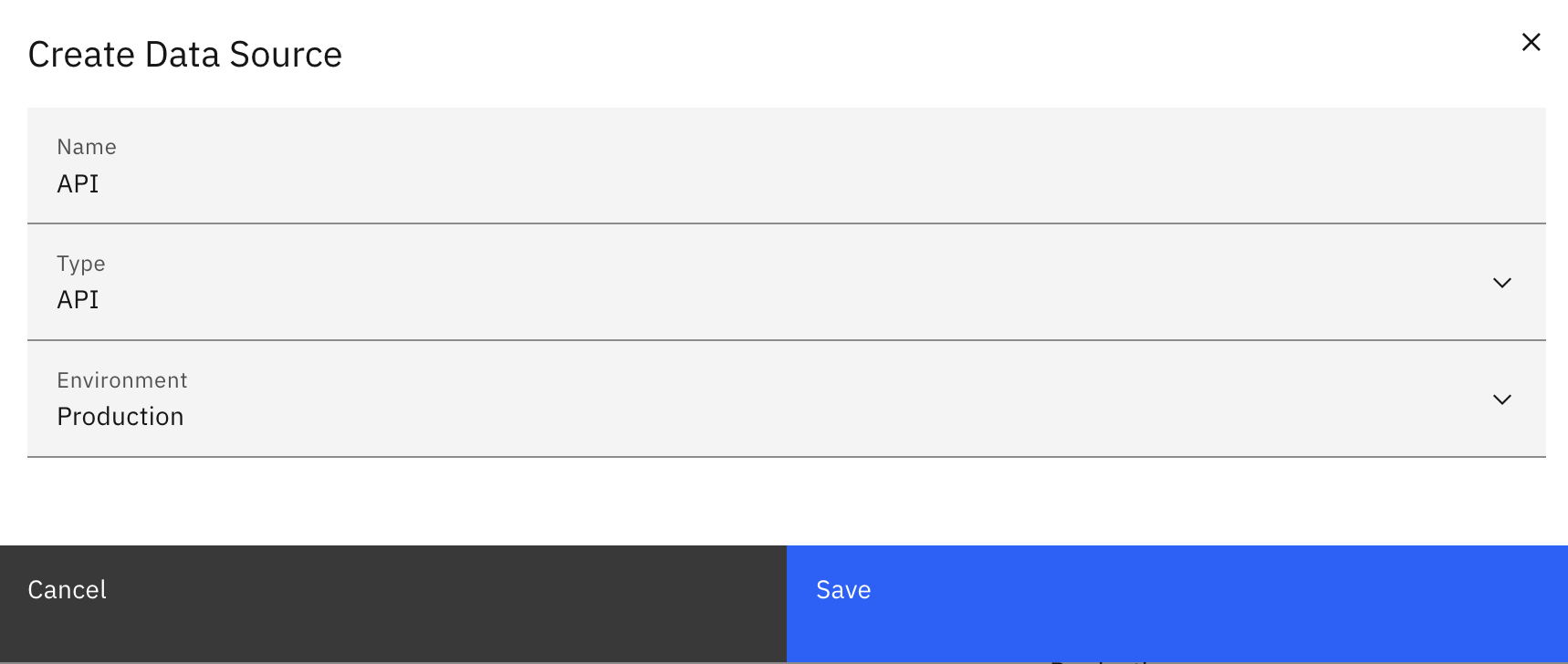
Enter the required values:
-
Name: e.g.
API -
Type:
API -
Environment: e.g.
Production
-
-
Click “Save”.
Step 2: Get Your API Endpoint
After saving, the Connection Details section displays your complete API endpoint URL.
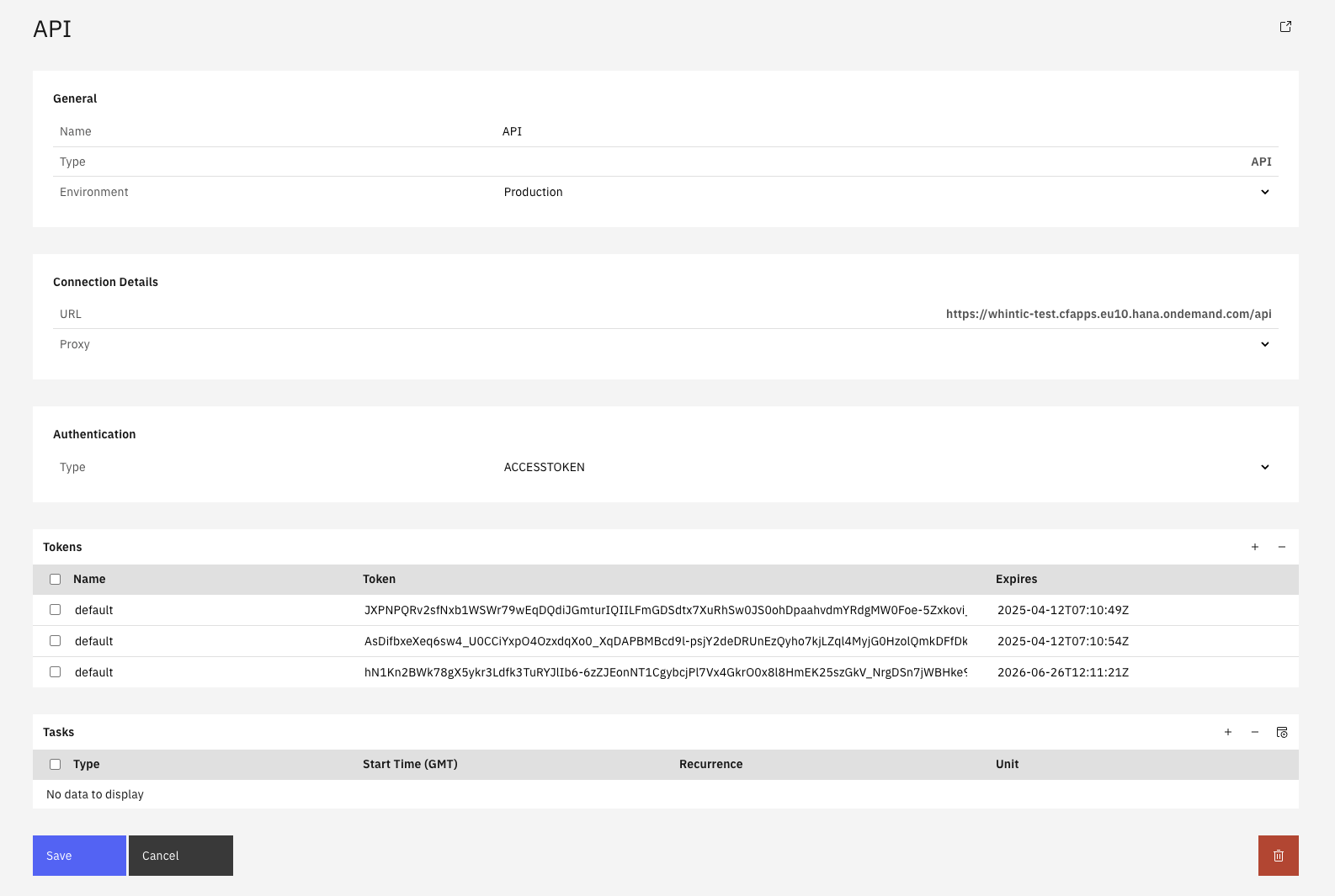
Your complete API endpoint (example):
https://your-instance.cfapps.eu10.hana.ondemand.com/api
Note: Your actual URL will be different based on your Integration Cockpit instance
For Postman Collection Users: You only need the base URL portion without https:// or /api (copy this to {{WHINT_BASE_URL}}):
your-instance.cfapps.eu10.hana.ondemand.com
Note: Your actual base URL will be different - use only your instance domain
This base URL goes into the {{WHINT_BASE_URL}} variable in the Postman collection.
For manual API requests: Copy and save the complete URL above - you'll use it for all direct API requests.
Step 3: Generate Access Token
In the Authentication section:

-
Type:
ACCESSTOKEN(recommended - selected by default)-
Alternative:
Basic authenticationis also supported
-
-
Create New Token: Click the "+" button in the Tokens section
-
Configure Token (optional customization):
-
Name: Change from "default" if desired (e.g. "API_Access")
-
Expires: Modify expiration date if needed (format: 2026-09-24T19:25:46Z)
-
-
Copy Token: Copy the complete token string from the Token column
-
Click “Save” to finalize configuration
Token Information:
-
Name: System-generated "default" or your custom name
-
Token: Long alphanumeric string for API authentication
-
Expires: Token expiration date
Result: Generated access token appears in tokens table with expiration date and is ready for HTTP client authentication.
Step 4: Configure and Download Postman Collection
Download the Collection: WHINT Integration Cockpit API v1.1.1.json
Import Collection: Open Postman → Import → Upload the downloaded JSON file
Set Variables: Collection → Variables tab:
-
{{WHINT_BASE_URL}}= Your domain from Step 2
(e.g.your-instance.cfapps.eu10.hana.ondemand.com)-
Domain only - no
https://or/api
-
-
{{BEARER_TOKEN}}= Your access token from Step 3
Test Connection: Run "01 - Get All Inventory Items" to verify setup
Expected Result: Successful response with your integration data proves API is ready for production use.
Next: Explore Postman Collection to understand the complete collection structure, then master Essential Operations for core API patterns.
Postman Collection
Professional API collection with 20 organized requests for immediate productivity.
Version Information
Current Version: 1.1.1
Release Date: October 30, 2025
Collection File: WHINT Integration Cockpit API v1.1.1.json
Download: Get Collection WHINT Integration Cockpit API v1.1.1.json
Note: We recommend using the newest Postman Version (11.65.0)
Version: 1.1.0
Release Date: September 29, 2025
Collection File: whint_api_collection_v1.1.json
Download: Get Collection
Note: We recommend to use the newest Postman Version (11.65.0)
Collection Overview
The collection follows a logical 3-tier progression designed for systematic API mastery:
Variables
Required Variables (Configure Once):
-
{{WHINT_BASE_URL}}- Your instance domain (no https:// or /api) -
{{BEARER_TOKEN}}- Your access token from Integration Cockpit
Optional Variables (Set When Needed):
-
{{EXAMPLE_ID}}- From Create response or Query result (for Update/Metadata operations) -
{{DATA_SOURCE_ID}}- From "Get All Data Sources" request (for advanced filtering) -
{{TAG_ID}}- From "Get Tag Values" response (use 'id' field, not 'tag_id') -
{{PROPERTY_ID}}- From "Get Property Types" response (use 'id' field)
API Reference
Before exploring operations, understand the core API patterns and query structure that power all requests.
Query Structure & Components
JSON Query Components
Core query elements with SQL equivalents for integration architects:
|
JSON Field |
Purpose |
Example |
SQL Equivalent |
|---|---|---|---|
|
|
Specifies which data type to query |
|
|
|
|
Lists specific columns to return |
|
|
|
|
Defines filter conditions |
|
|
|
|
Joins related data from other entities |
|
|
|
|
Restricts number of results returned |
|
|
|
|
Skips specified number of results |
|
|
Response Fields
Standard fields returned in query responses:
|
Response Field |
Description |
Example Value |
|---|---|---|
|
|
Unique identifier for each integration object |
|
|
|
Integration type number (0-24) |
|
|
|
Human-readable integration name |
|
|
|
Object creation timestamp |
|
|
|
Last modification timestamp |
|
Filter Operators
Available operators for WHERE conditions:
|
Operator |
Description |
Example Usage |
|---|---|---|
|
|
Equals exact value |
|
|
|
Contains text pattern |
|
|
|
Greater than (datetime) |
|
|
|
Less than (datetime) |
|
|
|
Negation operator |
Combined with other operators for exclusion |
Logic Operations
Control how multiple conditions are evaluated:
-
"option": 0- AND logic (all conditions must be true) -
"option": 1- OR logic (any condition can be true)
Apply this knowledge: See Essential Operations for practical examples using these query components.
Entity Reference
Complete reference of available entities for building queries and understanding data relationships.
Core Entities
-
inventory- Integration objects and flows -
dataFlow- End-to-end integration processes -
system- Connected systems -
dataSource- Data source configurations -
metadata- Entity metadata -
properties- Entity properties -
tags- Entity classifications
Traffic Entities (Time-based)
|
Entity |
Time Field |
Purpose |
|---|---|---|
|
|
|
BTP CI message traffic |
|
|
|
SAP IDoc traffic |
|
|
|
Logic App executions |
Platform-Specific Entities
-
abap_integration_engine_interface- SAP ABAP interfaces -
azure_api_management_api- Azure APIM APIs -
btp_cloud_integration_artefact- BTP CI artifacts -
anypoint_asset- MuleSoft assets -
solace_queue- Solace queues
Entity Naming Convention
Convert database names to API format:
-
data_flow→dataFlow -
btp_cloud_integration_message→btpCloudIntegrationMessage
Rule: Change _a-z to A-z
Apply this knowledge: Use correct entity names in your queries as shown in Essential Operations.
Integration Types Reference
Quick reference for accurate platform categorization and filtering in your queries.
Most Common Types
-
Type 21 - SAP IS Cloud Integration
-
Type 22 - SAP Process Orchestration
-
Type 3 - Azure API Management
-
Type 20 - SAP IS API Management
-
Type 0 - MuleSoft API
Usage in Your Queries
Single Platform Analysis:
{
  "field": {
    "name": "type",
    "eq": "20"
  }
}
Multi-Platform Analysis: Use OR logic with multiple conditions (Collection: "Get Multiple Integration Types")
Apply this knowledge: Return to Essential Operations for filtering examples or Advanced Operations for multi-platform analysis patterns.
Essential Operations
Master these core operations to understand API fundamentals before advancing to complex scenarios.
Query Operations
Get All Inventory Items
Collection: "01 - Get All Inventory Items"
{
  "query": {
    "entity": "inventory"
  }
}
Retrieves all integration inventory with complete field structure, helping you understand your data model and available fields for subsequent operations.
Use Cases: Initial discovery, landscape assessment, complete integration catalog export
Get Specific Inventory Fields
Collection: "02 - Get Essential Inventory Fields"
{
  "query": {
    "entity": "inventory",
    "fields": ["id", "type", "name", "sender_name", "receiver_name", "description"]
  }
}
Use field selection for reporting, dashboards and performance-critical queries where you don't need complete object data.
Use Cases: Dashboard reporting, business stakeholder communication, high-volume queries
Get Inventory by Type (Filtered)
Collection: "03 - Get Integration Types Reference"
{
  "query": {
    "entity": "inventory",
    "where": [{
      "option": 0,
      "conditions": [{
        "field": {
          "name": "type",
          "eq": "20"
        }
      }]
    }]
  }
}
Common Type Codes: 20 (SAP IS API Management), 21 (SAP IS Cloud Integration), 22 (SAP Process Orchestration), 17 (SAP Event Mesh)
Use Cases: Technology-specific analysis, platform migration planning, integration type discovery
See Integration Types Reference for all 25 platform types.
Get Inventory with Data Source (JOIN)
Collection: "04 - Get Inventory Items with Data Source Join"
{
  "query": {
    "entity": "inventory",
    "fields": ["id", "name", "type"],
    "with": [{
      "entity": "dataSource",
      "fields": ["id", "name"]
    }]
  }
}
This JOIN operation enables traceability analysis, showing which discovery mechanisms contributed specific integrations to your landscape.
Use Cases: Discovery audit trails, data source impact analysis, governance reporting
Mutation Operations
Create Inventory Item
Collection: "01 - Create Inventory Item"
{
  "upsert": {
    "inventory": [{
      "name": "Customer Data Synchronization",
      "description": "Bidirectional customer data sync between CRM and ERP systems",
      "type": 20
    }]
  }
}
Supported Fields:
-
name(required): Integration display name -
type(required): Integration platform type code -
description(optional): Business purpose description
Advanced creation can include tags, properties, and metadata in the same upsert operation.
See Advanced Operations for examples.
Response Format: Returns array with new object ID: ["eoF-BJHppnA"]
Copy this ID to {{EXAMPLE_ID}} variable for update operations.
Update Inventory Item
Collection: "02 - Update Inventory Item"
Prerequisites: Set {{EXAMPLE_ID}} variable from Create response or Query result.
{
  "upsert": {
    "inventory": [{
      "id": "{{EXAMPLE_ID}}",
      "name": "Customer Data Synchronization - Enhanced",
      "description": "Enhanced with error handling and monitoring",
      "type": 20
    }]
  }
}
Updatable Fields: name, type, description
Use Cases: Integration lifecycle management, documentation updates
Add Metadata
Collection: "03 - Add Metadata (Additive)"
Prerequisites: Set {{EXAMPLE_ID}} variable from Create response or Query result.
{
  "upsert": {
    "inventory": [{
      "id": "{{EXAMPLE_ID}}",
      "name": "Customer Data Synchronization - Enhanced",
      "type": 20,
      "metadata": [
        {"name": "BUSINESS_OWNER", "value": "Customer Operations Team"},
        {"name": "TECHNICAL_CONTACT", "value": "integration@company.com"},
        {"name": "ENVIRONMENT", "value": "PRODUCTION"}
      ]
    }]
  }
}
Metadata Behavior:
-
Operations are additive - new entries are added to existing metadata
-
Existing values cannot be modified
-
Individual entries cannot be deleted
-
Ensures data integrity while supporting governance workflows
Use Cases: Governance tagging, contact information, environment marking, compliance data
Advanced Operations
Complex operations for enterprise integration management and governance.
Enterprise Classification
Classification enables systematic categorization using existing taxonomy. You cannot create new tags or property types via API - they must be pre-configured in Integration Cockpit.
Get Available Tag Values
Collection: "Get Tag Values"
{
  "query": {
    "entity": "tagValue"
  }
}
Response Structure:
[
  {
    "id": "IOWcT-he8Fc",
    "create_time": "2025-09-22T07:34:52Z",
    "change_time": "2025-09-22T07:34:52Z",
    "value": "decommissioned",
    "tag_id": "fuWVakMLfHc"
  }
]
Important: Copy the "id" value ("IOWcT-he8Fc"), not the "tag_id" value, to your {{TAG_ID}} variable.
Add Tags to Inventory Item
Collection: "Add Tags to Inventory Item"
Prerequisites:
-
Set
{{EXAMPLE_ID}}from Create response or Query result -
Set
{{TAG_ID}}from Get Tag Values response (idfield)
{
  "upsert": {
    "inventory": [{
      "id": "{{EXAMPLE_ID}}",
      "name": "Customer Data Synchronization - Tagged",
      "description": "Integration with classification tags",
      "tags": [{"id": "{{TAG_ID}}"}]
    }]
  }
}
Use Cases: Classification, categorization, filtering enhancement
Get Available Property Types
Collection: "Get Property Types"
{
  "query": {
    "entity": "propertyType"
  }
}
Response Structure:
[
  {
    "id": "a4qYpkuz9UU",
    "create_time": "2024-06-04T13:16:25Z",
    "change_time": "2025-09-19T09:32:03Z",
    "kind": 1,
    "format": 2,
    "name": "Integration Team"
  }
]
Copy the "id" value ("a4qYpkuz9UU") to your {{PROPERTY_ID}} variable.
Add Properties to Inventory Item
Collection: "Add Properties to Inventory Item"
Prerequisites:
-
Set
{{EXAMPLE_ID}}from Create response or Query result -
Set
{{PROPERTY_ID}}from Get Property Types response (idfield)
{
  "upsert": {
    "inventory": [{
      "id": "{{EXAMPLE_ID}}",
      "name": "Customer Data Synchronization - With Properties",
      "description": "Integration with typed properties",
      "properties": [{
        "type_id": "{{PROPERTY_ID}}",
        "value": "CRITICAL_PRIORITY"
      }]
    }]
  }
}
Use Cases: Configuration parameters, business rules, technical specifications
Advanced Query Patterns
Multi-Platform Analysis (OR Logic)
Collection: "Get Multiple Integration Types"
{
  "query": {
    "entity": "inventory",
    "fields": ["id", "name", "type", "description"],
    "where": [{
      "option": 1,
      "conditions": [
        {"field": {"name": "type", "eq": "20"}},
        {"field": {"name": "type", "eq": "21"}},
        {"field": {"name": "type", "eq": "22"}},
        {"field": {"name": "type", "eq": "17"}}
      ]
    }]
  }
}
Logic: "option": 1 creates OR logic - any condition can match.
SAP Technologies: SAP Technologies: 20 (IS API Management), 21 (IS Cloud Integration), 22 (Process Orchestration), 17 (Event Mesh)
Use Cases: Platform family analysis, migration planning, technology consolidation assessment
Complete SAP Ecosystem Query
Collection: "Get Complete SAP Integration Landscape"
{
  "query": {
    "entity": "inventory",
    "fields": ["id", "name", "type", "sender_name", "receiver_name"],
    "where": [{
      "option": 1,
      "conditions": [
        {"field": {"name": "type", "eq": "14"}},
        {"field": {"name": "type", "eq": "15"}},
        {"field": {"name": "type", "eq": "16"}},
        {"field": {"name": "type", "eq": "17"}},
        {"field": {"name": "type", "eq": "18"}},
        {"field": {"name": "type", "eq": "19"}},
        {"field": {"name": "type", "eq": "20"}},
        {"field": {"name": "type", "eq": "21"}},
        {"field": {"name": "type", "eq": "22"}},
        {"field": {"name": "type", "eq": "23"}},
        {"field": {"name": "type", "eq": "24"}},
        {"field": {"name": "type", "eq": "25"}},
        {"field": {"name": "type", "eq": "26"}}
      ]
    }]
  }
}
SAP Platform Types: SAP Platform Types: 14 (Planned Integration), 15 (OData), 16 (SOAP), 17 (Event Mesh), 18 (IDoc), 19 (XI), 20 (IS API Management), 21 (IS Cloud Integration), 22 (Process Orchestration), 23 (EAM), 24 (Solace Queues), 25 (RFC), 26 (PO CI)
Use Cases: Complete SAP integration inventory, enterprise architecture documentation, migration planning
Search by Name Pattern (Text Search)
Collection: "Search Integrations by Name Pattern"
{
  "query": {
    "entity": "inventory",
    "fields": ["id", "name", "sender_name", "receiver_name", "type"],
    "where": [{
      "option": 1,
      "conditions": [{
        "field": {
          "name": "name",
          "like": "Customer"
        }
      }]
    }]
  }
}
Customization: Replace "Customer" with any search term to find integrations by business domain.
Use Cases: Content discovery, business domain filtering, integration name searches
Traffic Monitoring & Analysis
Monitor Integration Performance
Collection: "Monitor BTP Integration Performance"
{
  "query": {
    "entity": "btpCloudIntegrationMessage",
    "fields": ["sender", "artefact", "package", "duration", "status", "started_on"],
    "where": [{
      "conditions": [{
        "field": {
          "name": "started_on",
          "gt_time": "2025-09-01T00:00:00.000Z"
        }
      }]
    }],
    "limit": 200
  }
}
Time Filter: gt_time retrieves messages processed after the specified timestamp.
Customization: Adjust date in "gt_time" and "limit" value as needed.
Use Cases: SLA compliance monitoring, performance bottleneck identification, operational dashboards
Monitor Performance (Time Window)
Collection: "Monitor BTP Integration Performance - Time Window"
{
  "query": {
    "entity": "btpCloudIntegrationMessage",
    "fields": ["sender", "artefact", "package", "duration", "status", "started_on"],
    "where": [{
      "conditions": [
        {
          "field": {
            "name": "started_on",
            "gt_time": "2025-08-31T23:59:59.999Z"
          }
        },
        {
          "field": {
            "name": "started_on",
            "lt_time": "2025-09-01T00:01:00.001Z"
          }
        }
      ]
    }],
    "limit": 200
  }
}
Time Window: Combines gt_time (after) and lt_time (before) for precise time range filtering.
Customization: Adjust "limit" value as needed.
Use Cases: Incident analysis, batch processing verification, maintenance window troubleshooting
Process Architecture Mapping
End-to-End Flow Mapping (Complex JOINs)
Collection: "End-to-End Integration Flow Mapping"
{
  "query": {
    "entity": "dataFlow",
    "with": [
      {
        "entity": "sender",
        "fields": ["name"],
        "with": [{"entity": "dataSource", "fields": ["name"]}]
      },
      {
        "entity": "receiver",
        "fields": ["name"],
        "with": [{"entity": "dataSource", "fields": ["name"]}]
      },
      {
        "entity": "items",
        "fields": ["sequence"],
        "with": [{
          "entity": "inventory",
          "fields": ["name", "type"],
          "with": [{"entity": "dataSource", "fields": ["name"]}]
        }]
      }
    ]
  }
}
JOIN Pattern: Multi-level relationships mapping complete data flows from sender systems through integration sequences to receiver systems, including full traceability to discovery sources.
Use Cases: End-to-end process documentation, integration architecture visualization, business process impact analysis, data lineage
Working with the API
Performance Optimization
Use Field Selection
Collection: "02 - Get Essential Inventory Fields" - Customized
{
  "query": {
    "entity": "inventory",
    "fields": ["id", "name", "type"],
    "limit": 1000
  }
}
Note: This example adds
"limit": 1000for production best practices.
The Postman collection example omits limit for simplicity.
Strategic field selection reduces response times and network overhead by requesting only needed data.
Customization: Adjust "limit" value as needed.
Use Cases: High-volume queries, dashboard refresh operations, API performance optimization
Implement Pagination
Collection: Multiple collection requests
// Pagination completion logic

{
  "query": {
    "entity": "inventory",
    "fields": ["id", "name", "type"],
    "limit": 100,
    "offset": 0
  }
}

// Continue until response.length < limit (e.g. < 100)
Pagination Process: Start with offset 0 and limit 100, process results, then increment offset by 100 for next batch (offset: 100, 200, 300...). Continue until response contains fewer than 100 results, indicating completion.
Customization: Adjust "limit" value as needed.
Use Cases: Large dataset processing, bulk exports, batch operations
Condition Based Queries
Collection: "03 - Get Integration Types Reference"
{
  "query": {
    "entity": "inventory",
    "fields": ["id", "name", "type", "description"],
    "where": [{
      "conditions": [{
        "field": {
          "name": "type",
          "eq": "20"
        }
      }]
    }],
    "limit": 200
  }
}
Note: This example adds
"limit": 100for production best practices.
The Postman collection example omits limit for simplicity.
Performance Rules:
-
Always use
fieldsarray to minimize data transfer -
Apply
whereconditions early to reduce dataset size -
Always include
limitfor large entity queries to prevent instance overload and timeouts -
Use
withjoins only for required data
Use Cases: Production deployments, high-performance requirements, enterprise-scale operations
Timebased Condition Queries
Collection: Query operations with time filters
{
  "query": {
    "entity": "inventory",
    "fields": ["id", "name", "change_time"],
    "where": [{
      "conditions": [{
        "field": {
          "name": "change_time",
          "gt_time": "2025-01-15T14:30:00.000Z"
        }
      }]
    }]
  }
}
Incremental change detection enables efficient monitoring of integration landscape updates.
Use Cases: Daily change reports, governance compliance, automated landscape monitoring
Bulk Operations
Create Multiple Items
{
  "upsert": {
    "inventory": [
      {
        "name": "Integration A",
        "type": 20,
        "description": "SAP Integration Suite flow"
      },
      {
        "name": "Integration B",
        "type": 21,
        "description": "SAP Process Orchestration interface"
      }
    ]
  }
}
Efficient bulk creation processes multiple inventory items in single requests for better performance.
Response Format: Returns array of created IDs in same order as input, enabling subsequent operations on bulk-created items.
Use Cases: Migration projects, initial landscape setup, batch provisioning
Metadata and Classification Operations
Add Metadata (Additive Only)
Collection: "03 - Add Metadata (Additive)"
{
  "upsert": {
    "inventory": [
      {
        "id": "{{EXAMPLE_ID}}",
        "name": "Customer Data Synchronization",
        "type": 20,
        "description": "Bidirectional customer data sync",
        "metadata": [
          {"name": "BUSINESS_OWNER", "value": "Customer Operations Team"},
          {"name": "TECHNICAL_CONTACT", "value": "integration@company.com"},
          {"name": "ENVIRONMENT", "value": "PRODUCTION"}
        ]
      }
    ]
  }
}
Critical Requirements:
-
Mandatory Fields:
nameandtypeare required in every upsert operation -
Optional Fields:
descriptionis optional but recommended for maintaining data completeness -
Additive Only: New metadata entries are added to existing metadata
-
No Updates: Existing metadata values CANNOT be modified via API
-
No Individual Deletion: Cannot remove specific metadata entries
-
Persistent: Metadata persists until complete replacement
Use Cases: Governance tagging, contact information, environment marking, compliance data
Add Tags to Inventory Items
Collection: "Add Tags to Inventory Item"
Prerequisites: Run "Get Tag Values" to discover available tag IDs
{
  "upsert": {
    "inventory": [
      {
        "id": "{{EXAMPLE_ID}}",
        "name": "Customer Data Synchronization - Tagged",
        "description": "Integration with classification tags",
        "tags": [
          {
            "id": "{{TAG_ID}}"
          }
        ]
      }
    ]
  }
}
Important ID Selection:
-
Use the
idfield from tag records (primary key) -
NOT the
tag_idfield (category reference) -
Tags must be pre-configured in Integration Cockpit UI - cannot create new tag values via API
Setup Process:
-
Run "Get Tag Values" query
-
Find desired tag (e.g., value: "decommissioned")
-
Copy its
idfield value (e.g., "IOWcT-he8Fc") -
Set
{{TAG_ID}}variable with this value -
Execute tag assignment request
Use Cases: Classification, categorization, filtering enhancement
Add Properties to Inventory Items
Collection: "Add Properties to Inventory Item"
Prerequisites: Run "Get Property Types" to discover available property type IDs
{
  "upsert": {
    "inventory": [
      {
        "id": "{{EXAMPLE_ID}}",
        "name": "Customer Data Synchronization - With Properties",
        "description": "Integration with typed properties",
        "properties": [
          {
            "type_id": "{{PROPERTY_ID}}",
            "value": "CRITICAL_PRIORITY"
          }
        ]
      }
    ]
  }
}
Important ID Selection:
-
Use the
idfield from property type records (primary key) -
Property types must be pre-configured in Integration Cockpit UI - cannot create new property types via API
-
Values must conform to property type validation rules
Setup Process:
-
Run "Get Property Types" query
-
Find desired property type (e.g., name: "Priority Level")
-
Copy its
idfield value (e.g., "V3G9lX8iEO4") -
Set
{{PROPERTY_ID}}variable with this value -
Execute property assignment request
Use Cases: Configuration parameters, business rules, technical specifications
Time-Based Query Patterns
Time-Based Filtering
Collection: "Monitor BTP Integration Performance - Time Window"
{
  "query": {
    "entity": "btpCloudIntegrationMessage",
    "fields": ["sender", "artefact", "duration", "status", "started_on"],
    "where": [{
      "conditions": [
        {
          "field": {
            "name": "started_on",
            "gt_time": "2025-08-31T23:59:59.999Z"
          }
        },
        {
          "field": {
            "name": "started_on",
            "lt_time": "2025-09-01T00:01:00.001Z"
          }
        }
      ]
    }],
    "limit": 200
  }
}
Time Operators:
-
gt_time: Greater than (after) specified timestamp -
lt_time: Less than (before) specified timestamp -
Combine for precise time windows
Customization: Adjust "limit" value as needed.
Use Cases: Incident analysis, batch verification, compliance reporting for exact time ranges
Multi-Type Filtering
Collection: "Get Multiple Integration Types"
{
  "query": {
    "entity": "inventory",
    "fields": ["id", "name", "type", "description"],
    "where": [{
      "option": 1,
      "conditions": [
        {"field": {"name": "type", "eq": "20"}},
        {"field": {"name": "type", "eq": "21"}},
        {"field": {"name": "type", "eq": "22"}},
        {"field": {"name": "type", "eq": "17"}}
      ]
    }]
  }
}
Logic Options:
-
option: 0= AND logic (all conditions must match) -
option: 1= OR logic (any condition can match)
Use Cases: Platform family analysis, migration planning, technology consolidation assessment
Complete Export
Systematic export strategy for backup, migration or governance reporting.
Export Interfaces
{
  "query": {
    "entity": "inventory",
    "fields": ["name", "type", "description"],
    "with": [
      {
        "entity": "sender",
        "fields": ["name"],
                  "with": [
                { "entity": "properties",
                        "fields": ["type_id","value"],
                        "with": [{
                        "entity": "type",
                        "fields": ["name", "kind"]
                    }]
                    }
                    ]
      },
      {
        "entity": "receiver",
        "fields": ["name"],
                  "with": [
                { "entity": "properties",
                        "fields": ["type_id","value"],
                        "with": [{
                        "entity": "type",
                        "fields": ["name", "kind"]
                    }]
                    }
                    ]
      },
      {"entity": "tags",
            "fields": ["value","tag_id"],
            "with": [{
            "entity": "tag",
            "fields": ["name"]
          }]
        },
         {
            "entity": "metadata",
            "fields": ["name", "value"]
        },
       { "entity": "properties",
            "fields": ["type_id","value"],
             "with": [{
            "entity": "type",
            "fields": ["name", "kind"]
          }]
        }
    ],
 "limit": 5000,
    "offset": 0
  }
}
Retrieves all inventory interfaces with comprehensive metadata including senders, receivers, properties, tags and metadata.
Use Cases: Complete inventory backup, environment migration,
governance reporting, compliance documentation
Export End-to-End Integrations
Collection: "End-to-End Integration Flow Mapping"
{
  "query": {
    "entity": "dataFlow",
    "with": [
      {
        "entity": "sender",
        "fields": ["name"],
        "with": [{"entity": "dataSource", "fields": ["name"]}]
      },
      {
        "entity": "receiver",
        "fields": ["name"],
        "with": [{"entity": "dataSource", "fields": ["name"]}]
      },
      {
        "entity": "items",
        "fields": ["sequence"],
        "with": [{
          "entity": "inventory",
          "fields": ["name", "type"],
          "with": [{"entity": "dataSource", "fields": ["name"]}]
        }]
      }
    ]
  }
}
Exports complete end-to-end process flows with relationships.
Use Cases: Process documentation, data lineage, impact analysis
Export Systems
Collection: "06 - Get Systems Inventory"
{
  "query": {
    "entity": "system"
  }
}
Exports all connected systems in the integration architecture.
Use Cases: Architecture documentation, system landscape backup, migration planning
Export Metadata
Standalone Export
{
  "query": {
    "entity": "metadata"
  }
}
Retrieves all metadata entries across the entire system without inventory context.
Use Cases: Metadata-only backup, governance tag analysis, metadata schema documentation
Metadata export with Inventory Context (Recommended)
Collection: "Get Inventory with Metadata Context"
{
  "query": {
    "entity": "inventory",
    "fields": ["id", "name", "type", "description"],
    "with": [
      {
        "entity": "metadata",
        "fields": ["name", "value"]
      }
    ]
  }
}
Retrieves inventory items with their associated metadata, showing which integrations have which governance tags.
Use Cases: Governance reporting, compliance documentation, understanding metadata distribution across integrations
Export Properties
Collection: “Get Property Types”
{
  "query": {
    "entity": "propertyType"
  }
}
Exports all configuration properties and business rules.
Use Cases: Configuration backup, cross-tenant migration, disaster recovery
Export Tags
Collection: “Get Tag Values”
{
  "query": {
    "entity": "tagValue"
  }
}
Retrieves complete classification taxonomy structure.
Use Cases: Taxonomy backup, classification migration, governance documentation
Troubleshooting
Quick solutions for common API issues.
Authentication
|
Problem |
Solution |
|---|---|
|
401 Unauthorized |
Token expired - regenerate in Settings → Data Sources → API |
|
|
Set variable in Collection → Variables (not Environment) |
|
Token format error |
Use |
Connection
|
Problem |
Solution |
|---|---|
|
Cannot reach endpoint |
Verify URL: |
|
Request timeout |
Add |
|
SSL/TLS errors |
Check domain spelling matches your instance exactly |
Query Structure
|
Problem |
Solution |
|---|---|
|
Entity not found |
Use camelCase: |
|
Field not found |
Run query without |
|
Empty response |
Not an error - no records match your filters. Remove |
|
Invalid JSON |
Check commas, brackets, quotes - use Postman's validator |
Common Query Fixes
Wrong entity name:
❌ "entity": "btp_cloud_integration_message"
✅ "entity": "btpCloudIntegrationMessage"
Missing required update fields:
❌ {"id": "abc", "description": "new"}
✅ {"id": "abc", "name": "Integration Name", "type": 20, "description": "new"}
Wrong filter syntax:
❌ "eq": 20
✅ "eq": "20"
Variables
|
Problem |
Solution |
|---|---|
|
|
Run Create request first, copy returned ID to variable |
|
|
Use |
|
Variables not resolving |
Set in Collection Variables → Save → Close/reopen request tabs |
Performance
|
Issue |
Fix |
|---|---|
|
Slow queries |
Add |
|
Large datasets |
Use |
|
Multiple joins slow |
Only include |
Last Updated: October 30, 2025