

The Property Extraction configuration enables automatic extraction of metadata from interface raw data and maps it to structured properties for reporting and analysis. This feature allows you to capture technical details like web proxies, communication users and identifiers directly from interface configurations.
Purpose: Configure automated extraction rules that parse interface raw data and populate property fields, enabling consistent metadata capture across integration platforms without manual enrichment workflows.
Navigate to Settings → Properties → Extraction to manage your extraction rules using regex patterns and field mapping techniques.
For detailed guidance on property configuration, see 2.1.1 Properties in the Onboarding Guide.
Property Extraction Overview
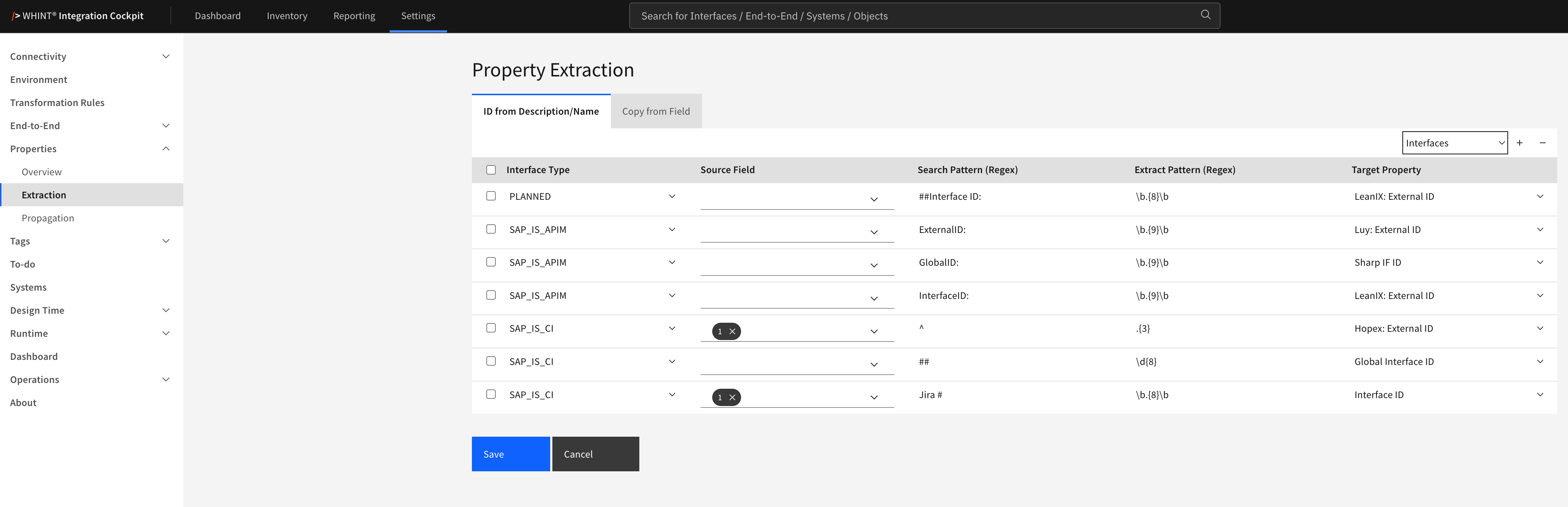
How Extraction Works
Extraction Methods
-
ID from Description/Name - finds an identifier inside a text field using two regular expressions. Use it when your teams write IDs into interface names or descriptions, for example an interface whose description reads “Order export - Interface ID: 4711-1234”.
-
Copy from Field - copies a value directly out of the interface raw data, without regular expressions. Use it for technical settings such as proxy hosts, communication users or endpoint addresses.
Interfaces or Systems
The context selector at the top right of the rule table decides where the value is written:
-
Interfaces - the value becomes a property of the individual interface. Use this when you report per interface, for example “which technical user does this interface use”.
-
Systems - the value becomes a property of the normalized system the interface belongs to. Use this to harmonize systems, for example when several IDoc interfaces should all point to the same logical system.
The same source field syntax works in both contexts - only the target changes. An IDoc partner number, for example, can either be stored on the individual interface or identify the system behind it.
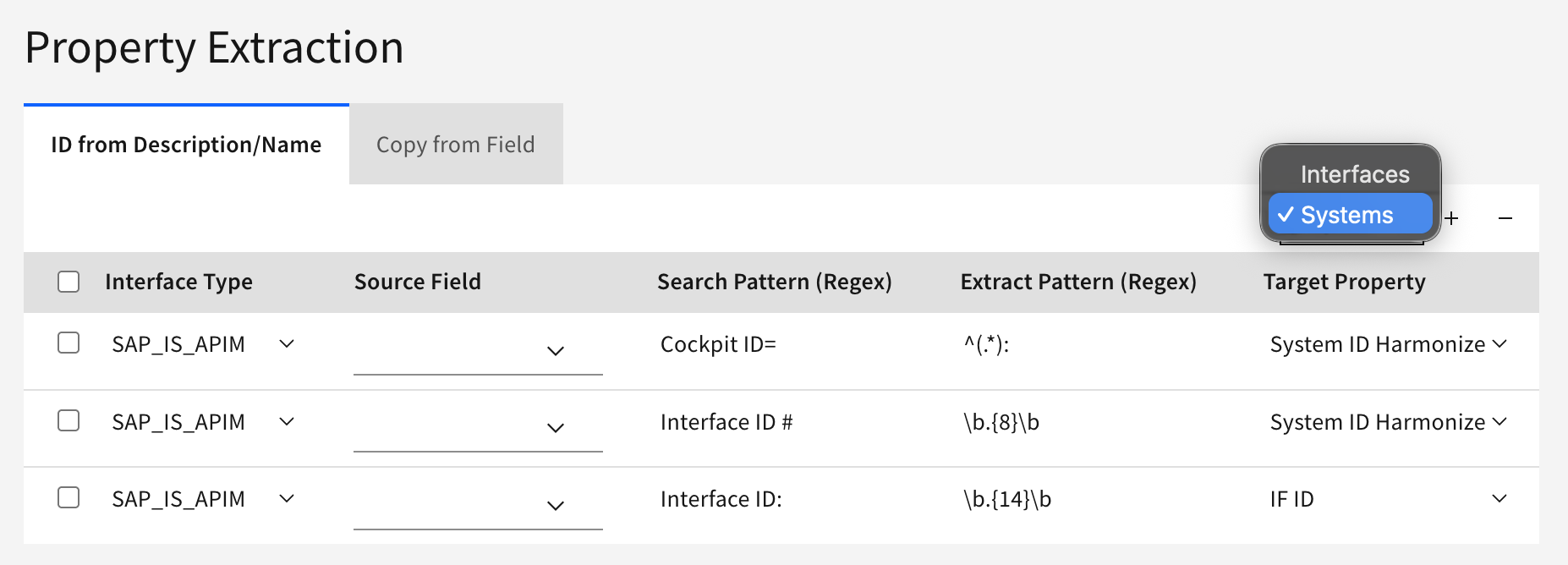
Which interface types are available
Not every platform delivers system-level data, so the selectable interface types depend on the tab and the context:
|
Tab |
Interfaces |
Systems |
|---|---|---|
|
ID from Description/Name |
|
|
|
Copy from Field |
|
|
Three interface types need additional explanation:
-
RESOURCE covers SAP IS CI User Credentials and SAP BTP destinations
-
PLANNED covers interfaces from your planning tool (Jira, Azure DevOps, SAP Integration Assessment)
-
EAM covers systems from your EAM tool (e.g. LeanIX, Luy, Bee360).
Rule Management
Adding Extraction Rules
Pick the tab and the context first, then click + and fill the row. What goes into the middle columns differs per tab - see ID from Description/Name and Copy from Field below.
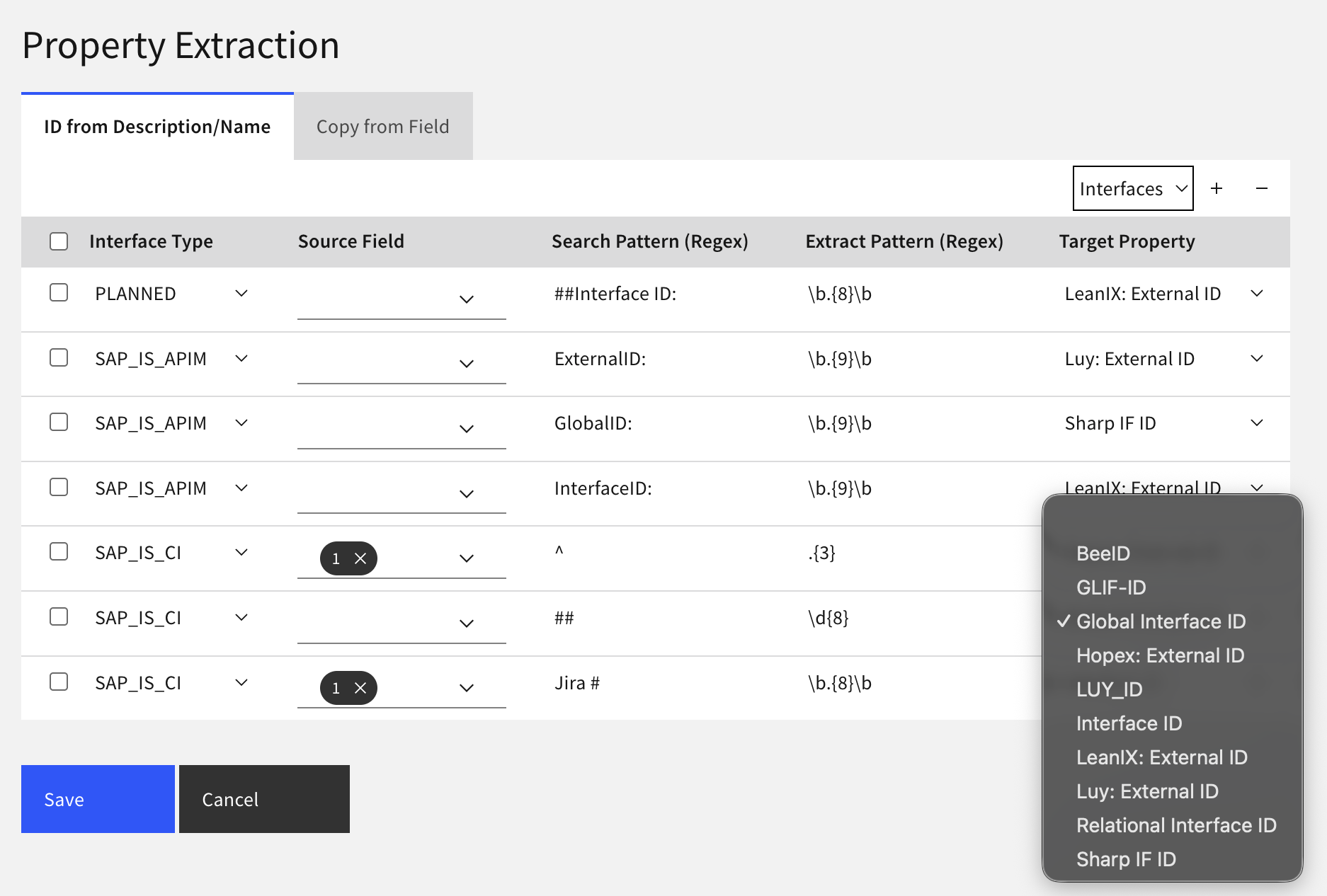
The dropdown shows Interface properties in the Interfaces context, System properties in the Systems context, and only ID-format properties on the ID from Description/Name tab.
Removing Extraction Rules
-
Select checkbox next to rules you want to remove
-
Click "-" button to delete selected rules
-
Click Save to confirm changes
Common Use Cases
One property is usually filled by several rules, because the same information sits in a different place on every platform.
Example Walkthrough: capture the technical user of your interfaces
A complete example for the first use case above and can be extended platform by platform.
-
Create the property
Go to Settings → Properties → Overview, open the Interface tab, click + and enter:
-
Name:
Communication User -
Format:
STRING
Click Save.
-
Create the first rule
Go to Settings → Properties → Extraction, open the Copy from Field tab and leave the context selector on Interfaces. Click + and fill in:
|
Column |
Value |
|---|---|
|
Interface Type |
SAP_SOAP |
|
Source Field |
|
|
Target Property |
|
Click Save.
-
Run the job (from Settings → Properties → Overview or in your designated Data Source)
SAP_SOAP is read from data already stored in Integration Cockpit, so the INVENTORY job applies this rule (see Apply and Validate). Start it from your specific Data Source or click the Update Inventory button found in the Properties Overview.
-
Check the result
Go to Inventory → Interfaces → by Property, select Communication User and click Next. Every SAP_SOAP interface whose service binding uses basic authentication now shows its technical user.
-
Extend to the other platforms
The same property can be filled from every platform - add one rule per interface type, all pointing at Communication User:
|
Interface Type |
Source Field |
|---|---|
|
SAP_RFC |
|
|
SAP_IDOC |
|
|
RESOURCE |
|
|
RESOURCE |
|
After the next INVENTORY run you have one property that answers "which technical user does this interface run under" across your whole landscape - and you can filter or export by it.
Note
The two RESOURCE rules read different artifacts (Cloud Integration credentials and BTP destinations), so they never compete for the same interface. Do not add two rules for the same interface type and the same property - see the note under “What the extracted values look like”.
ID from Description/Name
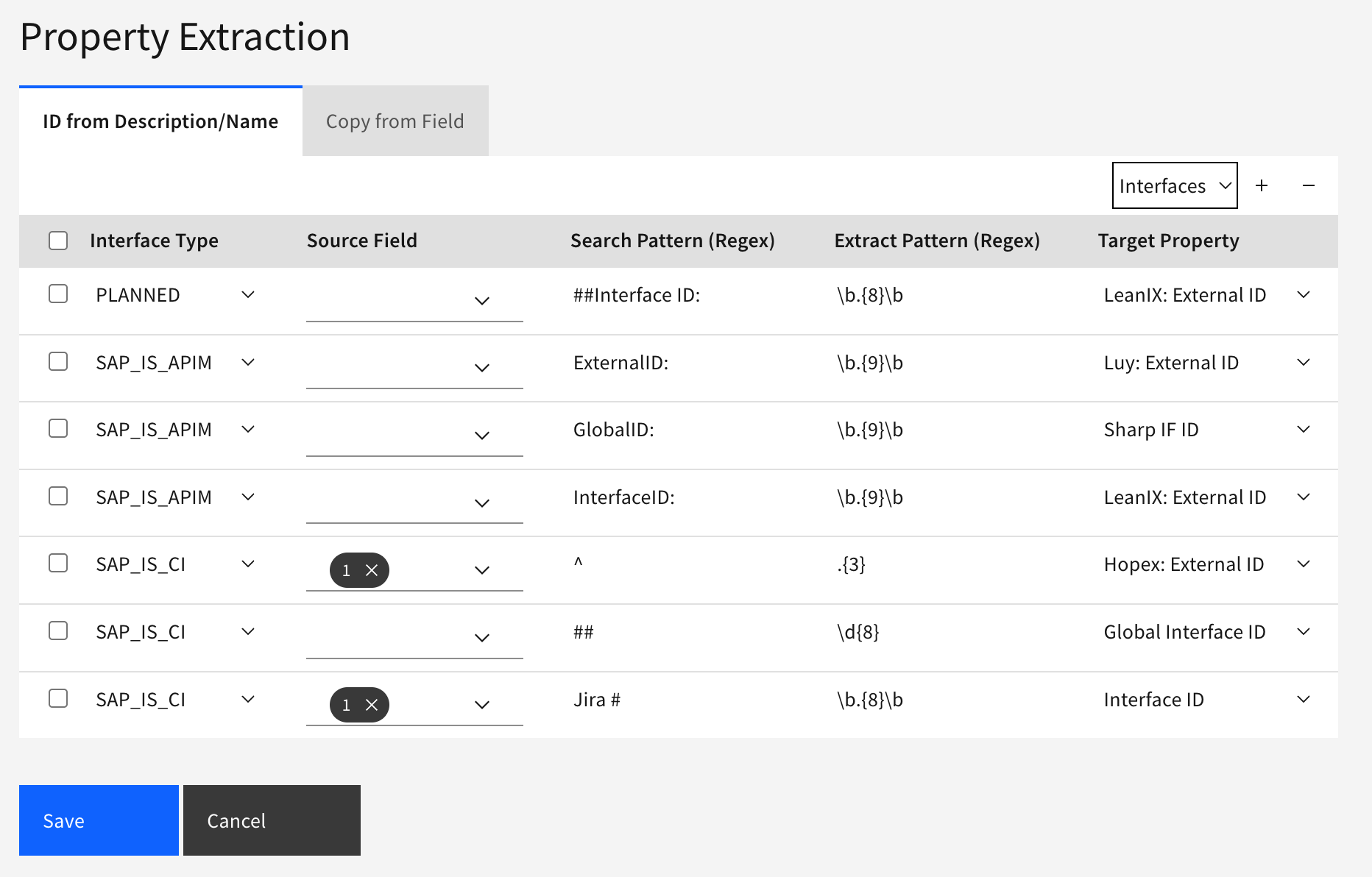
What you see:
-
Context selector (Interfaces, Systems) to determine where the extracted value is stored
-
Interface Type - the platform the rule applies to
-
Source Field - which text field is searched (Name, Description, Title). The options depend on the Interface Type. Leave empty to search all available fields.
-
Search Pattern (Regex) - locates the label in the text
-
Extract Pattern (Regex) - reads the value that follows the label
-
Target Property - the property that receives the value
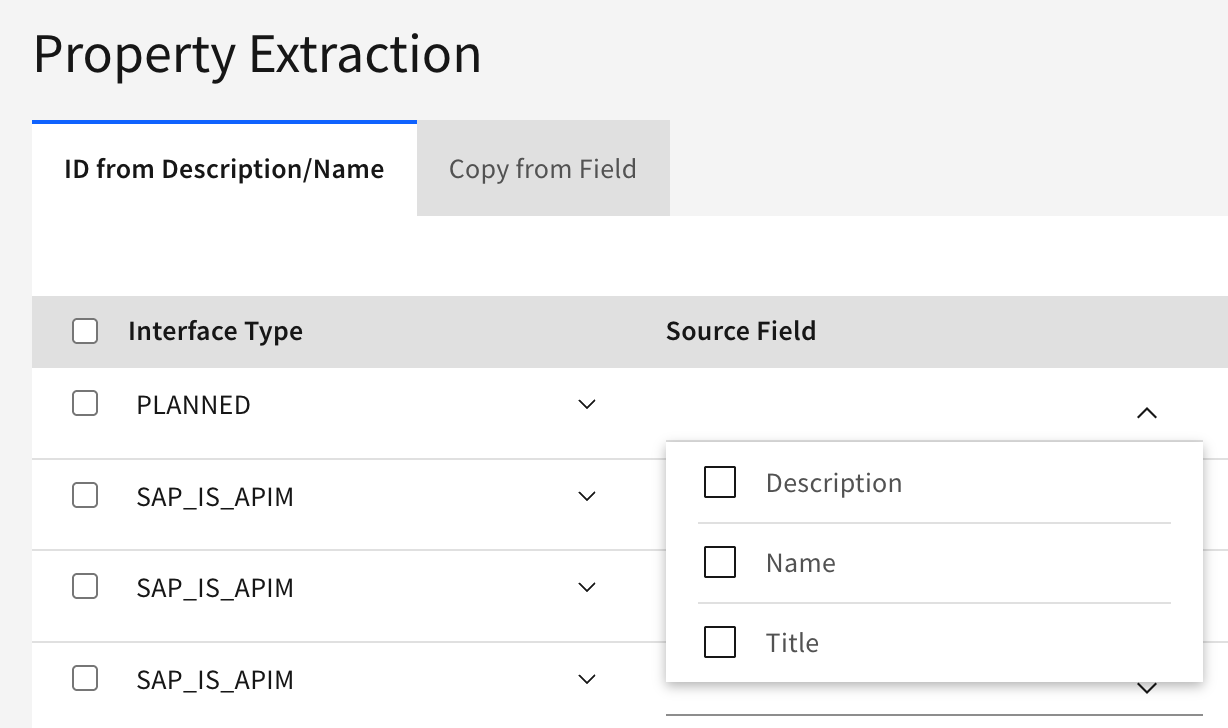
How to use:
-
Click "+" to add a new rule
-
Select the Interface Type
-
Optionally narrow the Source Field to specific fields
-
Enter the Search Pattern - the label that precedes your ID
-
Enter the Extract Pattern - the shape of the ID itself
-
Select the Target Property
-
Click Save
The Search Pattern locates a label in the text. The Extract Pattern is then applied only to the text that follows that label, so keep the Search Pattern short and literal.
Leaving Source Field empty
An empty Source Field means all available fields are searched.
Target Property format
Only properties with the ID format are available in this tab. If a property is missing from the dropdown, check its format under Settings → Properties → Overview and make sure it is set to ID.
Common Extraction Patterns
Copy from Field
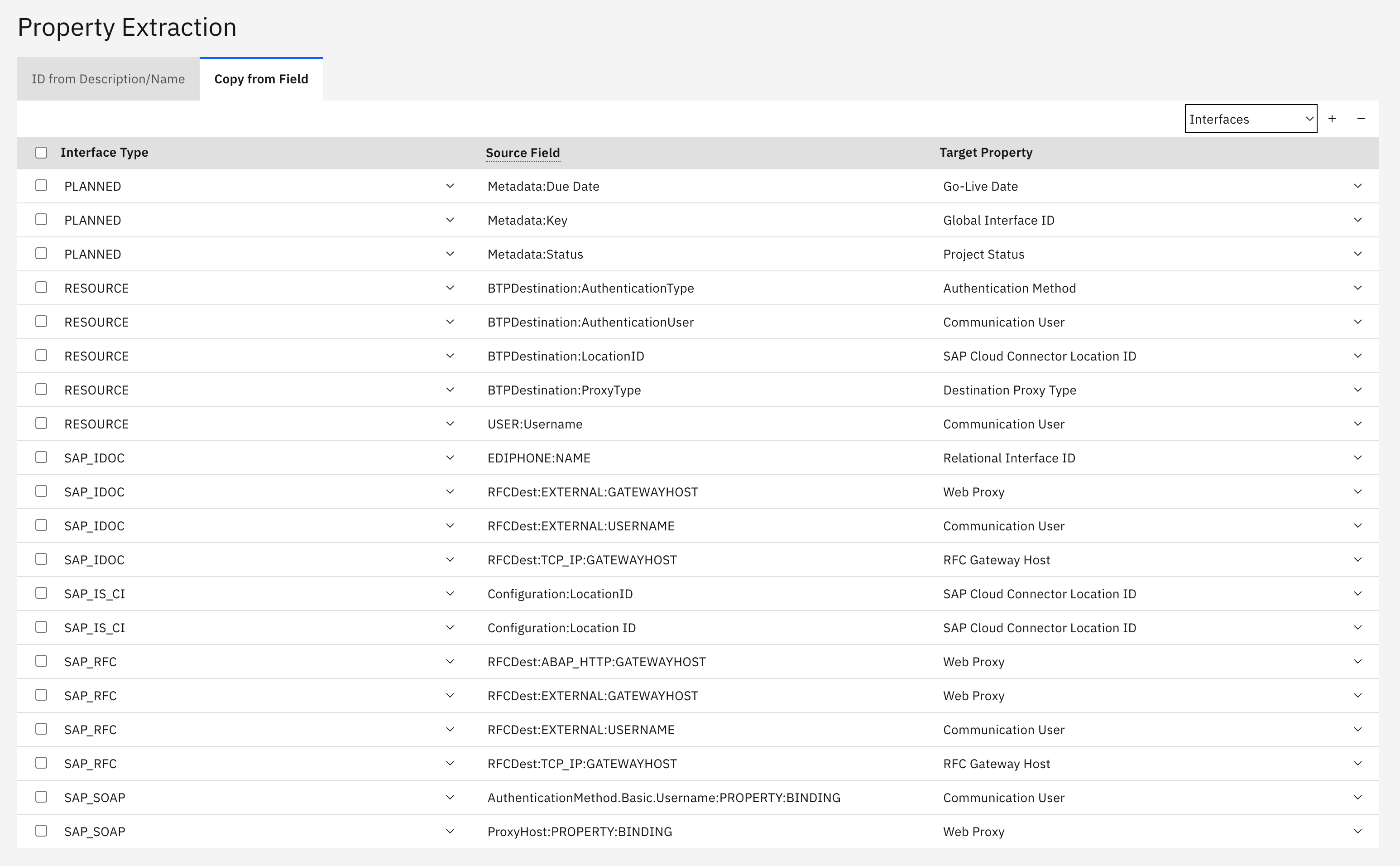
What you see:
-
Context selector (Interfaces, Systems) to determine where the extracted value is stored
-
Interface Type - the platform the rule applies to
-
Source Field - the field path in the raw data, entered as text
-
Target Property - the property that receives the value. All property formats are available on this tab.
How to use:
-
Click "+" to add a new rule
-
Select the Interface Type
-
Enter the Source Field using the syntax for that platform (see below)
-
Select the Target Property
-
Click Save
What the extracted values look like
|
Interface Type |
Source Field |
Value stored in the property |
|---|---|---|
|
SAP_SOAP |
|
|
|
SAP_SOAP |
|
|
|
SAP_RFC |
|
|
|
SAP_IDOC |
|
|
|
SAP_IS_CI |
|
|
|
RESOURCE |
|
|
|
PLANNED (e.g. Jira) |
|
|
|
EAM (Systems) |
|
|
One value is stored per interface and property. Avoid pointing two rules at the same property for the same interface type.
Common Source Field Syntax
Apply and Validate
Implementation Workflow:
-
Create Properties first in Settings → Properties → Overview
-
Configure extraction rules using the patterns and field paths described above
-
Run the job that applies your rules -
INVENTORY(for Interface properties) orCONFIGURATION(for System properties) -
Verify extraction in Inventory → Interfaces/Systems → by Property
-
Use extracted properties for reporting and filtering workflows
What happens on the next run
Extraction overwrites the value it manages, but it never removes values:
-
Value changed in the source system - the property is updated with the new value on the next run
-
Rule changed - the new rule takes effect on the next run and overwrites the value it wrote before
-
Rule deleted, or the value no longer exists in the source system - the property keeps the value it last had. Nothing cleans it up automatically
So if you remove a rule or reorganize your properties, delete the values you no longer want on the interface detail page, or through mass maintenance in Inventory → Interfaces. Otherwise old values stay in your reports.
If a rule stays empty
Rules and patterns are not validated when you save them, so a mistake shows up as an empty property rather than an error message. Check in this order:
-
Did you run the right job? See the table above - several syntaxes are only applied by the CONFIGURATION job, never by INVENTORY
-
Is the required data source option enabled? See Requirements and Setup
-
Does the source field exist and is it spelled exactly right? Look it up in SOAMANAGER, the iFlow Configure view or transaction WE20. RFCDest, the RFCType and package tag names are case sensitive, and a rule only reads the destination type it names
-
Is the Target Property a value list? Only values contained in that list are stored
Best Practices
-
Plan your properties before your rules. Use one property per piece of information and fill it from every platform, rather than one property per platform. That way a single filter or export column answers the question for your whole landscape
-
Start small. Create one rule for one interface type, run the job and check the result before rolling out broadly
-
Name the source field explicitly where an ID could appear in more than one field, instead of relying on the search order
-
Clean up when you change your mind. Removing a rule leaves its values behind - delete them through mass maintenance in Inventory → Interfaces → Mass Maintenance
-
Prefer fields the source cannot leave empty. An authentication method or a technical ID is maintained on every object, so a rule reading it covers your whole landscape. Optional settings that teams fill in only sometimes give you a sample, not a report - check how many objects actually carry a value before you build a property around it
Related Documentation
For comprehensive property extraction and configuration guidance:
-
How to report on properties like web proxies and users - Practical examples of property extraction implementation and reporting workflows
-
Onboarding Guide - 2.1.1 Properties - Step-by-step property configuration and best practices
-
Properties - Complete property reference and usage examples
-
Property Propagation - Carrying a property from one interface type to another, for example from a planned interface to the technical interface that implements it
Last Updated: August 28, 2026