

The SAP ABAP section displays enterprise integration components from your SAP ABAP systems organized into IDocs, Files, SOAP Services, OData Services, Integration Engine, RFC Destinations, and SOAP XI catalogs. This inventory helps organizations manage SAP integration interfaces, track business data exchange patterns and maintain visibility into enterprise application integration infrastructure for reliable system connectivity and data consistency.
Navigate to Inventory → Data Sources → SAP → ABAP → <Data Source Name> to access these integration component catalogs.
IDocs
The IDocs catalog displays Intermediate Documents with predefined hierarchical structures for business data exchange between SAP and external systems. This view helps you understand business transaction data flows, track document types and directions, and manage asynchronous messaging for master data, invoices, delivery notes, and other business processes through ALE (Application Link Enabling) and EDI (Electronic Data Interchange) protocols.
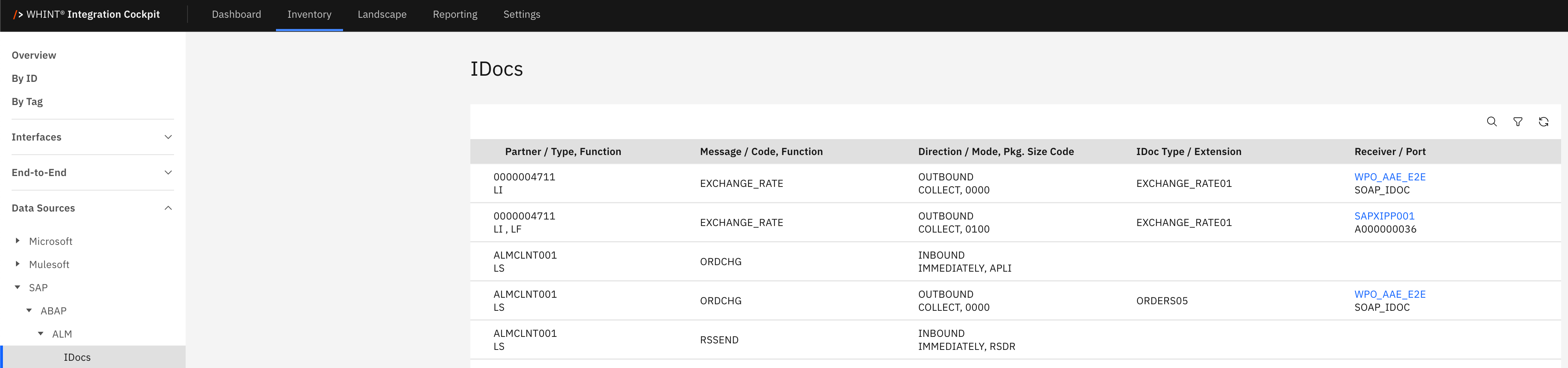
What you see:
-
Partner / Type, Function: Trading partner identifier with partner type and function codes
-
Message / Code, Function: IDoc message type with processing codes and function identifiers
-
Direction / Mode, Pkg, Size Code: Data flow direction (INBOUND/OUTBOUND), processing mode, package size configurations
-
IDoc Type / Extension: IDoc format type with extension specifications (e.g. EXCHANGE_RATE01, ORDERS05)
-
Receiver / Port: Target system receiver with communication port identifiers (clickable)
IDoc Detail View
Clicking an IDoc receiver opens a detailed view showing:
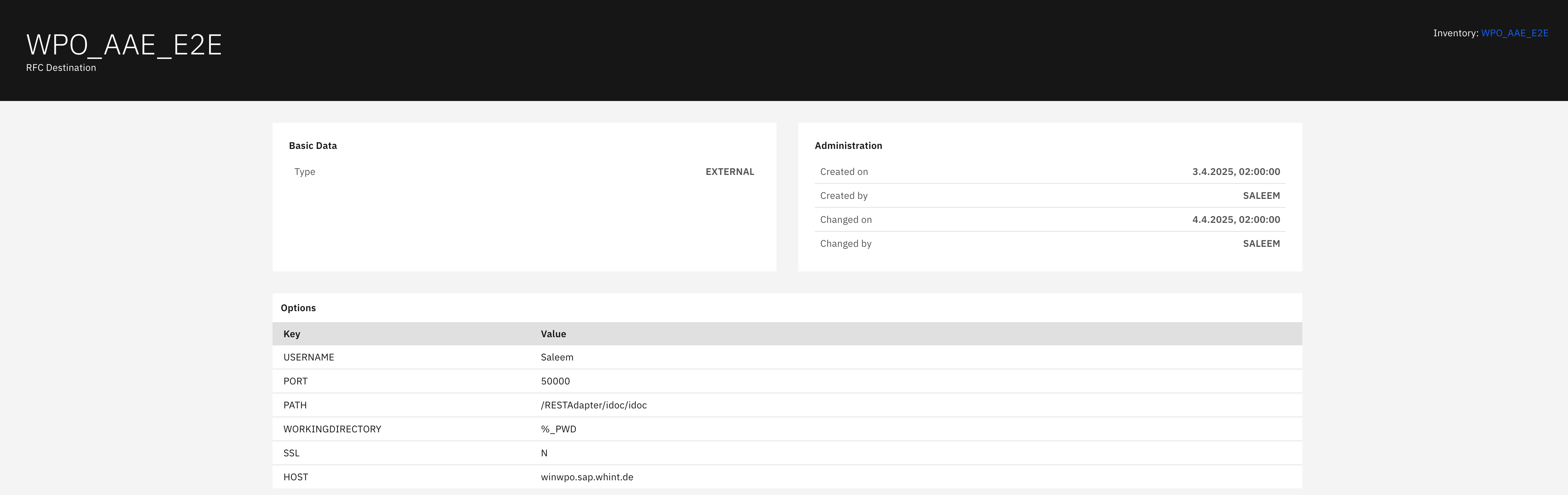
Basic Data section displays:
-
Type: IDoc communication type (EXTERNAL/INTERNAL)
Administration section displays:
-
Created on: IDoc configuration creation timestamp
-
Created by: IDoc configuration author
-
Changed on: Last modification timestamp
-
Changed by: Last modifier identifier
Options section displays:
-
USERNAME: User credentials for IDoc processing
-
PORT: Communication port number for data transmission
-
PATH: Directory path for IDoc file processing
-
WORKINGDIRECTORY: Working directory for IDoc operations
-
SSL: SSL encryption configuration (Y/N)
-
HOST: Target system hostname for IDoc delivery
Files
The Files catalog displays file-based integration interfaces with logical and physical path configurations for cross-platform data exchange. This view helps you understand file transfer patterns, track system-specific path mappings, and manage file-based integration scenarios across UNIX and Windows environments for batch processing and data import/export operations.
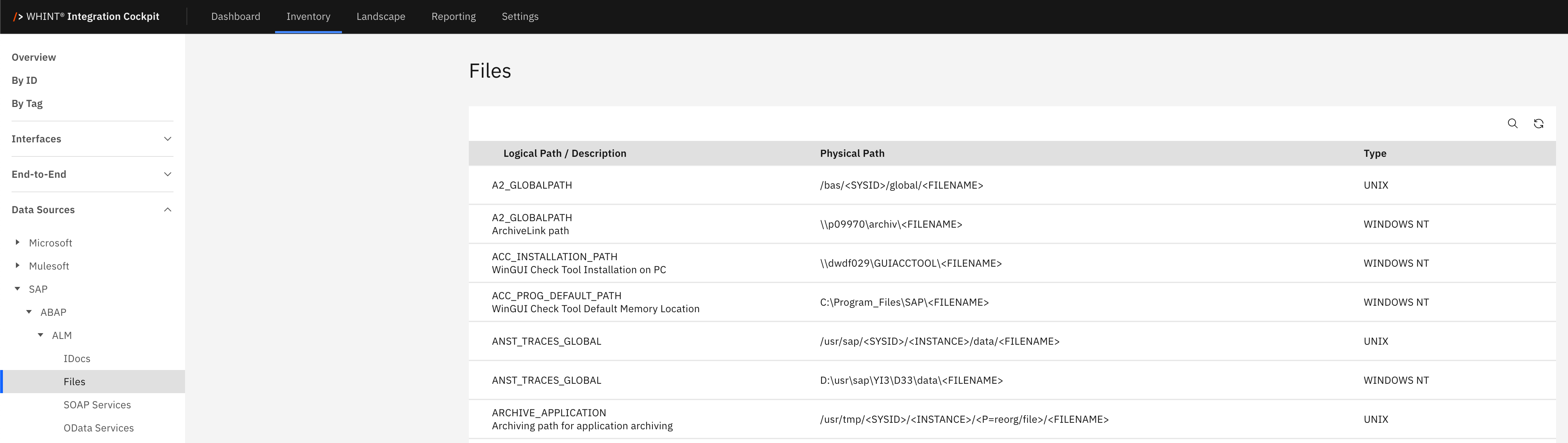
What you see:
-
Logical Path / Description: SAP logical path identifier with descriptive text below
-
Physical Path: Actual file system path with platform-specific directory structures
-
Type: Operating system type (UNIX, WINDOWS NT)
File paths support dynamic filename placeholders (<FILENAME>) and environment-specific directory structures for flexible file processing across different system landscapes.
File Access
To read the access to files via ABAP-statement OPEN DATASET, the following configuration is required by activating the aggregated authorization trace (transaction code: STUSOBTRACE).
-
Set the filter Authorization Object
S_DATASET -
Set the profile parameter
auth/authorization_trace = Fwhile the system is running via transaction codeRZ11
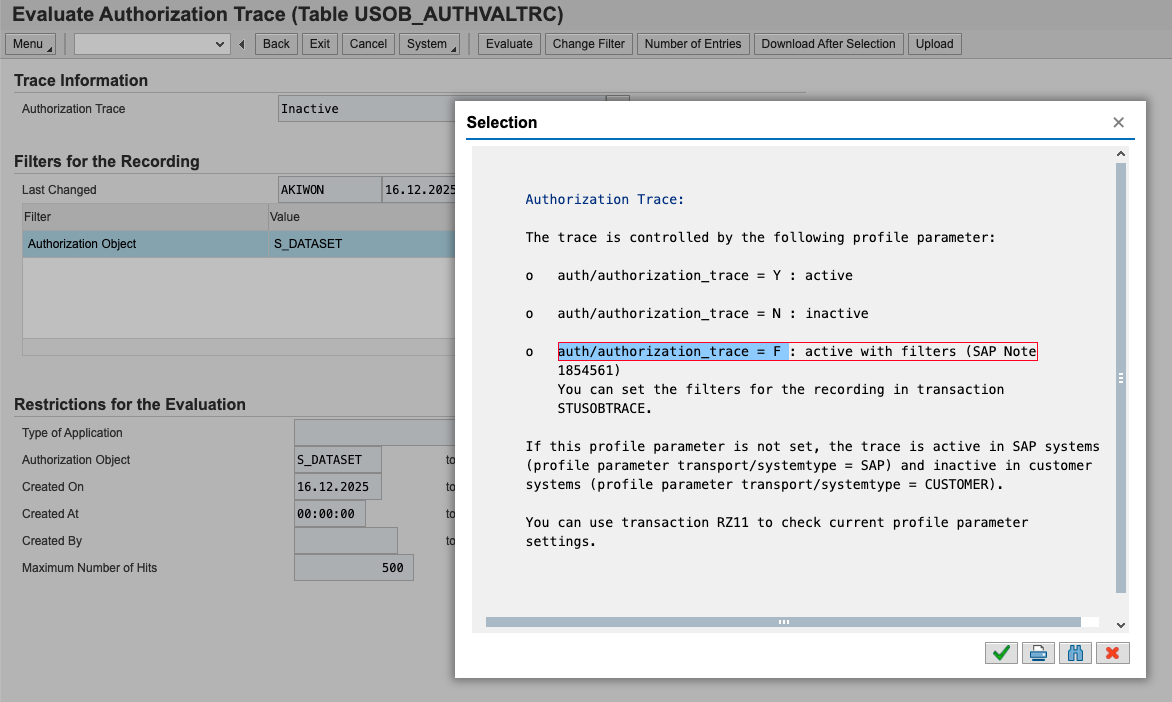
Caution: Activating the authorization trace without filters has a negative effect on performance!
Collected File Accesses are generating Interfaces during the run of the INVENTORY job.
SOAP Services
The SOAP Services catalog displays web service interfaces for HTTP-based communication using Simple Object Access Protocol. This view helps you track service configurations, monitor service states and manage web service integrations that enable function calls via HTTP protocol with WSDL service descriptions for external system connectivity.
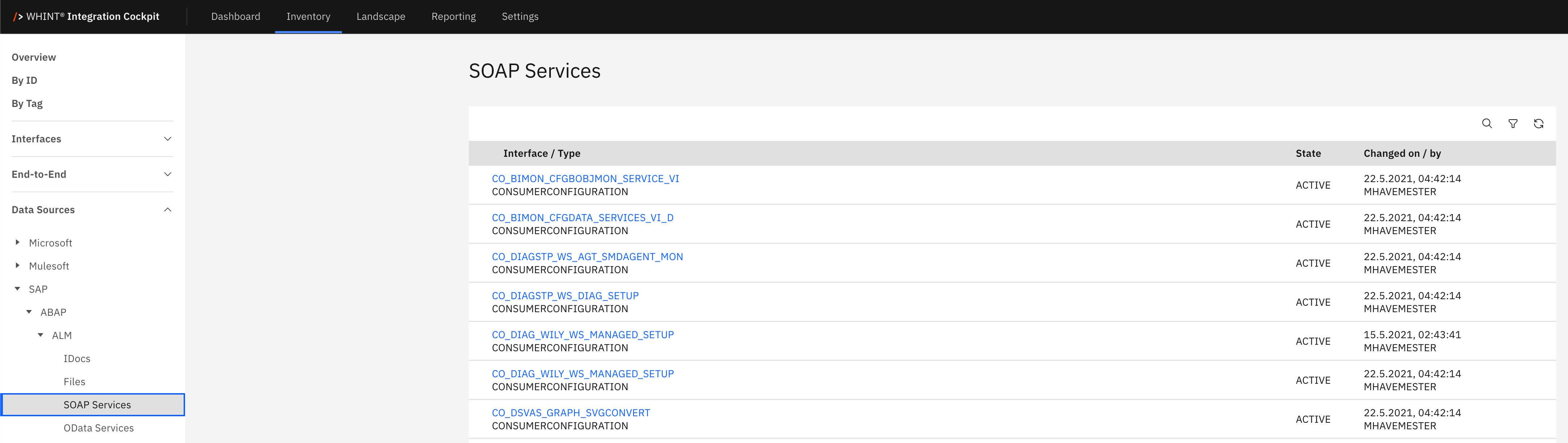
What you see:
-
Interface / Type: SOAP service interface identifier with service type classification (CONSUMERCONFIGURATION)
-
State: Service operational status (ACTIVE/INACTIVE)
-
Changed on / by: Last modification timestamp and user identifier
SOAP Service Detail View
Clicking a SOAP service opens a detailed view showing:
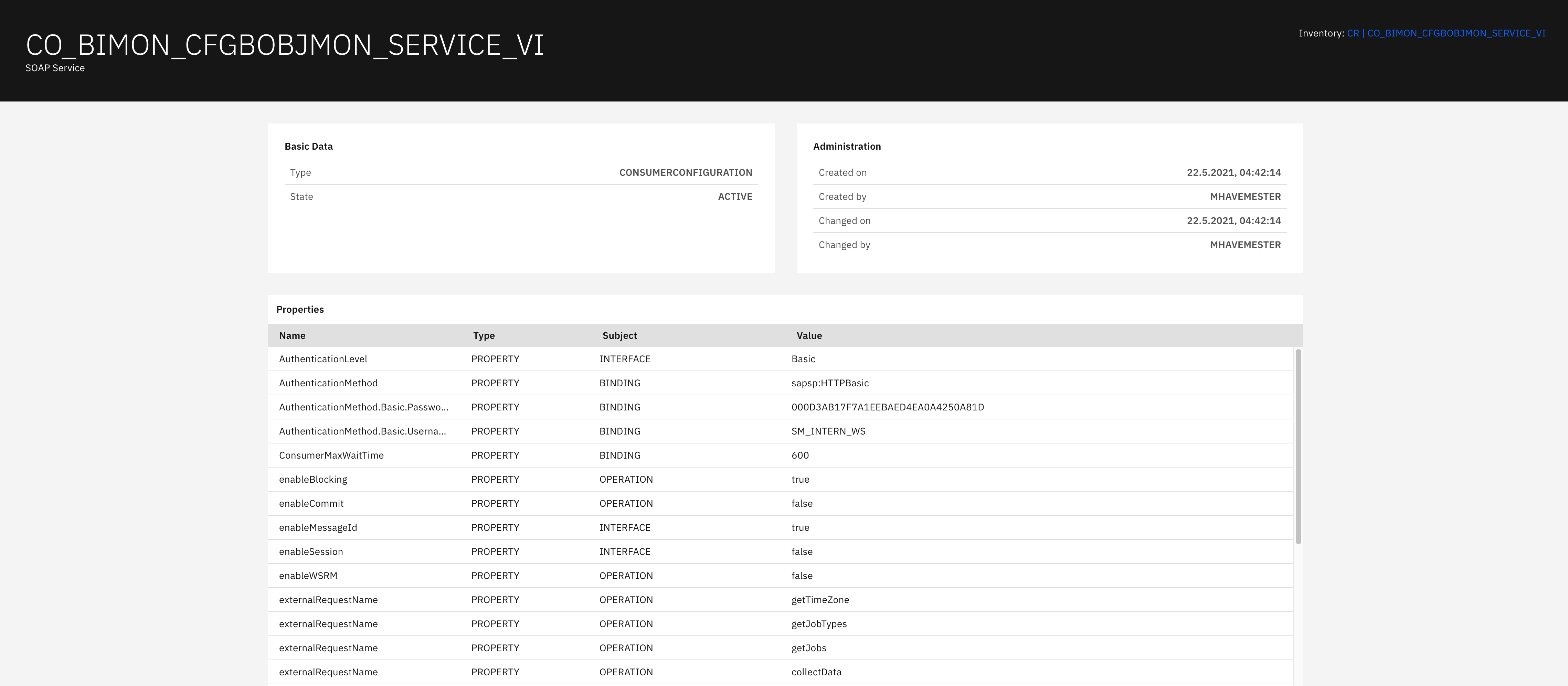
Basic Data section displays:
-
Type: Service configuration type (CONSUMERCONFIGURATION)
-
State: Service operational status (ACTIVE)
Administration section displays:
-
Created on: Service creation timestamp
-
Created by: Service creator identifier
-
Changed on: Last modification timestamp
-
Changed by: Last modifier identifier
Properties section displays:
-
Name: Property identifier (AuthenticationLevel, AuthenticationMethod, etc.)
-
Type: Property classification (PROPERTY)
-
Subject: Property category (INTERFACE, BINDING, OPERATION)
-
Value: Property configuration value (Basic, sapsslHTTPBasic, timeout values, etc.)
OData Services
The OData Services catalog displays Open Data Protocol services providing RESTful APIs for SAP data access. This view helps you understand modern HTTP-based API endpoints, track service versions and manage RESTful integration patterns that enable flexible data consumption through standard web protocols for modern application connectivity.
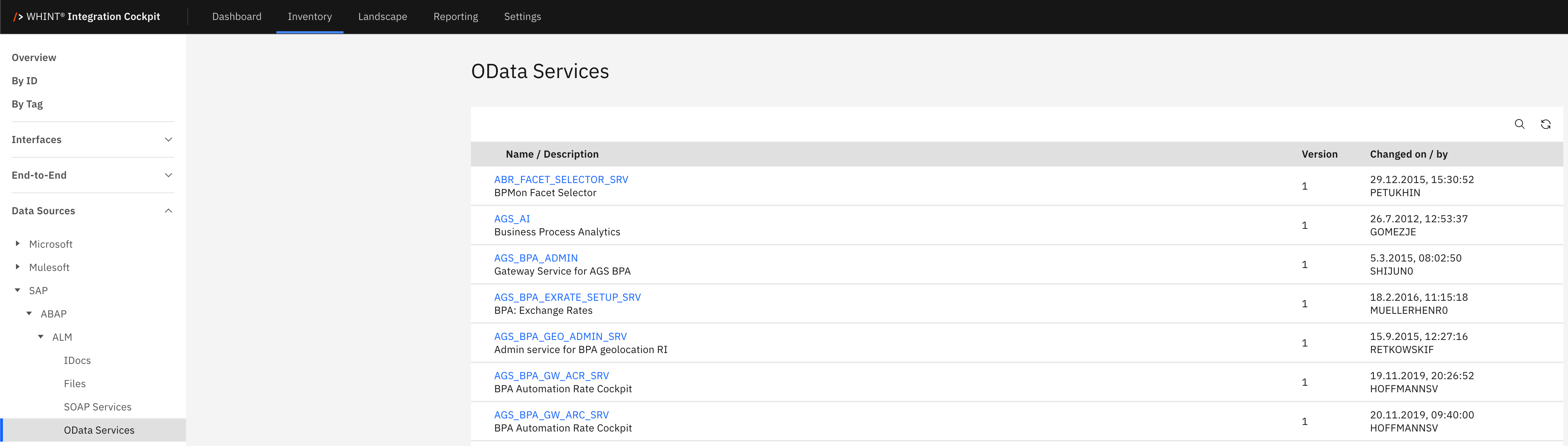
What you see:
-
Name / Description: OData service identifier with business description below
-
Version: Service version number for API lifecycle management
-
Changed on / by: Last modification timestamp and user identifier
OData Service Detail View
Clicking an OData service opens a detailed view showing:

Basic Data section displays:
-
Description: Service business description (e.g., "Gateway Service for AGS BPA")
-
Address: Complete service endpoint URL for API access
-
Version: Service version number for compatibility tracking
Administration section displays:
-
Changed on: Last modification timestamp
-
Changed by: Service maintainer identifier
Integration Engine
The Integration Engine catalog displays message processing and routing configurations within SAP Exchange Infrastructure (XI/PI/PO). This view helps you track integration scenarios, monitor message destinations and manage enterprise application integration flows that enable reliable message exchange between distributed systems and business processes.
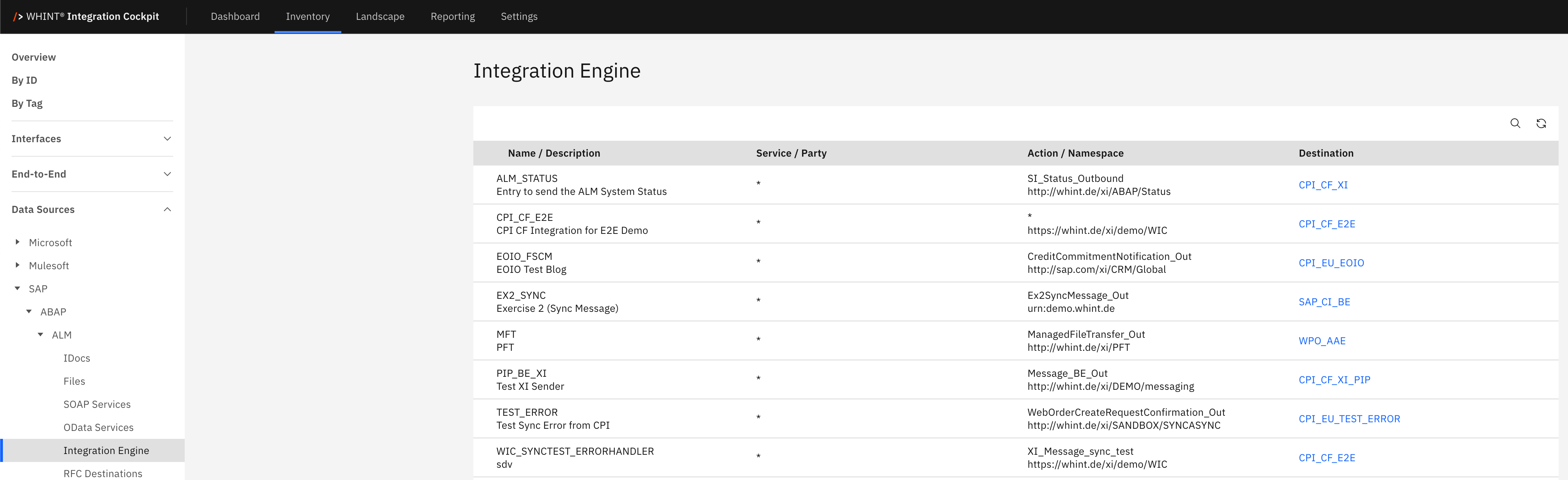
What you see:
-
Name / Description: Integration scenario identifier with business description below
-
Service / Party: Source service or business party information
-
Action / Namespace: Integration action with namespace specification
-
Destination: Target system or service identifier (clickable)
Integration scenarios support various message patterns including synchronous/asynchronous processing, error handling, and multi-step business process orchestration.
RFC Destinations
The RFC Destinations catalog displays Remote Function Call endpoints for communication between SAP systems and external applications. This view helps you understand system connectivity configurations, track connection types and manage RFC-based integration patterns that enable synchronous function calls across distributed SAP landscapes and third-party systems.
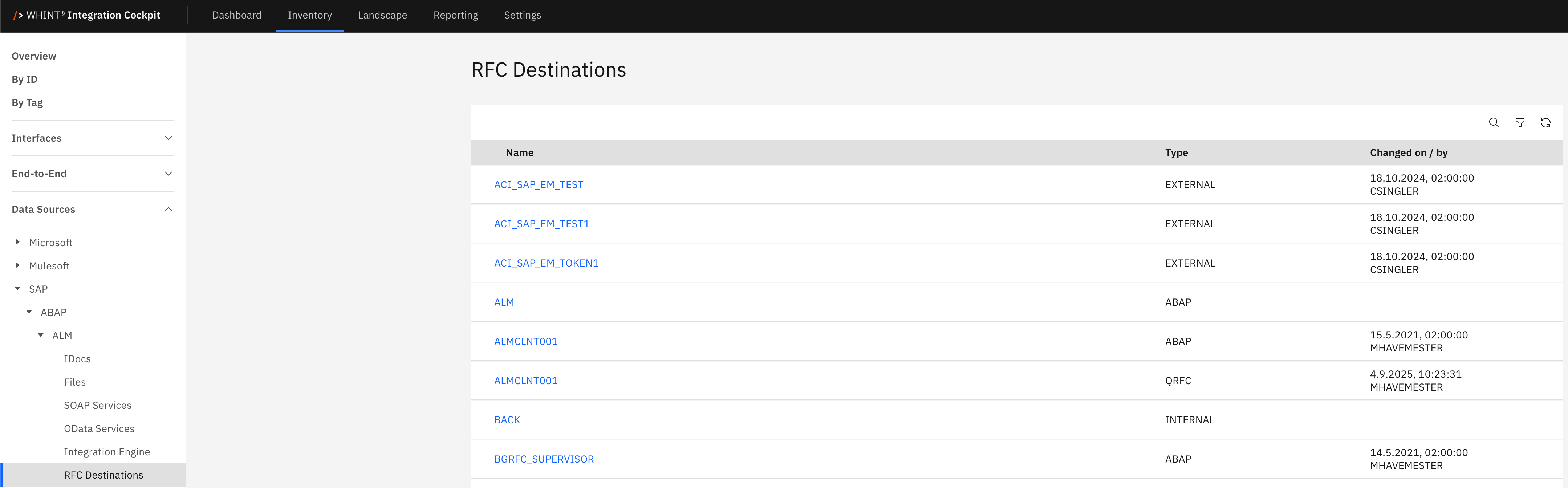
What you see:
-
Name: RFC destination identifier for remote system connections (clickable)
-
Type: Connection type (EXTERNAL, ABAP, QRFC, INTERNAL)
-
Changed on / by: Last modification timestamp and user identifier
RFC Destination Detail View
Clicking an RFC destination opens a detailed view showing:
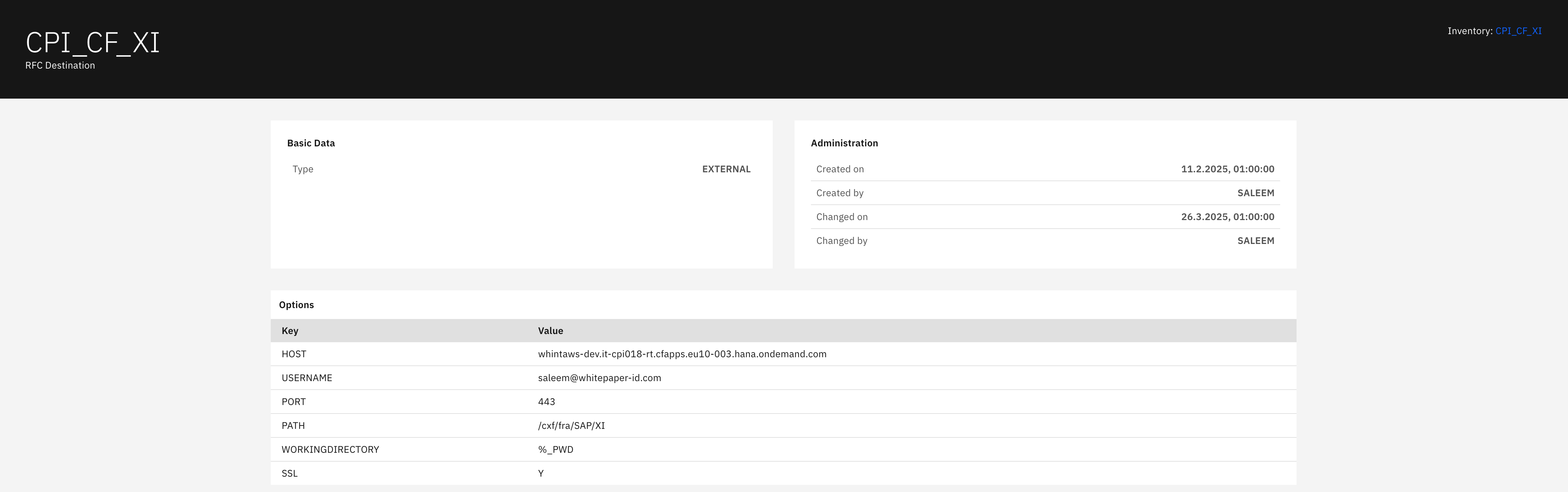
Basic Data section displays:
-
Type: RFC connection type (EXTERNAL for external systems)
Administration section displays:
-
Created on: Destination creation timestamp
-
Created by: Destination creator identifier
-
Changed on: Last modification timestamp
-
Changed by: Last modifier identifier
Options section displays:
-
HOST: Target system hostname for RFC connections
-
USERNAME: Authentication username for RFC calls
-
PORT: Communication port number (e.g. 443 for HTTPS)
-
PATH: Service path for RFC endpoint access
-
WORKINGDIRECTORY: Working directory for RFC operations
-
SSL: SSL encryption configuration (Y/N)
SOAP XI
The SOAP XI catalog displays SOAP web service interfaces within SAP Exchange Infrastructure for enterprise integration scenarios. This view helps you track XI-based message processing, monitor interface namespaces, and manage SOAP-based integration patterns that support complex business process integration across enterprise application landscapes.
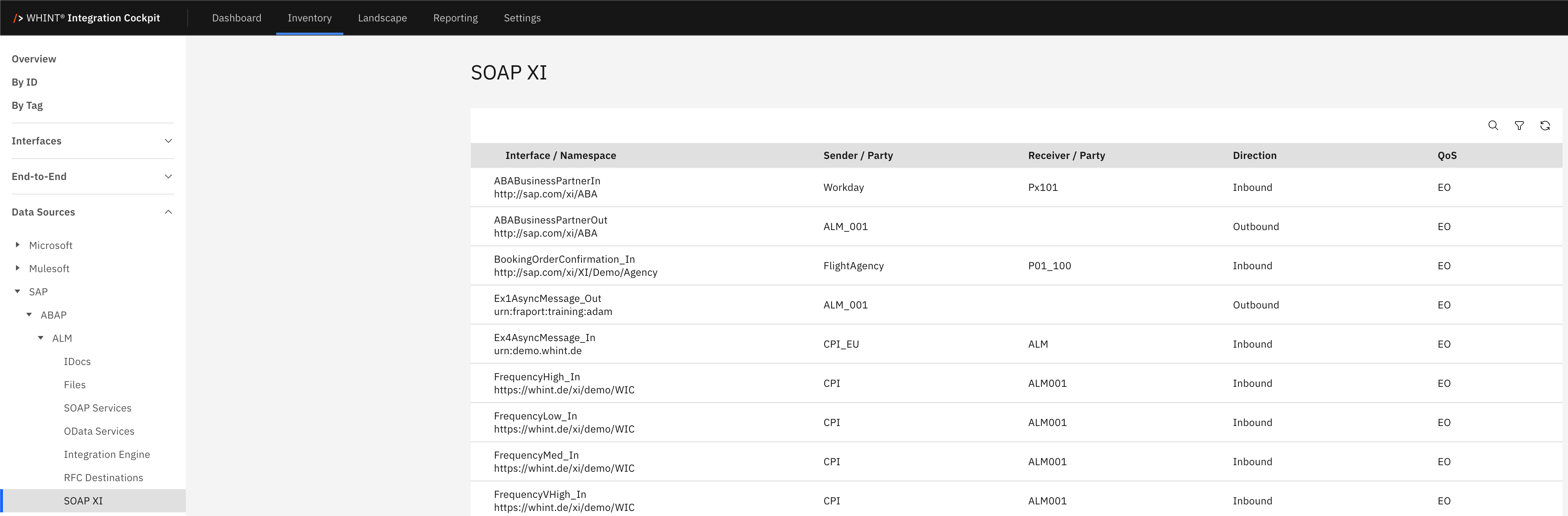
What you see:
-
Interface / Namespace: SOAP interface identifier with XI namespace specification below
-
Sender / Party: Source system or business party information
-
Receiver / Party: Target system or business party identifier
-
Direction: Message flow direction (Inbound/Outbound)
-
QoS: Quality of Service configuration (EO = Exactly Once)
SOAP XI interfaces support enterprise-grade message processing with guaranteed delivery, error handling, and business process orchestration capabilities within SAP Exchange Infrastructure.
Navigation
All catalog views include:
-
Search icon (magnifying glass) in the top right toolbar
-
Refresh icon next to the search
-
Filter capabilities for efficient interface discovery
-
Blue-highlighted names that open detailed views with configuration information
Last Updated: September 03, 2026