

The Adapter Usage Interfaces view shows detailed information about specific interfaces that use particular adapter technologies. This view appears when you drill down from the Adapter Usage Overview by clicking on adapter counts or using adapter filters.
Navigate to Reporting → Adapter Usage → Interfaces to access detailed interface listings filtered by adapter technology.
Came from Overview? This view shows interfaces for the adapter you selected. Use filters to refine results or return to Adapter Usage Overview for the technology distribution summary.
Interfaces Overview
Adapter Usage Interfaces displays a detailed table of interfaces using specific adapter technologies, allowing you to analyze which interfaces implement particular adapters and their configurations.
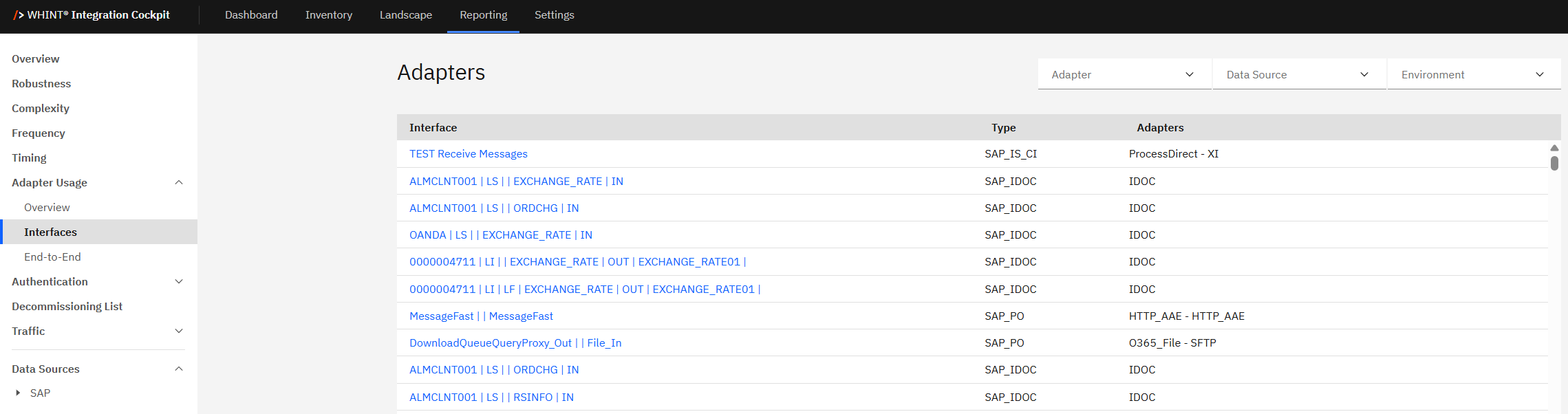
What you see:
-
Interface details table with interface names, types, and adapter specifications
-
Adapter filter to focus on specific adapter technologies
-
Data Source filter to analyze specific integration platforms
-
Environment filter to switch between Production, Test, Development views
-
Sortable columns for organizing interface information
Using Interface Information
Interface table provides detailed information about adapter usage at the interface level:
|
Column |
Description |
Purpose |
|---|---|---|
|
Interface |
Interface name (clickable blue links) |
Navigate to detailed interface analysis |
|
Type |
Integration platform type (SAP_IS_CI, SAP_IDOC, SAP_PO) |
Understand source platform |
|
Adapters |
Specific adapter implementation details |
See exact adapter configuration |
How to use the interface data:
Interface names (blue links):
-
Click "TEST Receive Messages" → Navigate to detailed interface documentation
-
Click "ALMCLNT001 | LS | | EXCHANGE_RATE | IN" → View specific interface configuration
-
Click any interface name to access comprehensive interface details
Type classifications:
-
SAP_IS_CI → SAP Integration Suite (Cloud Integration) interfaces
-
SAP_IDOC → SAP ABAP Backend IDoc interfaces
-
SAP_PO → SAP Process Orchestration interfaces
Adapter specifications:
-
ProcessDirect - XI → Internal processing with XI protocol
-
IDOC → SAP IDoc adapter implementation
-
HTTP_AAE - HTTP_AAE → HTTP adapter configuration
-
O365_File - SFTP → Office 365 file transfer via SFTP
Filtering and Analysis
Filter options help you focus on specific adapter technologies and environments:
Adapter Filter:
-
Select specific adapter types to see only interfaces using that technology
-
Useful for impact analysis when planning adapter migrations or updates
-
Compare usage patterns across different adapter technologies
Data Source Filter:
-
Filter by integration platform (SAP Cloud Integration, SAP PO, etc.)
-
Analyze adapter usage patterns within specific technology stacks
-
Support platform-specific modernization planning
Environment Filter:
-
Switch between Production, Test, Development environments
-
Compare adapter usage across different landscape tiers
-
Validate deployment consistency across environments
Analysis workflow:
-
Use filters to focus on specific adapter types or platforms
-
Review interface names to understand business context
-
Click interface links to investigate specific implementations
-
Analyze adapter patterns to identify standardization opportunities
Adapter Interface (Selected)
When you click any blue interface name, you'll see the Interface Details view with comprehensive information about that specific interface.
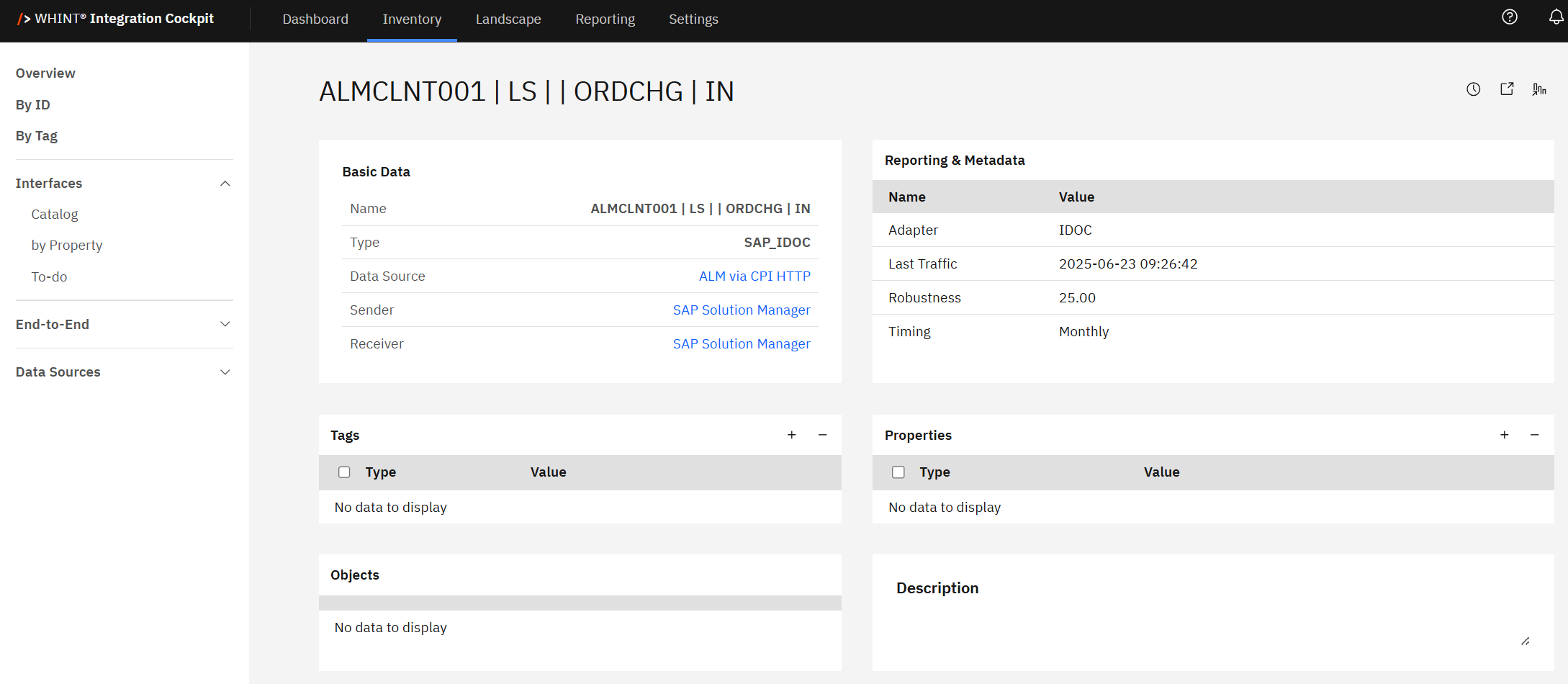
What you see after clicking an interface:
-
Interface name header with the specific interface identifier
-
Basic Data section showing Name, Type, Data Source, Sender, and Receiver
-
Reporting & Metadata section with Adapter, Last Traffic, Robustness and Timing details
-
Tags section for business object classifications
-
Objects section for associated business objects
-
Properties section for additional metadata
-
Description section for interface documentation
Key information displayed:
-
Adapter type (e.g. IDOC) confirming the adapter technology
-
Last Traffic showing recent activity (e.g. 2025-06-23 09:26:42)
-
Robustness score indicating interface stability (e.g. 25.00)
-
Timing schedule showing execution frequency (e.g., Monthly)
-
System context via Sender and Receiver information
Use the interface details to:
-
Verify adapter implementation and configuration specifics
-
Assess interface health through robustness and traffic data
-
Understand business context via sender/receiver and object mappings
-
Document interface specifications using the description field
Adapter Usage Insights
Interface-level analysis helps with:
Migration planning:
-
Identify all interfaces using deprecated adapters (No Fit classification)
-
Assess migration complexity by reviewing specific adapter implementations
-
Plan migration sequencing based on interface criticality
Standardization opportunities:
-
Find interfaces using non-standard adapter configurations
-
Identify opportunities to consolidate similar adapter implementations
-
Support adapter strategy enforcement across development teams
Impact assessment:
-
Understand which business processes depend on specific adapter technologies
-
Assess potential impact of adapter changes or deprecations
-
Plan testing scope for adapter-related updates
Best practices:
-
Use this view to document adapter usage patterns
-
Regular review of interfaces helps identify configuration drift
-
Combine with Strategy Fit data to prioritize modernization efforts
Navigation
Return to overview:
-
Navigate back to Adapter Usage → Overview for technology distribution summary
-
Use browser back button to return to previous adapter analysis
-
Access other reporting sections via left navigation menu
Deep dive into interfaces:
-
Click blue interface names to access detailed interface documentation
-
Use interface-level data for troubleshooting and optimization
-
Cross-reference with other KPIs (Complexity, Frequency, Robustness)
Related Documentation
For comprehensive adapter and interface analysis:
-
Onboarding Guide - 2.3.1 Adapter - Adapter strategy configuration
Last Updated: August 25, 2025