

The Adapter Usage view shows the technology distribution and strategic alignment of adapters across your integration landscape. Use this analysis to identify dominant protocols, assess strategic fit and support standardization and modernization efforts.
Navigate to Reporting → Adapter Usage → Overview to access adapter technology analytics with strategy fit assessment and usage distribution.
Want to configure Strategy Fit?
See Onboarding Guide - 2.3.1 Adapter for adapter strategy configuration.
Adapter Usage Overview
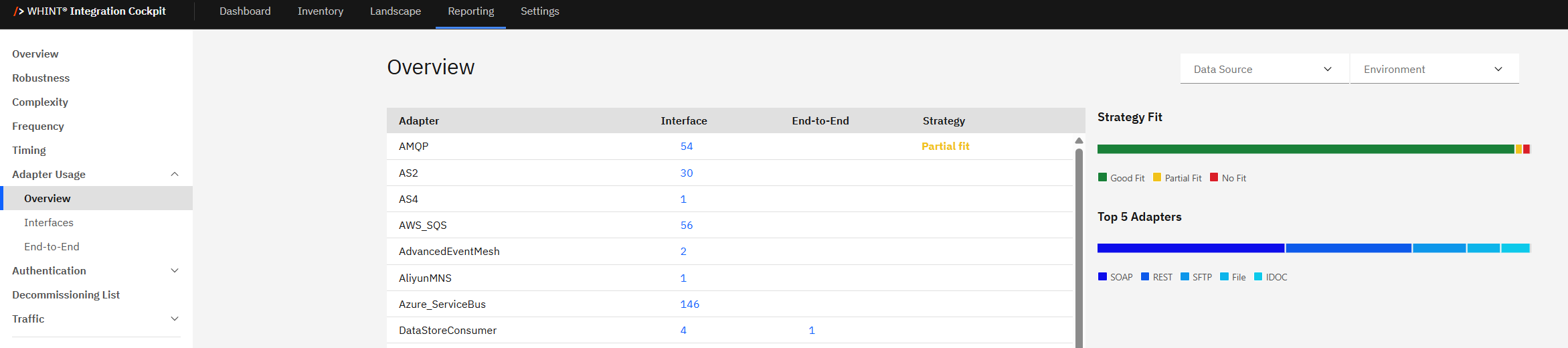
Adapter Usage displays the technology distribution across your integration landscape, highlighting which adapters are used most frequently and how well they align with your integration strategy.
What you see:
-
Adapter distribution table with adapter types, clickable blue interface counts, and strategy fit indicators
-
Strategy Fit legend showing Good Fit (green), Partial Fit (yellow), and No Fit (red) classifications
-
Top 5 Adapters bar chart displaying the most frequently used adapter technologies
-
Data Source filter to analyze specific integration platforms
-
Environment filter to switch between Production, Test, Development views
Using Adapter Counts
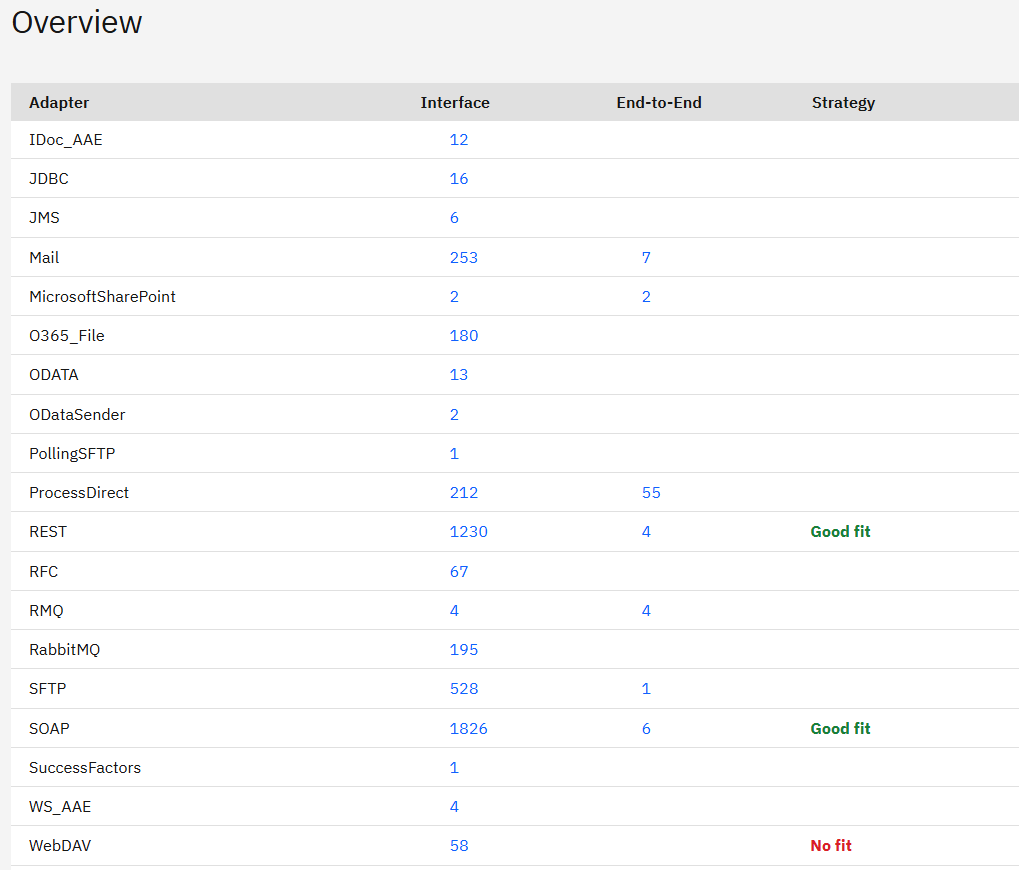
Adapter table shows detailed information for each adapter technology:
|
Column |
Description |
|---|---|
|
Adapter |
Technology name (e.g. SOAP, REST, SFTP, Mail) |
|
Interface |
Clickable blue count of interfaces using this adapter |
|
End-to-End |
Number of end-to-end processes using this adapter |
|
Strategy |
Strategic classification if configured |
|
Strategy Fit |
Color-coded indicator (Good fit/Partial fit/No fit) |
How to use the interface counts:
Click blue interface count numbers to filter and view specific interfaces:
-
Click "1826" (SOAP) → Shows all interfaces using SOAP adapter
-
Click "1230" (REST) → Displays REST-based interfaces
-
Click "253" (Mail) → Lists email-based interfaces
-
Click "180" (O365_File) → Shows Office 365 file-based interfaces
-
Click any adapter count to see detailed interface breakdown
Strategy Fit
Strategy Fit shows how well your adapters align with your integration strategy through color-coded classifications:

Strategy Fit legend:
-
Good Fit (Green) → Adapters aligned with your integration strategy (e.g. REST, SOAP)
-
Partial Fit (Yellow) → Acceptable but not ideal adapters
-
No Fit (Red) → Deprecated or blacklisted adapters (e.g. WebDAV)
How to use Strategy Fit:
-
Good Fit adapters → Continue using and promote for new interfaces
-
Partial Fit adapters → Monitor usage, consider alternatives when possible
-
No Fit adapters → Plan migration or replacement strategies
Strategy indicators help:
-
Identify migration priorities → High usage + No Fit = urgent action needed
-
Support standardization → Promote Good Fit adapters across teams
-
Guide technology decisions → Avoid No Fit adapters for new implementations
Top 5 Adapters
Top 5 Adapters displays the most frequently used adapter technologies across your integration landscape:

Current top adapters:
-
SOAP - Dominant protocol, traditional web services
-
REST - Modern API standard
-
SFTP - Secure file transfer protocol
-
File - Basic file handling operations
-
IDOC - SAP-specific integration protocol
Use Top 5 Adapters to:
-
Identify technology concentration and potential dependencies
-
Support modernization planning by understanding current technology mix
-
Guide standardization efforts based on actual usage patterns
-
Assess portfolio balance between legacy and modern adapters
Adapter Usage Insights
Technology distribution patterns:
-
High SOAP usage may indicate legacy landscape requiring modernization
-
Strong REST presence suggests API-first architecture adoption
-
Diverse adapter portfolio may indicate fragmented technology standards
Recommended actions:
-
High usage + No Fit → Priority migration candidates (e.g., high FTP usage)
-
Low usage + No Fit → Easy wins for cleanup (e.g., deprecated protocols)
-
High usage + Good Fit → Success patterns to promote (e.g., REST APIs)
-
Fragmented usage → Opportunities for standardization
Strategic planning:
-
Use adapter data to support technology roadmap decisions
-
Identify opportunities for adapter consolidation and standardization
-
Plan migration strategies for No Fit adapters with high usage
-
Promote Good Fit adapters for new interface development
Related Documentation
For comprehensive adapter strategy and configuration:
-
Dashboard Overview - Adapter Usage (Top 5) - Top 5 adapters methodology
-
Dashboard Overview - Adapter Usage (Strategy Fit) - Strategy fit assessment details
-
Onboarding Guide - 2.3.1 Adapter - Adapter strategy configuration
Last Updated: August 25, 2025