

The SAP BTP Cloud Integration Landscape Check section provides comprehensive version comparison and artifact lifecycle management across multiple integration environments.
This reporting helps organizations maintain consistency between Development, Quality, and Production tenants, track artifact deployment status and ensure proper version control throughout the integration development lifecycle.
Navigate to Reporting → Data Sources → SAP → BTP → Cloud Integration → Landscape Check to access these environment comparison views.
Version Comparison
The Version Comparison view displays artifact status and version alignment across multiple Cloud Integration tenants and environments. This view helps you identify version mismatches, track deployment progress, and maintain artifact consistency across your integration landscape development lifecycle.
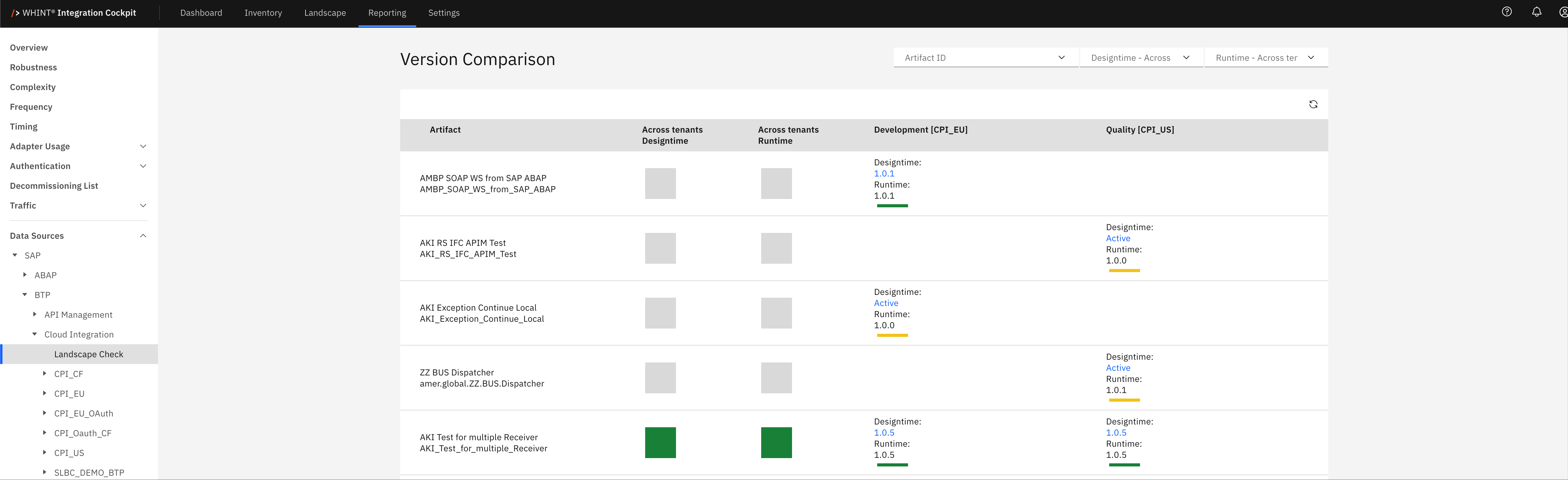
What you see:
-
Artifact: Integration flow or artifact name deployed across environments (clickable)
-
Across tenants Development/Baseline: Version status in baseline development environment
-
Across tenants Development: Version status in active development environment
-
Development [CPI_EU]: Development quality indicator and version status
-
Quality [CPI_US]: Quality environment version status and validation results
The interface displays version alignment using visual indicators:
-
Green checkmarks: Artifacts synchronized across environments
-
Gray squares: Artifacts not present or inactive in specific environments
-
Status labels: Active, Archive, Baseline, indicating artifact lifecycle stage
Integration Artifact Detail View
Clicking an artifact name opens a detailed view showing:
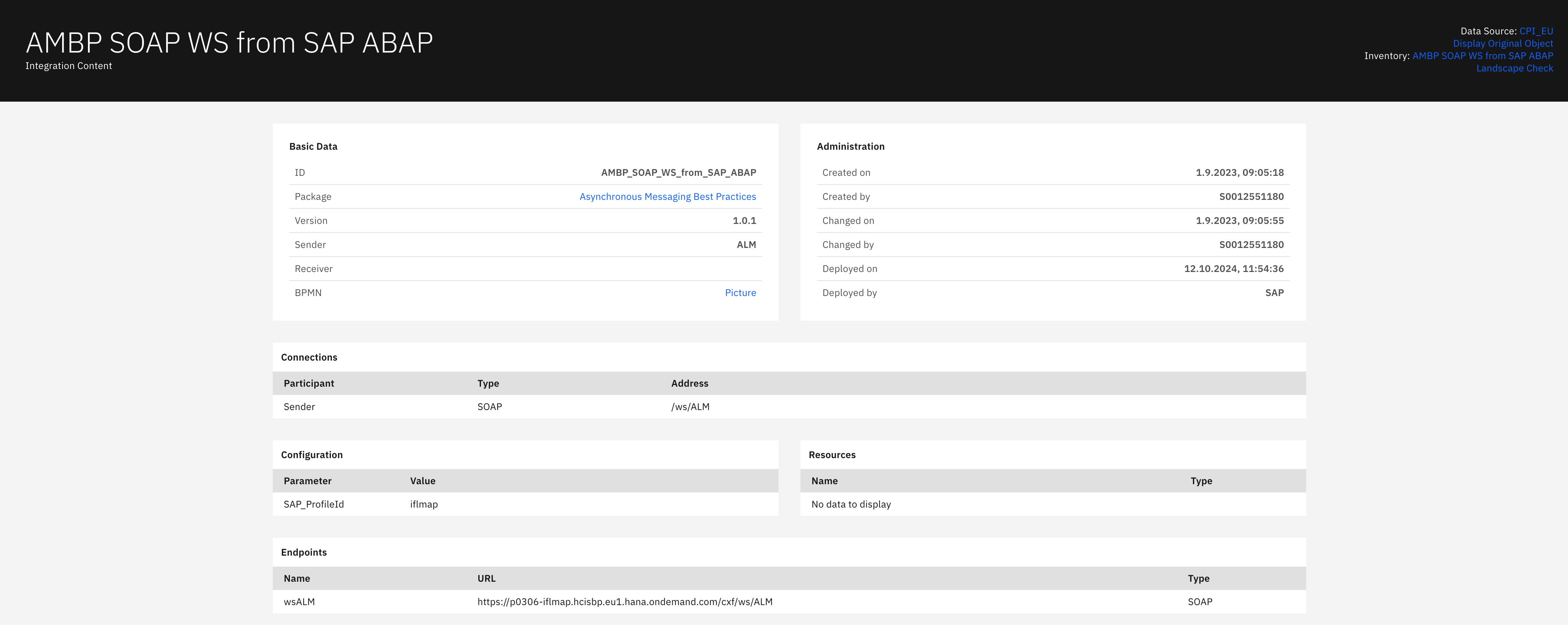
Basic Data section displays:
-
ID: Unique integration artifact identifier
-
Package: Integration package containing the artifact (clickable)
-
Version: Current artifact version number
-
Sender: Source system identifier (ALM)
-
Receiver: Target system or endpoint
-
BPMN: Business Process Model visualization link
Administration section displays:
-
Created on: Artifact creation timestamp
-
Created by: User identifier who created the artifact
-
Changed on: Last modification timestamp
-
Changed by: User identifier who last modified the artifact
-
Deployed on: Deployment timestamp to runtime environment
-
Deployed by: Deployment user identifier (SAP)
Connections section displays:
-
Participant: Connection participant identifier (Sender)
-
Type: Communication protocol (SOAP/HTTP/REST)
-
Address: Service endpoint or address configuration
Configuration section displays:
-
Parameter: Configuration parameter name (SAP_ProfileId)
-
Value: Parameter configuration value (ifImap)
Resources section displays:
-
Name: Resource file or script identifier
-
Type: Resource type classification Note: Shows "No data to display" when no resources are configured
Endpoints section displays:
-
Name: Service endpoint identifier (wsALM)
-
URL: Complete endpoint URL for service access
-
Type: Endpoint protocol type (SOAP/REST)
Navigation
Landscape comparison views include:
-
Artifact ID and Environment filters for focused environment analysis
-
Development lifecycle status indicators (Active, Archive, Baseline)
-
Version synchronization indicators showing alignment across tenants
-
Drill-down navigation through artifact names for detailed configuration review
-
Quality gate status showing validation results across environments
Last Updated: September 10, 2025