

The Traffic Data Monitor shows how much traffic data is stored per data source and which period the stored data covers.
Purpose: Check whether traffic collection is working and how far back the stored traffic data reaches.
Navigate to Settings → Operations → Traffic Data Monitor.
Traffic Data Monitor Overview
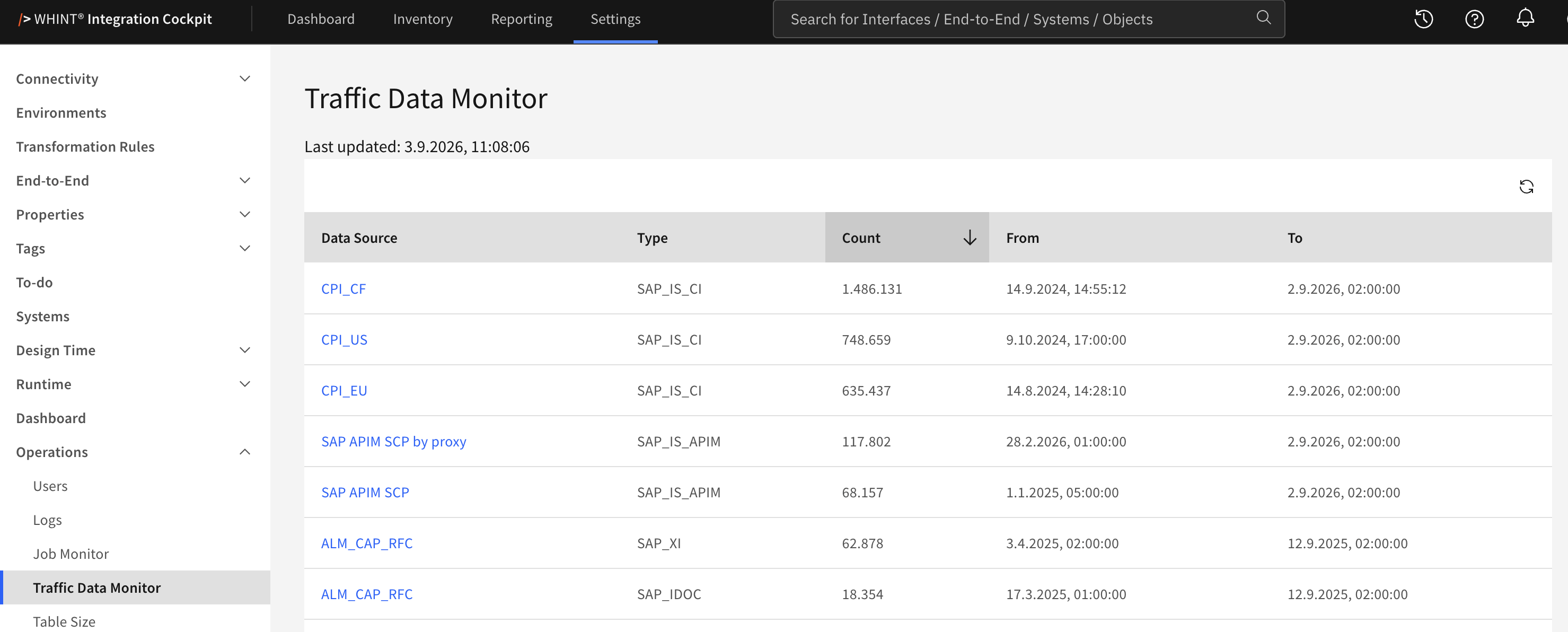
What you see:
-
Last updated – when the statistics were last recalculated
-
Reload – recalculates the statistics
-
One row per Data Source and (traffic) Type, sorted by Count in descending order
A data source that provides more than one traffic type appears once per type.
For example, an ABAP system with IDoc and XI traffic has two rows.
Columns
|
Column |
Content |
|---|---|
|
Data Source |
The connection, linked to its configuration |
|
Type |
The traffic type: |
|
Count |
The number of messages or calls in the stored traffic data |
|
From |
The oldest stored record |
|
To |
The newest stored record |
All columns can be sorted by clicking the column header.
The table shows 20 rows per page and can be changed to 40, 60, 80 or 100 rows.
From and To describe the stored traffic data, not the collection schedule. To reflects the latest traffic collected by the most recent Runtime run. From moves forward as older traffic is aggregated or removed.
Refreshing the Statistics
The statistics are stored and are not recalculated every time the page is opened. They are refreshed:
-
by the Runtime task of the Housekeeping data source, together with the monthly traffic aggregation
-
immediately when you click Reload
The recalculation reads the traffic data of all data sources and may take some time on large landscapes. Last updated shows when the statistics were last recalculated.
Traffic is evaluated for SAP Cloud Integration, SAP API Management, ABAP IDoc, ABAP XI messages and SAP Process Orchestration.
Related Documentation
-
Job Monitor – Check whether the Runtime tasks are running
-
Table Size – See how much space the stored data occupies
-
Housekeeping – The data source that aggregates traffic and refreshes these statistics
Last Updated: September 2, 2026