

The MuleSoft Anypoint section displays enterprise integration platform components from your MuleSoft Anypoint Platform organized into Assets catalogs.
This inventory helps organizations manage API-led connectivity initiatives, track reusable integration assets and maintain visibility into enterprise API ecosystems for accelerated development through asset reuse and standardization.
Navigate to Inventory → Data Sources → MuleSoft → Anypoint → <Data Source Name> → Assets to access these integration asset catalogs.
Assets
The Assets catalog displays reusable integration components from your Anypoint Exchange including APIs, applications, connectors, templates, and other enterprise integration artifacts. This view helps you understand your organization's API portfolio, track asset versions and deployment status, and promote reuse across development teams to accelerate project delivery and ensure consistency.
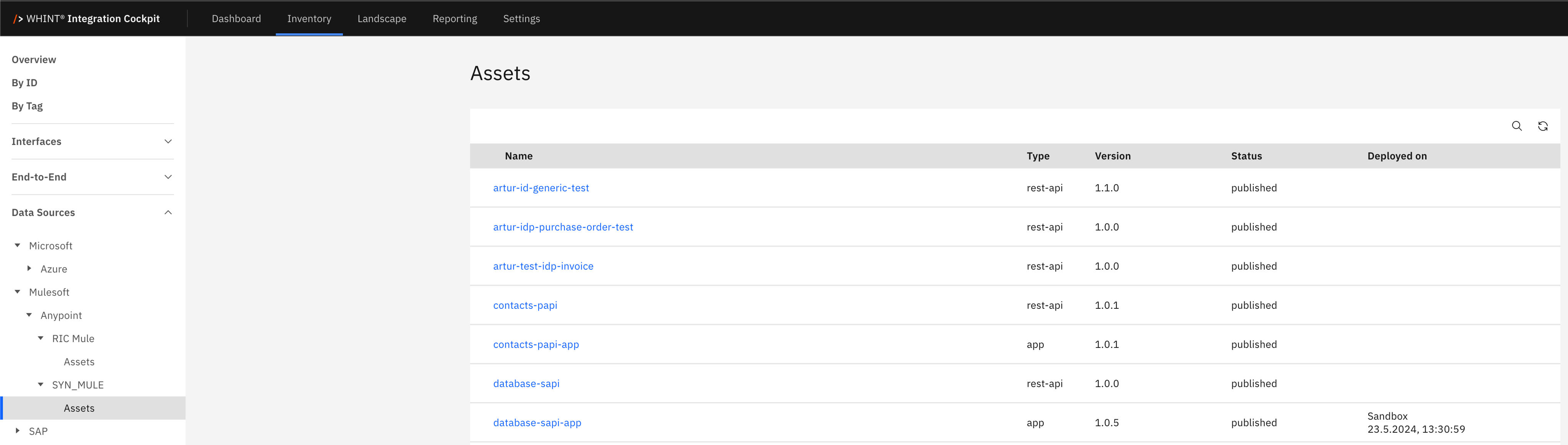
What you see:
-
Name: Asset identifier for APIs, applications, or other integration components (clickable)
-
Type: Asset category (rest-api, app, connector, template, etc.)
-
Version: Current asset version number (e.g. 1.0.0, 1.1.0)
-
Status: Asset publication status (published, draft, deprecated)
-
Deployed on: Environment and deployment timestamp information
Asset Detail View
Clicking an asset name opens a detailed view showing:

Basic Data section displays:
-
Type: Asset category identifier (app, rest-api, connector, etc.)
-
Version: Current version number for asset tracking
-
Status: Publication state (published, draft, deprecated)
Administration section displays:
-
Created on: Asset creation timestamp
-
Created by: Asset author/creator identifier
-
Changed on: Last modification timestamp
This view provides complete asset lifecycle information including versioning, authorship, and deployment tracking for enterprise asset governance and collaboration.
Asset Types and Business Value
REST API Assets represent API specifications published to Exchange for discovery and reuse across development teams. These assets enable API-led connectivity by providing standardized interfaces for system integration.
Application Assets contain deployable Mule applications including integration flows, transformations, and business logic. These assets promote reuse of proven integration patterns and accelerate project delivery.
Connector Assets provide pre-built connectivity to enterprise systems, SaaS platforms, databases, and protocols. These assets reduce custom development effort and ensure reliable system connections.
Template Assets offer reusable integration patterns and project scaffolding to jumpstart development with proven architectural approaches and best practices.
Asset versioning enables controlled evolution of integration components while maintaining backward compatibility. Status tracking (published, draft, deprecated) supports asset lifecycle management and governance policies across enterprise development teams.
Navigation
All catalog views include:
-
Search icon (magnifying glass) in the top right toolbar
-
Refresh icon next to the search
-
Pagination controls showing item counts and page navigation
-
Blue-highlighted names that open detailed views with additional asset information
Last Updated: September 09, 2025