

The Data Sources UI provides a central overview of all configured integration platforms, including their systems, environments, and authentication methods. It also allows you to manage these connections across your integration landscape.
For guidance on creating and configuring each Data Source, see Step 1: Create Data Sources & Schedule Tasks in the Onboarding Guide.
Navigate to Settings → Connectivity → Data Sources to view and manage your integration platform connections.
Data Sources Overview
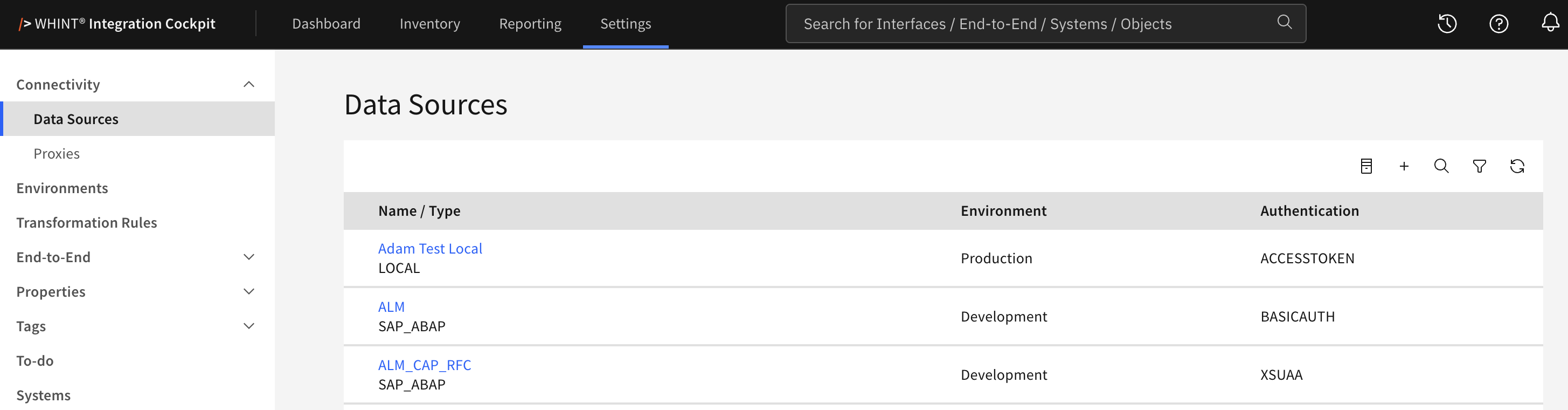
What you see:
-
Name/Type column showing the name you assigned to the data source and its
platform type (e.g. ALM / SAP_ABAP, CPI_EU / SAP_BTP) -
Environment classification (your configured environments e.g. Development,
Test, Production, Quality) -
Authentication method (BASICAUTH, OAUTH2, ACCESSTOKEN, APIKEY, XSUAA)
-
Management controls for adding, searching, filtering and reloading data
sources, and for viewing deleted data sources
Data Source Management
Adding New Data Sources
-
Click "+" Add button to create new data source connections
-
Enter a Name and select the Type and Environment
-
Configure platform-specific connection details and authentication
-
Schedule data collection tasks for inventory population
-
Alternatively, use Copy on an existing data source to reuse its configuration
Managing Existing Connections
-
Filter data sources by environment or platform type
-
Search for specific data source names
-
Reload the list to refresh it with the latest data
-
Update configuration settings as needed
-
Delete a data source you no longer need. Deleted data sources stay
available under View deleted datasources, where they can be removed
permanently
Data Source Information
The data sources table provides essential connection information:
|
Column |
Description |
Purpose |
|---|---|---|
|
Name / Type |
Data source identifier and platform type |
Identify specific systems and their integration platform |
|
Environment |
Environment classification |
Organize connections by landscape tier |
|
Authentication |
Authentication method used |
Verify security configuration |
XSUAA is used for CAP RFC connections to SAP ABAP systems.
Environment Classifications:
-
Production → Live business systems
-
Test → Testing environments
-
Development → Development systems
-
Quality → Quality assurance environments
Data Source Setup and Configuration
For detailed setup instructions for each platform type, see the comprehensive Onboarding Guide - Step 1: Create Data Sources & Schedule Tasks.
The guide includes platform-specific instructions for:
Integration Layer
-
SAP Integration Suite / SAP BTP (SAP_BTP) - configured per product:
API Management, Cloud Integration, Event Mesh, Integration Assessment,
Cloud Connector, Destination, Edge Integration Cell -
SAP PI/PO (SAP_PO) - Process Orchestration systems
-
Microsoft Azure (MICROSOFT_AZURE) - Azure integration services
-
MuleSoft Anypoint Platform (MULESOFT_ANYPOINT) - MuleSoft integration platform
-
Solace (SOLACE) - Solace event broker and Event Mesh
-
Confluent Kafka (CONFLUENT_KAFKA) - Confluent Cloud and Kafka clusters
-
ASAPIO (ASAPIO) - ASAPIO configuration linked to a SAP ABAP system
Backend Systems
-
SAP ABAP Systems (SAP_ABAP) - Backend SAP systems, connected via HTTP,
via SAP CPI, or via CAP RFC -
SAP ABAP Environment on SAP BTP (SAP_ABAP_BTP) - reads Communication
Arrangements and Communication Systems
Collaboration & Documentation
-
Jira (JIRA) and Confluence (CONFLUENCE) - Project management and
documentation platforms -
API token setup and integration configuration
Enterprise Architecture Tools
-
LeanIX (LEANIX) - Business capability context integration
-
Bee360 (BEE360), LUY (LUY), HOPEX (HOPEX) - Architecture
repository connections
DevOps
-
Microsoft Azure DevOps (MICROSOFT_AZURE_DEVOPS) - Azure DevOps
organizations and projects
System Maintenance / Housekeeping
-
Housekeeping (LOGS) - Log reorganization and performance optimization tasks
Cockpit Internal
-
API (API) - Access to the Integration Cockpit's own API endpoint; the URL
is fixed and no external connection details are required -
LOCAL (LOCAL) - Local data source without connection details
Note: SAP Event Mesh is not a separate data source type. It is configured as a Product within a SAP_BTP data source. Solace-based event meshes use the SOLACE type.
Deleted Data Sources
Deleting a data source is a two-step process. The data source is first removed
from the active list and kept in a separate view, from where it can be deleted
permanently.
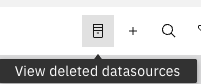
Click the View deleted datasources icon in the toolbar to open the
Data Sources (Deleted) view.
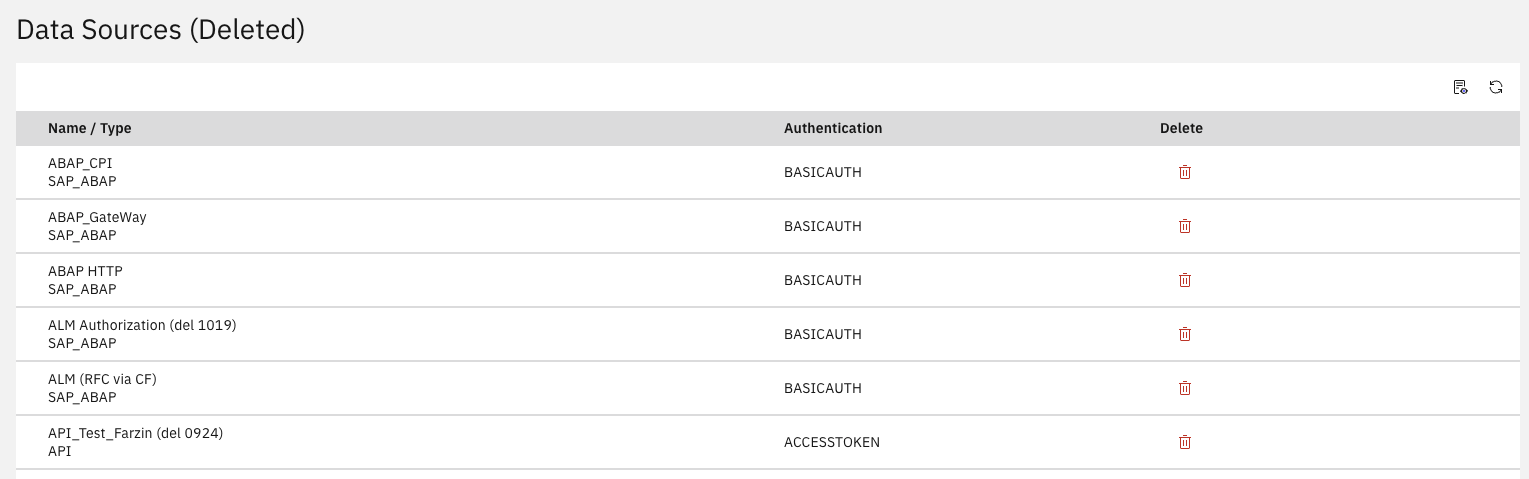
What you see:
-
Name / Type column showing the data source name and its platform type
-
Authentication method that was configured
-
Delete action to remove the entry permanently
Available actions:
-
Delete (trash icon) - permanently removes the data source. You are asked
to confirm; this action cannot be undone -
View all datasources - returns to the active data sources list
-
Reload - refreshes the view
Related Documentation
For comprehensive data source setup and configuration:
-
Onboarding Guide - Step 1: Create Data Sources & Schedule Tasks - Complete platform-specific setup instructions
Last Updated: August 28, 2026