

The SAP BTP Event Mesh section displays components from your SAP Business Technology Platform Event Mesh services organized into Queues, Topics and WebHooks. This inventory helps organizations manage event-driven architectures, implement asynchronous messaging patterns and enable real-time business event distribution across hybrid cloud and on-premise landscapes for greater application decoupling and scalability.
Navigate to Inventory → Data Sources → SAP → BTP → Event Mesh → <Data Source Name> to access these component catalogs.
Queues
The Queues catalog displays message queues that buffer and store events until they are processed by consumers. This view helps you manage message persistence, track queue capacity and usage, configure access patterns (exclusive vs. non-exclusive) and monitor dead letter queue handling for failed message processing scenarios.
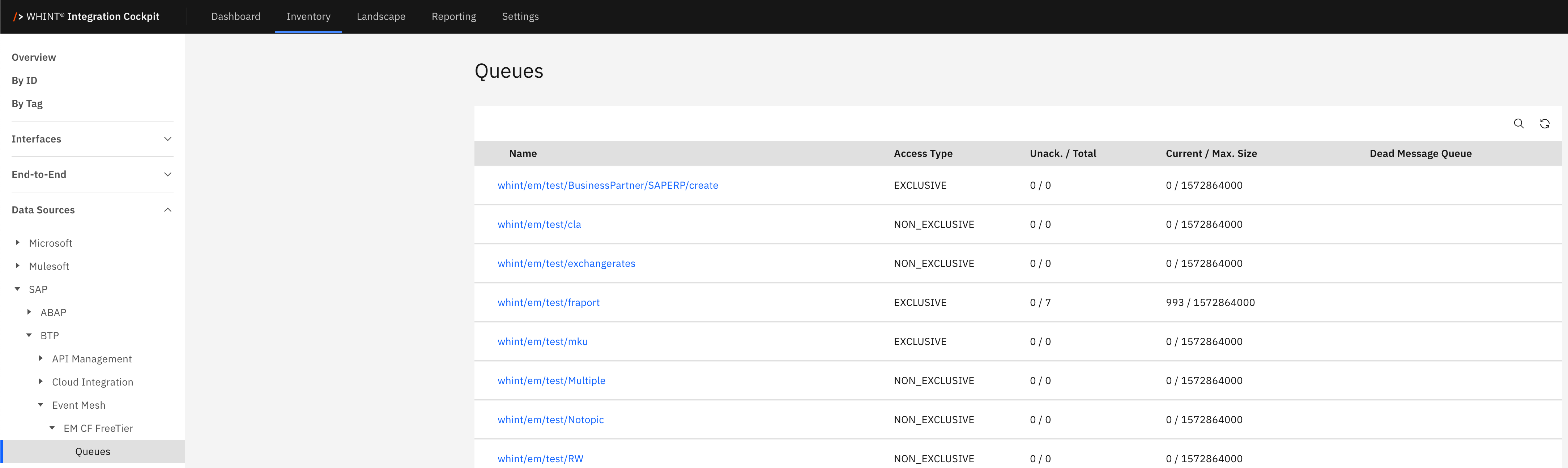
What you see:
-
Name: Queue identifier and namespace path (clickable)
-
Access Type: Queue consumption model (EXCLUSIVE, NON_EXCLUSIVE)
-
Unack. / Total: Unacknowledged messages count and total message count
-
Current / Max. Size: Current queue size and maximum capacity in bytes
-
Dead Message Queue: Associated dead letter queue for failed messages
Queue Detail View
Clicking a queue name opens a detailed view showing:
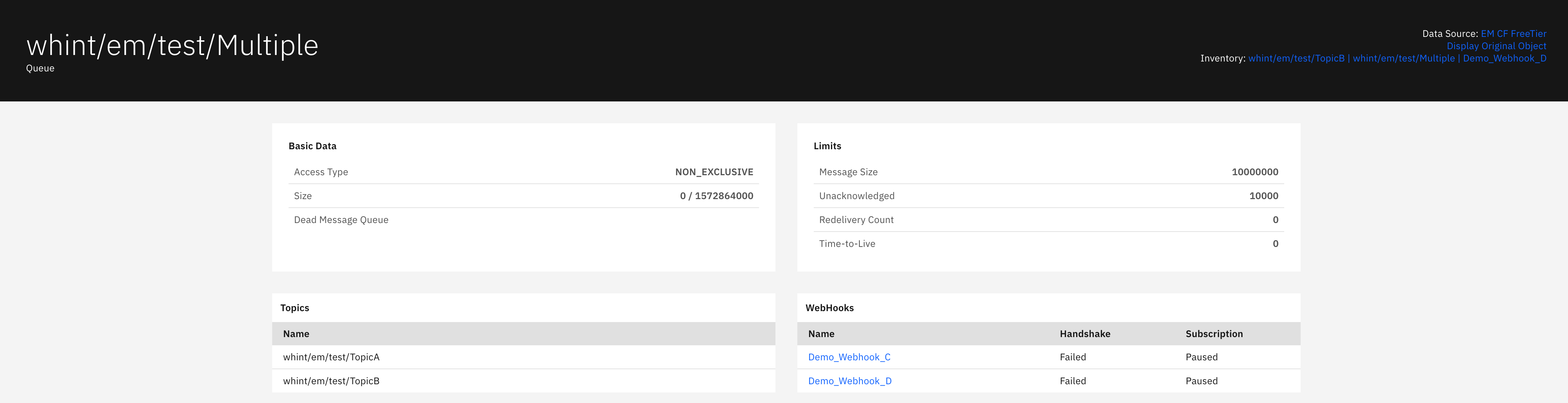
Basic Data section displays:
-
Access Type: Queue consumption model (NON_EXCLUSIVE)
-
Size: Current queue size and maximum capacity
-
Dead Message Queue: Dead letter queue reference for failed messages
Limits section displays:
-
Message Size: Maximum message size limit in bytes
-
Unacknowledged: Maximum unacknowledged messages count
-
Redelivery Count: Maximum message redelivery attempts
-
Time-to-Live: Message expiration time in seconds
Topics section displays:
-
Name: Topic identifiers that this queue subscribes to
Webhooks section displays:
-
Name: Webhook identifier (clickable)
-
Handshake: Webhook authentication status (Failed/Exempted)
-
Subscription: Webhook subscription status (Paused/Active)
Topics
The Topics catalog displays event topics that enable publish-subscribe messaging patterns for one-to-many event distribution. This view helps you understand topic-to-queue relationships, manage event routing patterns and track which queues subscribe to specific business event topics for decoupled application communication.
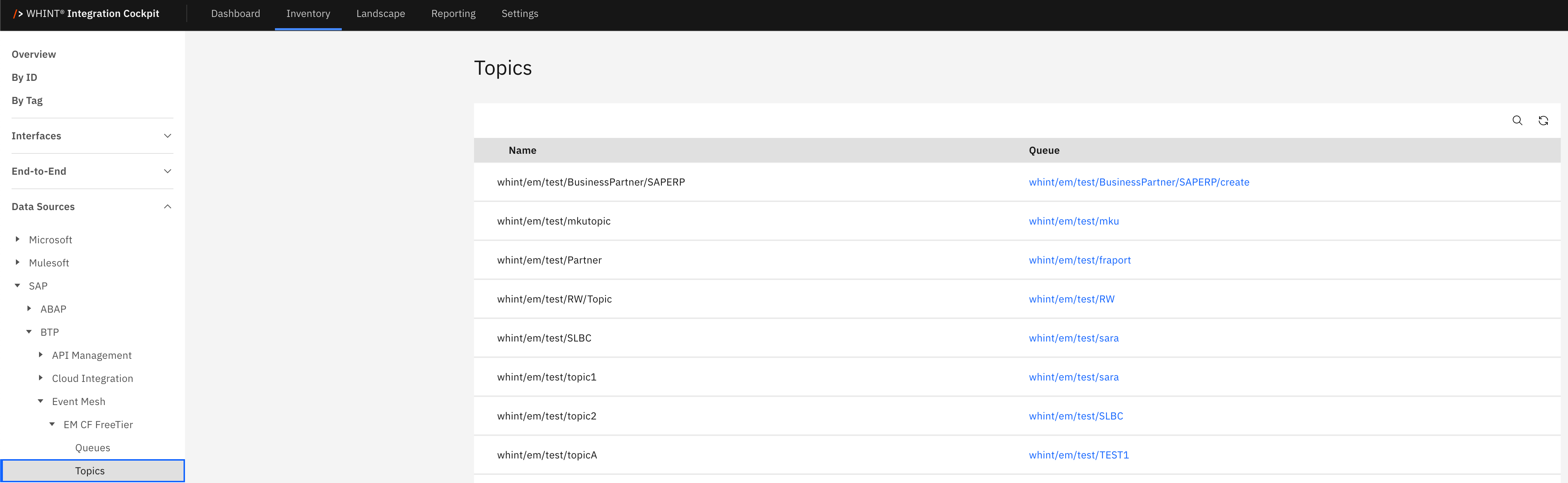
What you see:
-
Name: Topic identifier and namespace path
-
Queue: Associated queue identifier that subscribes to this topic (clickable)
Topic Detail View (via Queue)
Clicking a queue name opens a detailed view showing the queue that subscribes to the topic:
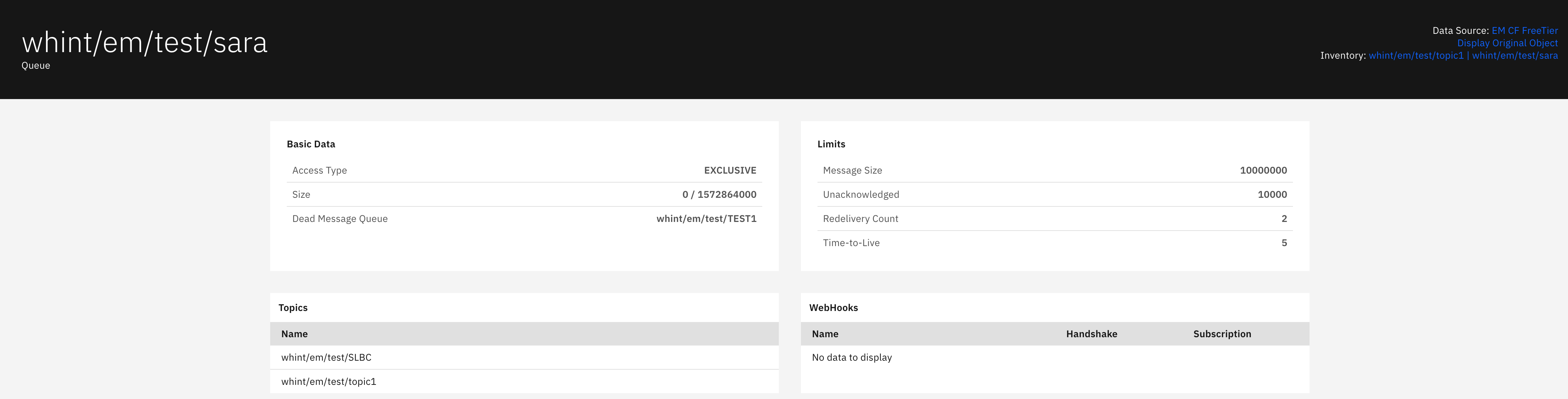
Basic Data section displays:
-
Access Type: Queue consumption model (EXCLUSIVE)
-
Size: Current queue size and maximum capacity
-
Dead Message Queue: Dead letter queue reference
Limits section displays:
-
Message Size: Maximum message size limit in bytes
-
Unacknowledged: Maximum unacknowledged messages count
-
Redelivery Count: Maximum message redelivery attempts
-
Time-to-Live: Message expiration time in seconds
Topics section displays:
-
Name: Topic identifiers that this queue subscribes to
Webhooks section displays:
-
Shows "No data to display" when no webhooks are configured for this queue
WebHooks
The WebHooks catalog displays HTTP-based event notification endpoints that enable server-to-server communication via POST/PUSH mechanisms. This view helps you manage webhook subscriptions, track delivery status and handshake authentication, configure Quality of Service settings and monitor webhook reliability for real-time event propagation to external systems.
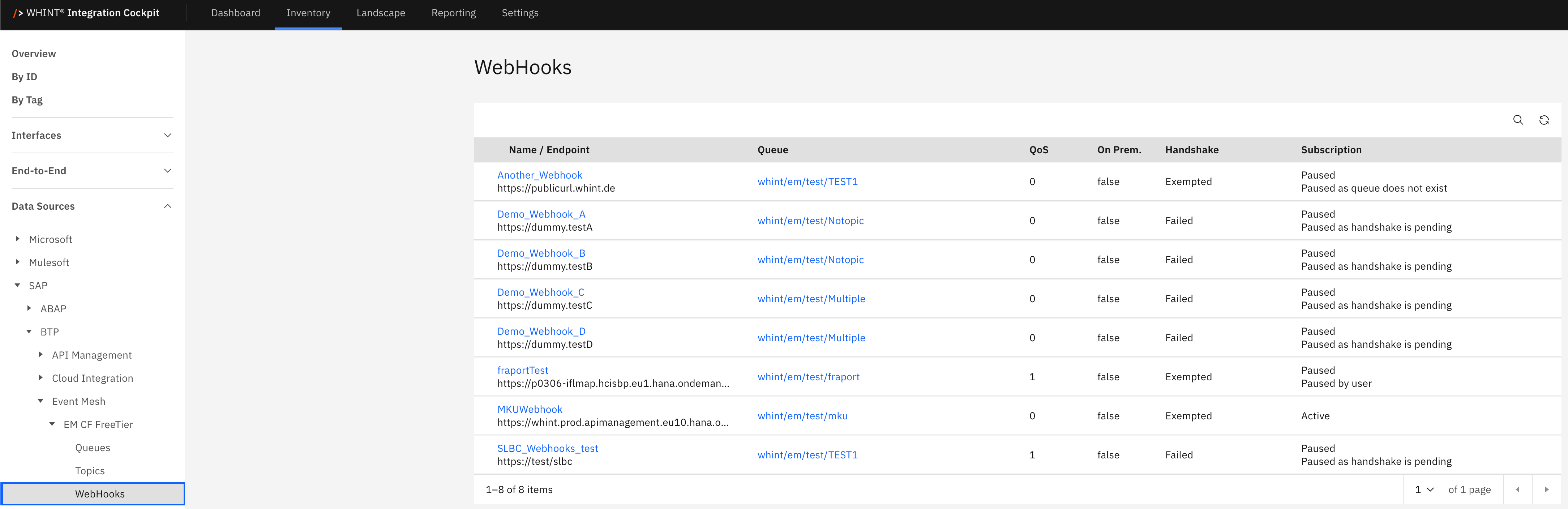
What you see:
-
Name / Endpoint: Webhook identifier with HTTP endpoint URL below (clickable)
-
Queue: Associated queue that triggers webhook notifications (clickable)
-
QoS: Quality of Service level (0, 1, 2)
-
On Prem.: On-premise deployment flag (true/false)
-
Handshake: Authentication handshake status (Failed/Exempted)
-
Subscription: Webhook subscription status (Paused/Active)
WebHook Detail View
Clicking a webhook name opens a detailed view showing:
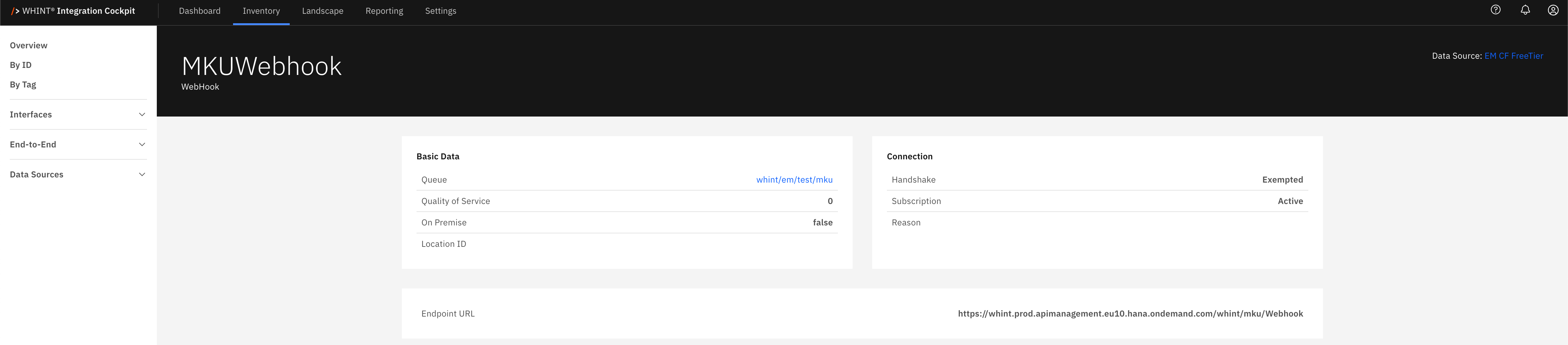
Basic Data section displays:
-
Queue: Associated queue identifier (clickable)
-
Quality of Service: QoS level for message delivery guarantees
-
On Premise: On-premise deployment indicator
-
Location ID: Geographic or logical location identifier
Connection section displays:
-
Handshake: Authentication handshake status (Exempted/Failed)
-
Subscription: Webhook subscription status (Active/Paused)
-
Reason: Status reason or error information
Endpoint URL section displays:
-
Endpoint URL: Complete webhook endpoint URL for HTTP notifications
Business Value
Event-Driven Architecture Benefits:
-
Asynchronous Communication: Enables fire-and-forget messaging patterns for improved application performance and scalability
-
Loose Coupling: Decouples event producers from consumers, allowing independent development and deployment cycles
-
Real-Time Processing: Supports immediate event propagation for responsive business process automation
-
Microservices Integration: Facilitates communication between distributed services and applications
Message Patterns:
-
Queue-based: Point-to-point messaging with persistent storage and exactly-once delivery per consumer
-
Topic-based: Publish-subscribe patterns enabling one-to-many event distribution to multiple subscribers
-
Queue Subscriptions: Hybrid approach combining queue persistence with topic-based routing flexibility
-
WebHook Notifications: HTTP-based push notifications for external system integration
Reliability Features:
-
Dead Letter Queues: Automatic handling of failed message processing with configurable retry policies
-
Quality of Service: Configurable delivery guarantees from fire-and-forget (QoS 0) to exactly-once (QoS 2)
-
Message Persistence: Durable message storage ensuring no data loss during system outages
-
Access Control: Exclusive and non-exclusive queue access patterns for different consumption scenarios
Navigation
All catalog views include:
-
Search icon (magnifying glass) in the top right toolbar
-
Refresh icon next to the search
-
Pagination controls showing item counts (e.g. "1-8 of 8 items")
-
Blue-highlighted names that open detailed views with additional configuration information
-
Cross-references between queues, topics and webhooks
Last Updated: September 09, 2025