

The SAP BTP Cloud Integration section displays components from your SAP Business Technology Platform Cloud Integration services organized into Integration Content, Credentials, Connections, and Endpoints. This inventory helps organizations manage integration flows and packages, secure authentication materials, network connectivity configurations and service endpoints for reliable message processing across cloud and on-premise systems.
Navigate to Inventory → Data Sources → SAP → BTP → Cloud Integration → <Data Source Name> to access these component catalogs.
Integration Content
The Integration Content catalog displays integration flows and packages that define automated business processes and data transformations. This view helps you understand your integration portfolio, track deployment status and manage the artifacts that enable system-to-system communication and business process automation.
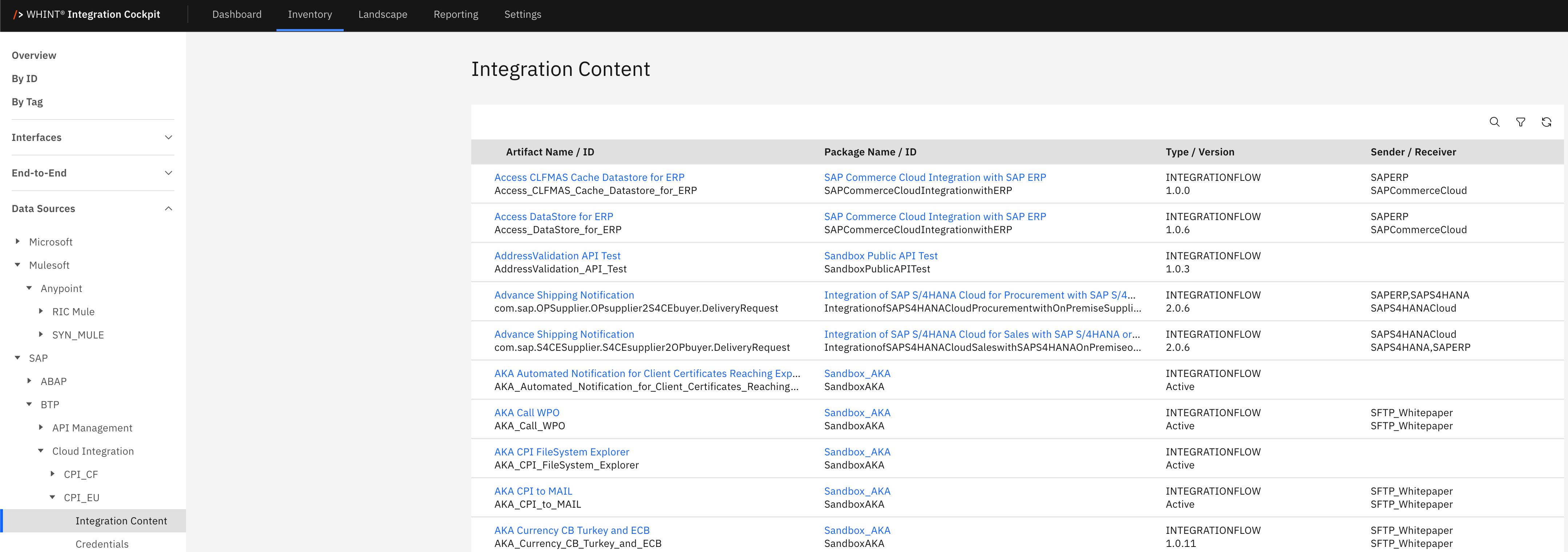
What you see:
-
Artifact Name / ID: Integration flow identifier with description text below (clickable)
-
Package Name / ID: Parent package containing the artifact (clickable)
-
Type / Version: Integration artifact type (INTEGRATIONFLOW) and version number
-
Sender / Receiver: Source and target systems for the integration flow
Integration Content Detail View
Clicking an artifact name opens a detailed view showing:
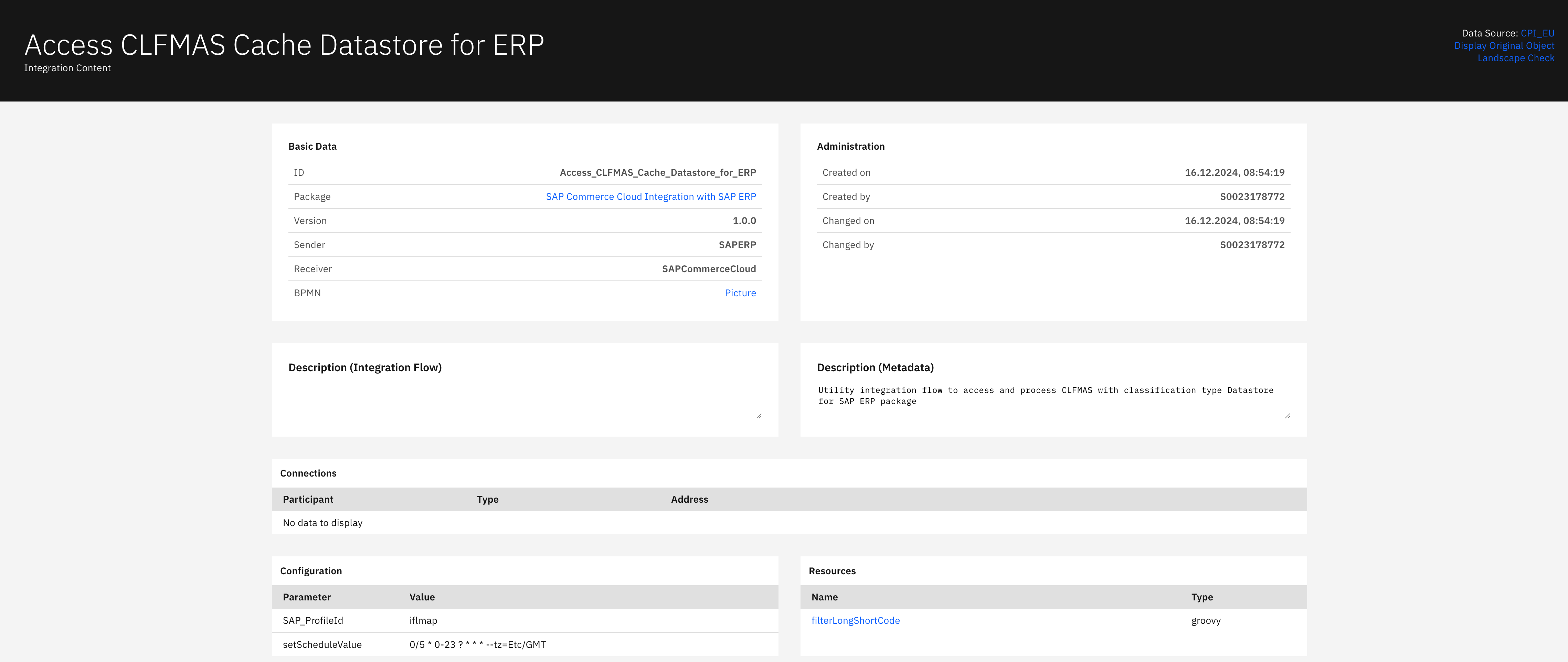
Basic Data section displays:
-
ID: Integration flow identifier
-
Package: Parent package name (clickable)
-
Version: Artifact version number
-
Sender: Source system identifier
-
Receiver: Target system identifier
-
BPMN: Process diagram reference (clickable)
Administration section displays:
-
Created on: Artifact creation timestamp
-
Created by: Creator's user ID
-
Changed on: Last modification timestamp
-
Changed by: Last modifier's user ID
Description (Integration Flow) section displays:
-
Integration flow description and technical documentation
Description (Metadata) section displays:
-
Detailed technical description and purpose documentation
Connections section displays:
-
Participant: Connection participant identifier
-
Type: Connection type (Mail, SOAP, HTTP, ProcessDirect)
-
Address: Connection endpoint or address
Configuration section displays:
-
Parameter: Configuration parameter name
-
Value: Parameter value setting
Resources section displays:
-
Name: Resource identifier (clickable)
-
Type: Resource type classification
Package Detail View
Clicking a package name opens a detailed view showing:
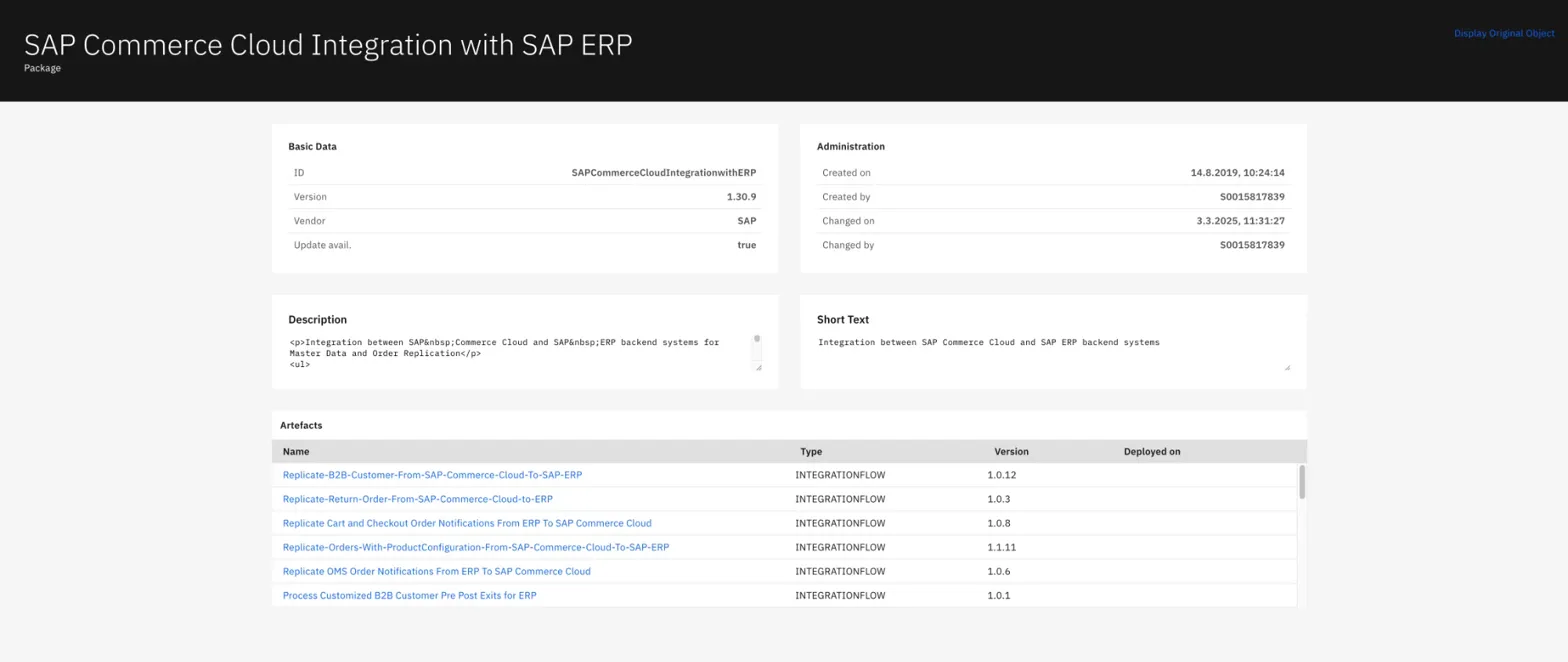
Basic Data section displays:
-
ID: Package identifier
-
Version: Package version number
-
Vendor: Package vendor (e.g. SAP)
-
Update avail.: Update availability status
Administration section displays:
-
Created on: Package creation timestamp
-
Created by: Creator's user ID
-
Changed on: Last modification timestamp
-
Changed by: Last modifier's user ID
Description section displays:
-
Package technical description and purpose
Short Text section displays:
-
Brief package summary and integration scope
Artifacts section displays:
-
Name: Integration artifact name (clickable)
-
Type: Artifact type (INTEGRATIONFLOW)
-
Version: Artifact version number
-
Deployed on: Deployment timestamp
Credentials
The Credentials catalog displays security materials used for authentication and secure communication with external systems. This view helps you manage authentication credentials, OAuth tokens, secure parameters and other security artifacts required for secure system-to-system integration flows.
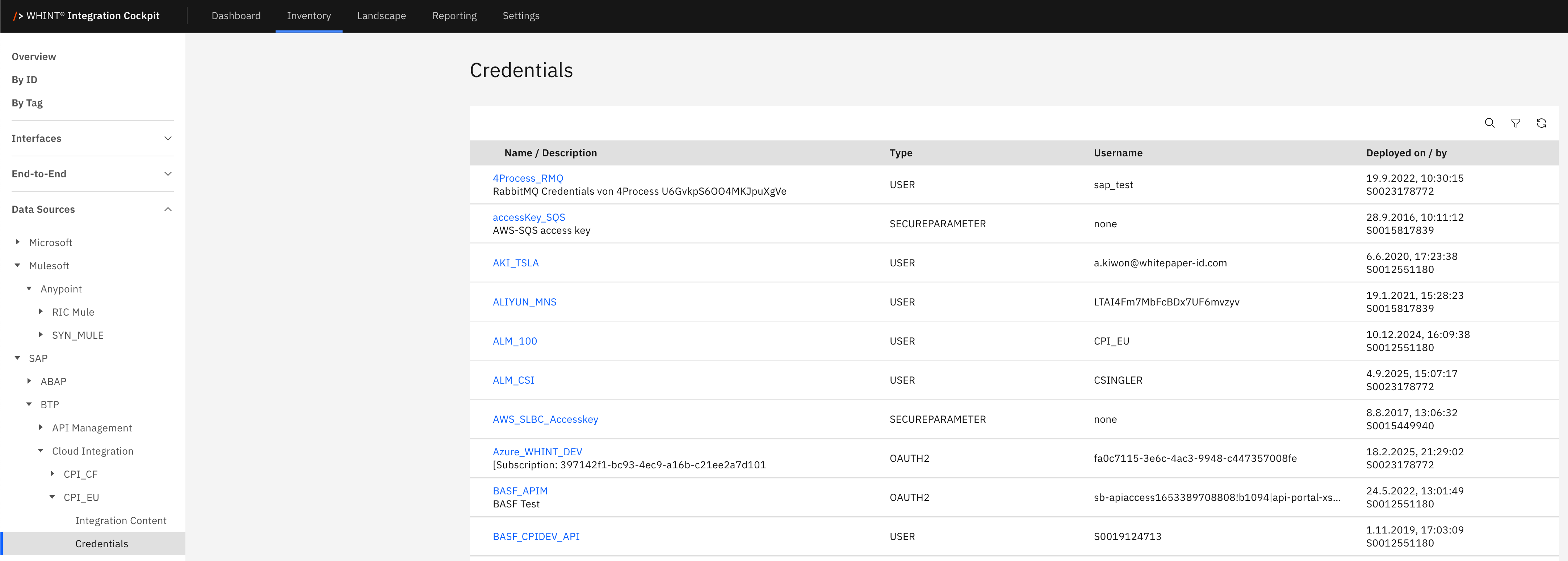
What you see:
-
Name / Description: Credential identifier with description text below (clickable)
-
Type: Authentication type (USER, SECUREPARAMETER, OAUTH2)
-
Username: Associated username or identifier
-
Deployed on / by: Deployment timestamp and deploying user ID
Credential Detail View
Clicking a credential name opens a detailed view showing:

Basic Data section displays:
-
Description: Credential description and usage details
-
Identification: Credential identifier or client ID
Administration section displays:
-
Created on: Credential creation timestamp
-
Created by: Creator identifier
Connections
The Connections catalog displays network connections and communication channels used by integration flows to connect with external systems. This view helps you understand system connectivity, protocol usage, and communication endpoints for troubleshooting and managing integration scenarios.
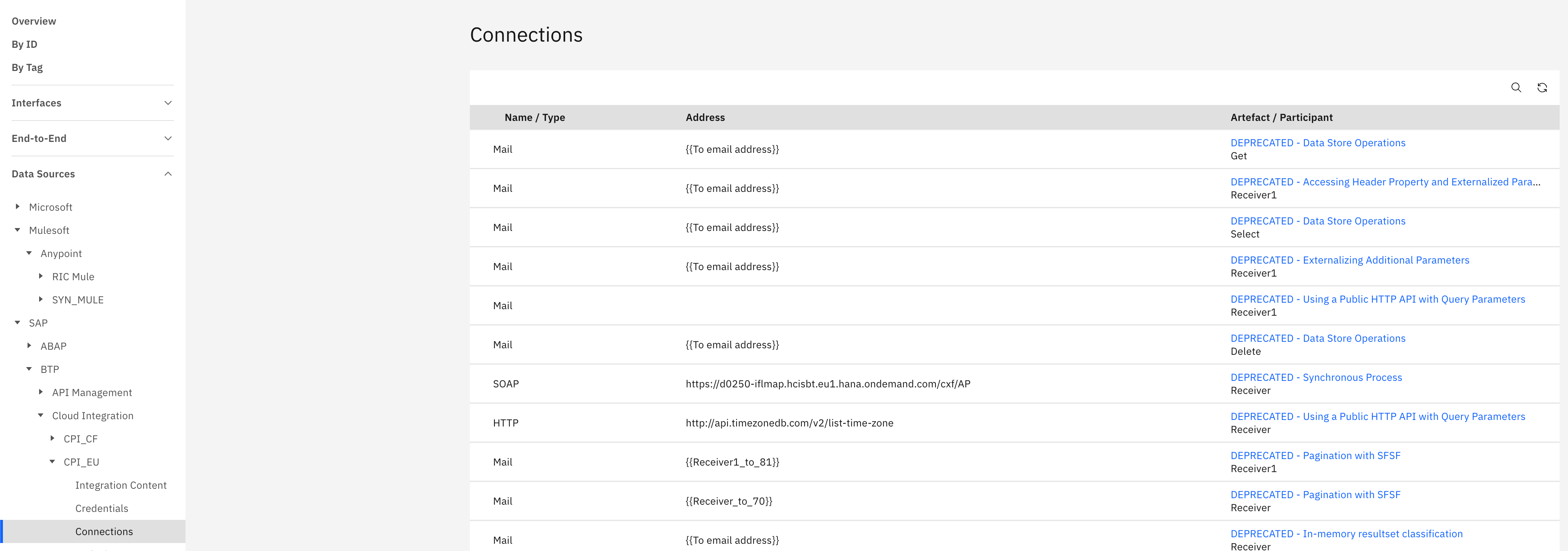
What you see:
-
Name / Type: Connection identifier and protocol type (Mail, SOAP, HTTP, ProcessDirect)
-
Address: Connection endpoint URL or address
-
Artifact / Participant: Associated integration artifact and participant role (clickable)
Connection Detail View
Clicking a connection artifact opens a detailed view showing:
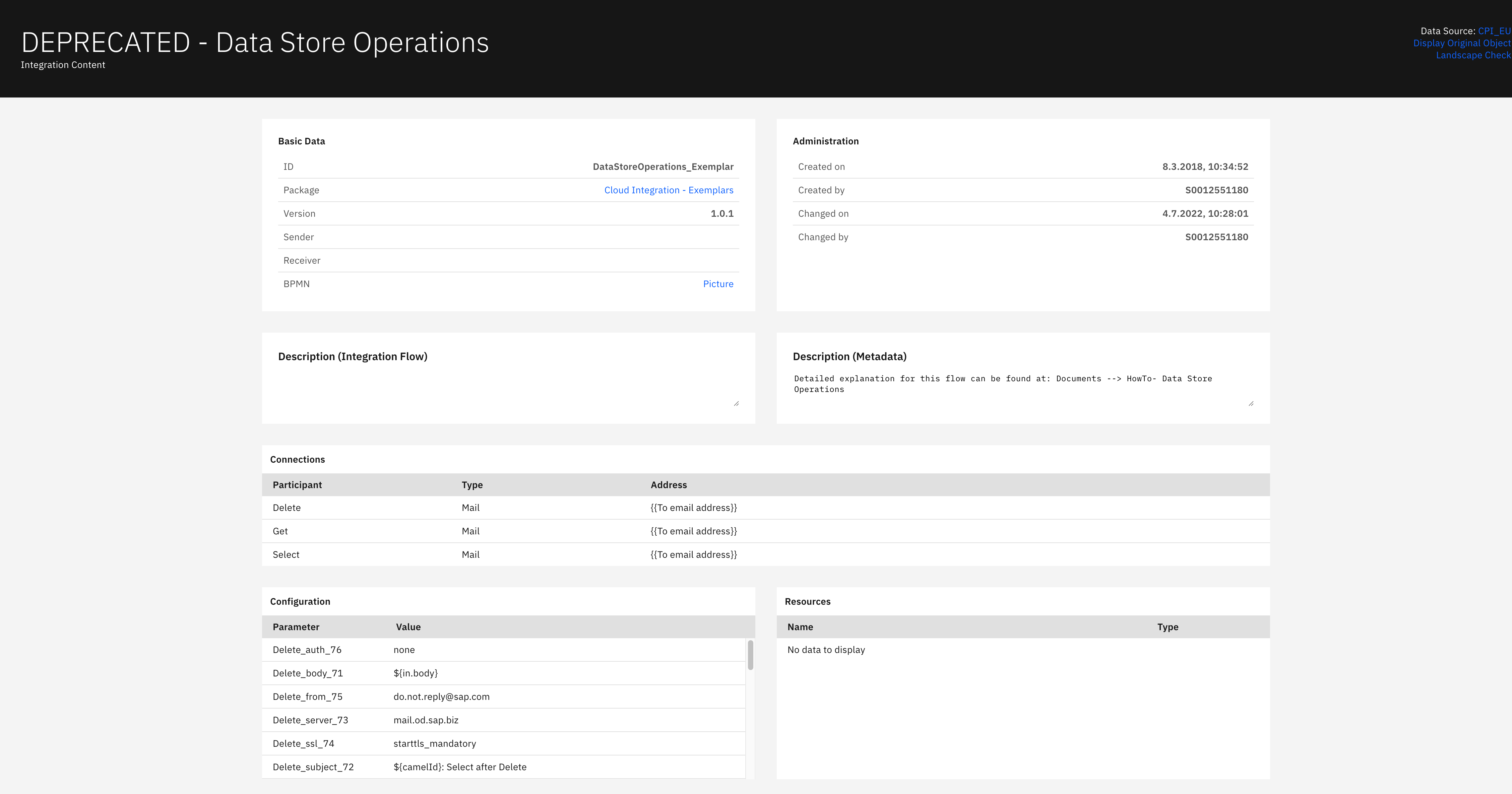
Basic Data section displays:
-
ID: Connection identifier
-
Package: Parent package reference (clickable)
-
Version: Connection version number
-
Sender: Source system identifier
-
Receiver: Target system identifier
-
BPMN: Process diagram reference (clickable)
Administration section displays:
-
Created on: Connection creation timestamp
-
Created by: Creator's user ID
-
Changed on: Last modification timestamp
-
Changed by: Last modifier's user ID
Description (Integration Flow) section displays:
-
Connection flow description and technical documentation
Description (Metadata) section displays:
-
Detailed technical metadata and connection purpose
Connections section displays:
-
Participant: Connection participant name
-
Type: Communication protocol (Mail, SOAP, HTTP)
-
Address: Connection endpoint address
Configuration section displays:
-
Parameter: Configuration parameter name
-
Value: Parameter value setting
Resources section displays:
-
Name: Resource identifier
-
Type: Resource type classification
-
Shows "No data to display" when no resources are configured
Endpoints
The Endpoints catalog displays service endpoints that expose integration flows to external systems for consumption. This view helps you manage API endpoints, track protocol usage and monitor endpoint versions for external system integration and testing scenarios.
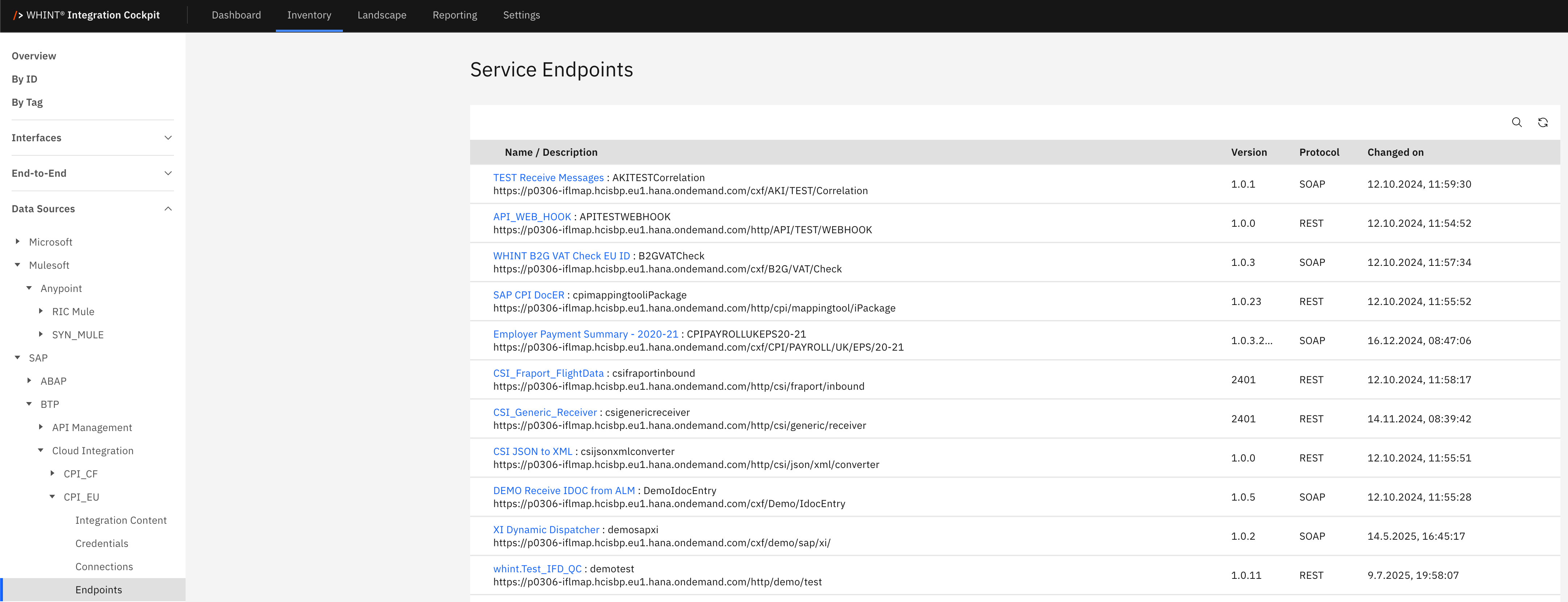
What you see:
-
Name / Description: Endpoint identifier with full URL below (clickable)
-
Version: Endpoint version number
-
Protocol: Communication protocol (SOAP, REST, ODATA)
-
Changed on: Last modification timestamp
Endpoint Detail View
Clicking an endpoint name opens a detailed view showing:
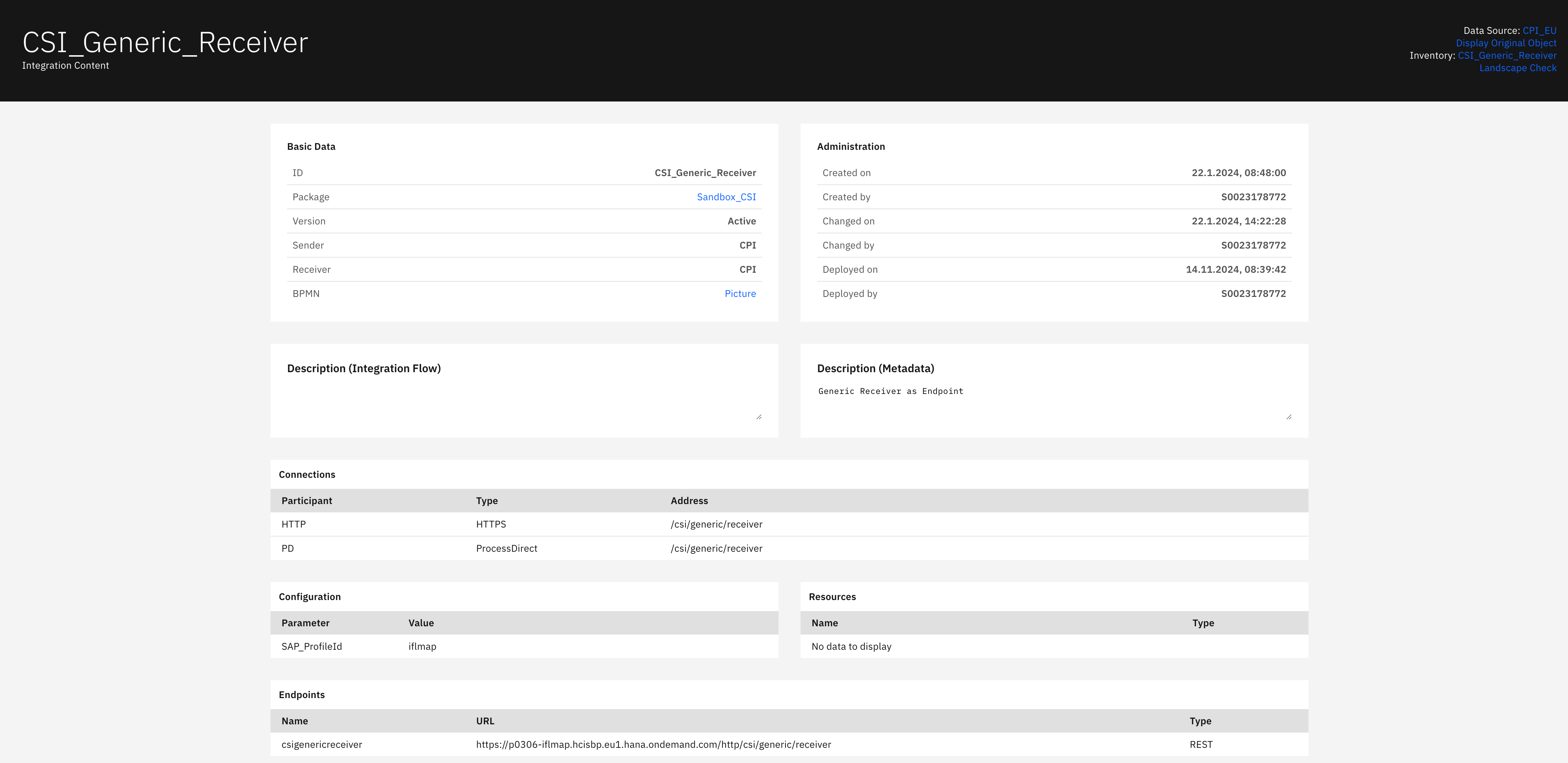
Basic Data section displays:
-
ID: Endpoint identifier
-
Package: Parent package reference (clickable)
-
Version: Endpoint version number
-
Sender: Source system identifier
-
Receiver: Target system identifier
-
BPMN: Process diagram reference (clickable)
Administration section displays:
-
Created on: Endpoint creation timestamp
-
Created by: Creator's user ID
-
Changed on: Last modification timestamp
-
Changed by: Last modifier's user ID
-
Deployed on: Deployment timestamp
-
Deployed by: Deploying user ID
Description (Integration Flow) section displays:
-
Endpoint flow description and technical documentation
Description (Metadata) section displays:
-
Detailed technical metadata and endpoint purpose
Connections section displays:
-
Participant: Connection participant name
-
Type: Communication protocol (HTTPS, ProcessDirect)
-
Address: Connection endpoint address
Configuration section displays:
-
Parameter: Configuration parameter name
-
Value: Parameter value setting
Resources section displays:
-
Name: Resource identifier
-
Type: Resource type classification
-
Shows "No data to display" when no resources are configured
Endpoints section displays:
-
Name: Endpoint name identifier
-
URL: Full endpoint URL for external access
-
Type: Endpoint protocol type (REST)
Navigation
All catalog views include:
-
Search icon (magnifying glass) in the top right toolbar
-
Filter icon next to the search
-
Refresh icon for updating the view
-
Blue-highlighted names that open detailed views with additional configuration information
-
Cross-references to related components (packages, artifacts, participants
Last Updated: Septemer 09, 2025