

Tag Ignore lets you exclude interfaces and End-to-End flows from selected evaluations by assigning tag values to the Ignore configuration.
Purpose: Keep interfaces that are decommissioned, replaced or not productive — test interfaces, for example — from distorting your counts, your decommissioning list and your generated End-to-End flows, without deleting them from the inventory.
Navigate to Settings → Tags → Ignore to configure the tag values to exclude.
For detailed guidance on tag configuration, see 2.1.2 Tags in the Onboarding Guide.
Tag Ignore Overview
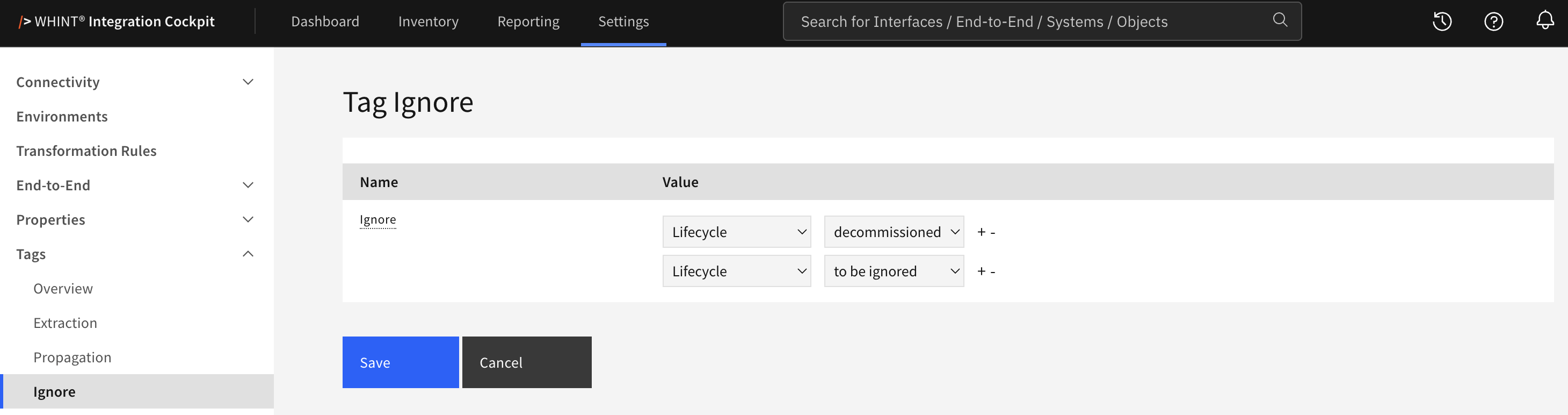
What you see:
-
Name column showing the fixed entry Ignore
-
Value column with one or more pairs of dropdowns — the left one selects the tag category, the right one a value of that category
-
+ and − next to each pair to add or remove an entry. The last remaining pair cannot be removed
-
Save and Cancel buttons to apply or discard your changes
Configuration
-
Select a tag category in the left dropdown. Only values of that category are then offered on the right.
-
Select the value to be excluded.
-
Click + to add another pair, or − to remove one.
-
Click Save.
Pairs without a selected value are ignored when saving. To exclude nothing at all, remove every value from the last remaining pair and save.
Where the Exclusion Takes Effect
An interface or End-to-End flow carrying one of the selected tag values is left out of:
-
Dashboard – the integration and interface counts
-
Inventory → Overview – interfaces by type
-
Reporting → Decommission – the decommissioning list, interfaces only
-
Reporting → Landscape → Overview – data sources by type
-
Reporting → Landscape → Gap Analysis
-
End-to-End generation – excluded interfaces are not grouped into generated flows and no single-interface flow is created for them
The interfaces and flows remain in the inventory and stay visible in the catalog.
Tag Ignore only removes them from the evaluations above.
A common setup combines this with Tag Extraction:
a rule tags test interfaces automatically by their name, and that tag value is listed here. The interfaces stay in the inventory and remain searchable, but they no longer appear in your counts and reports.
Relationship to Decommissioning
This setting is stored as part of the decommissioning configuration. The same Ignore entry is therefore also shown under Settings → Runtime → Decommission, next to the green and red thresholds and the day settings.
Both pages edit the same setting. A change made here also changes the entry under Settings → Runtime → Decommission, and the other way round.
Related Documentation
-
Tags – Defining tag categories and their values
-
Tag Extraction – Assigning tags automatically
-
Decommissioning – Thresholds and day settings for the decommissioning report
Last Updated: August 31, 2026