

The To-do view provides a comprehensive task management interface for completing interface metadata and documentation. Use this view to track and manage interface enrichment progress across systems mapping, objects assignment, properties configuration and tags application.
Workflow Integration: The To-do view connects with all other inventory views, ensuring that interfaces enhanced here become more discoverable and analyzable through By Tag, By Property and catalog filtering capabilities.
Navigate to Inventory → Interfaces → To-do to access the interface completion tracking with visual progress indicators for systematic metadata enhancement.
For To-do configuration guidance, see 2.4 To-do in the Onboarding Guide.
To-do List
The To-do List displays all interfaces with completion tracking across four key metadata categories, enabling systematic interface enrichment and documentation management.
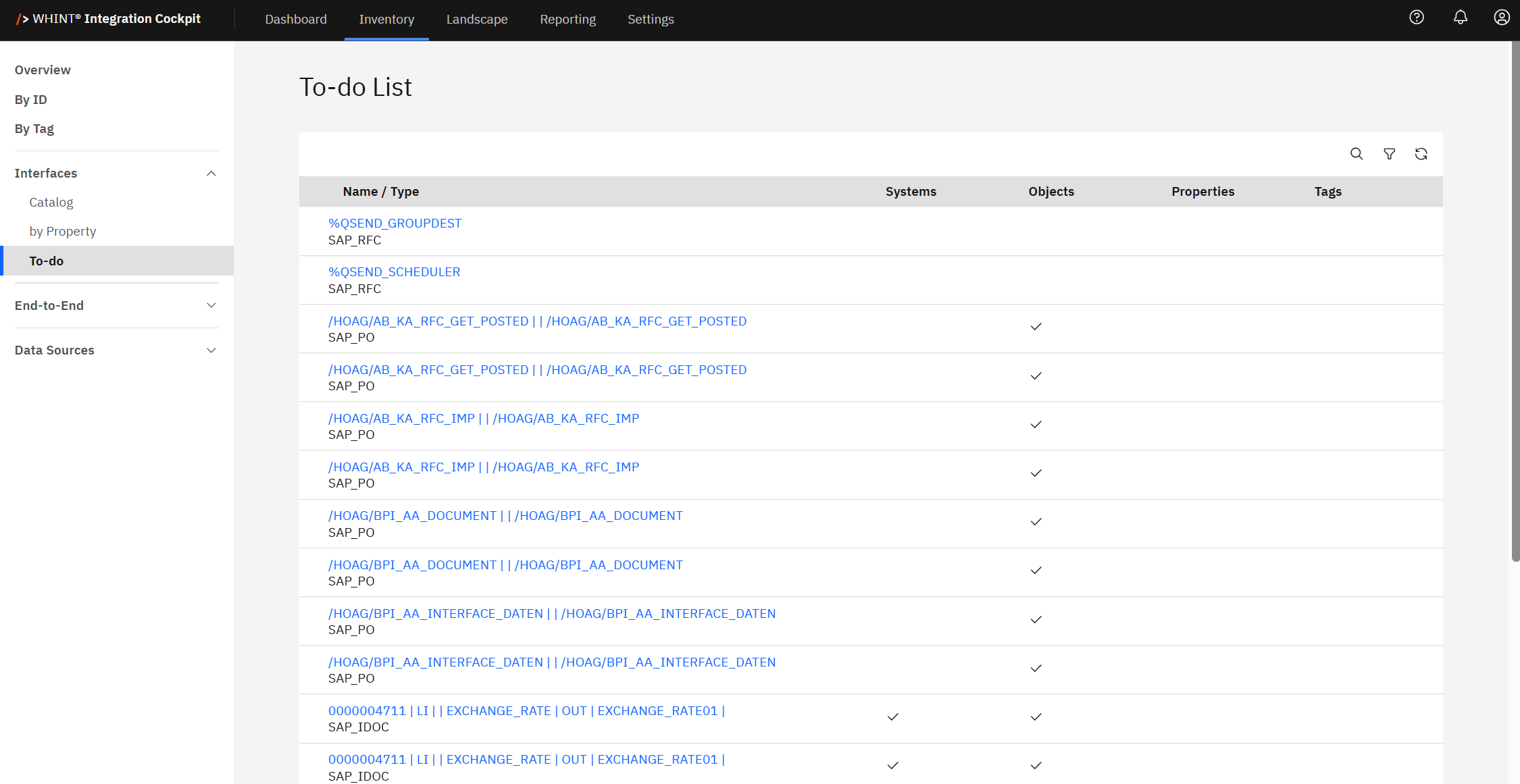
Completion Tracking Columns
-
Name / Type: Interface identifier and technology classification (clickable)
-
Systems: System mapping completion status (checkmark indicates sender/receiver systems are properly assigned)
-
Objects: Business objects assignment status (checkmark indicates associated business objects are defined)
-
Properties: Custom properties completion status (checkmark indicates organizational properties are assigned)
-
Tags: Categorization completion status (checkmark indicates interface tags are applied)
Visual Progress Indicators
-
Checkmarks (✓): Indicate completed metadata categories for each interface
-
Empty Cells: Show incomplete or missing metadata requiring attention
-
Complete Rows: Interfaces with checkmarks across all columns are fully documented
-
Partial Completion: Interfaces with mixed checkmarks and empty cells need additional work
Clicking an interface name (e.g. "00000047111 LI | EXCHANGE_RATE") opens the detailed interface view where you can complete missing metadata assignments.
Interface Completion Workflow
The To-do view supports systematic interface enhancement:
-
Incomplete Systems: Click interface name to assign proper sender and receiver system mappings
-
Missing Objects: Access interface details to associate relevant business objects
Undefined Properties: Add organizational properties like team ownership, criticality or external references -
Untagged Interfaces: Apply appropriate categorization tags for filtering and analysis
Filtering and Progress Management
Use the toolbar controls to manage completion workflows:
-
Search: Find specific interfaces requiring metadata completion
-
Filter: Show only interfaces missing specific metadata types
-
Progress Tracking: Monitor overall completion rates across your interface portfolio
Completion Benefits: Fully documented interfaces enable more effective filtering in By Tag, By Property, and catalog views, improving integration landscape visibility and governance capabilities.
Common Use Cases
-
Architect: Ensure consistent interface documentation standards across the organization
-
Developer: Complete interface documentation as part of development and deployment workflows
Systematic Approach: Use the To-do view to establish interface documentation standards and track completion progress, ensuring comprehensive metadata for effective integration landscape management.
Large-Scale Portfolio Management
The To-do view handles extensive interface inventories efficiently:
-
Pagination Support: Navigate through large interface sets (showing "1 - 20 of 6008 items")
-
Bulk Operations: Identify common completion patterns for systematic enhancement
-
Progress Monitoring: Track documentation improvement over time across your integration portfolio
Best Practice
Establish interface documentation standards and use the To-do view regularly to maintain high-quality metadata across your integration landscape, enabling better governance and operational visibility.
Last Updated: August 20, 2025