

The To-do view provides a comprehensive task management interface for completing end-to-end integration metadata and documentation. Use this view to track and manage integration enrichment progress across systems mapping, properties configuration, and tags application.
Workflow Integration: The To-do view connects with all other End-to-End views, ensuring that integrations enhanced here become more discoverable and analyzable through by Property, Catalog and filtering capabilities.
Navigate to End-to-End → To-do to access integration completion tracking with visual progress indicators for systematic metadata enhancement.
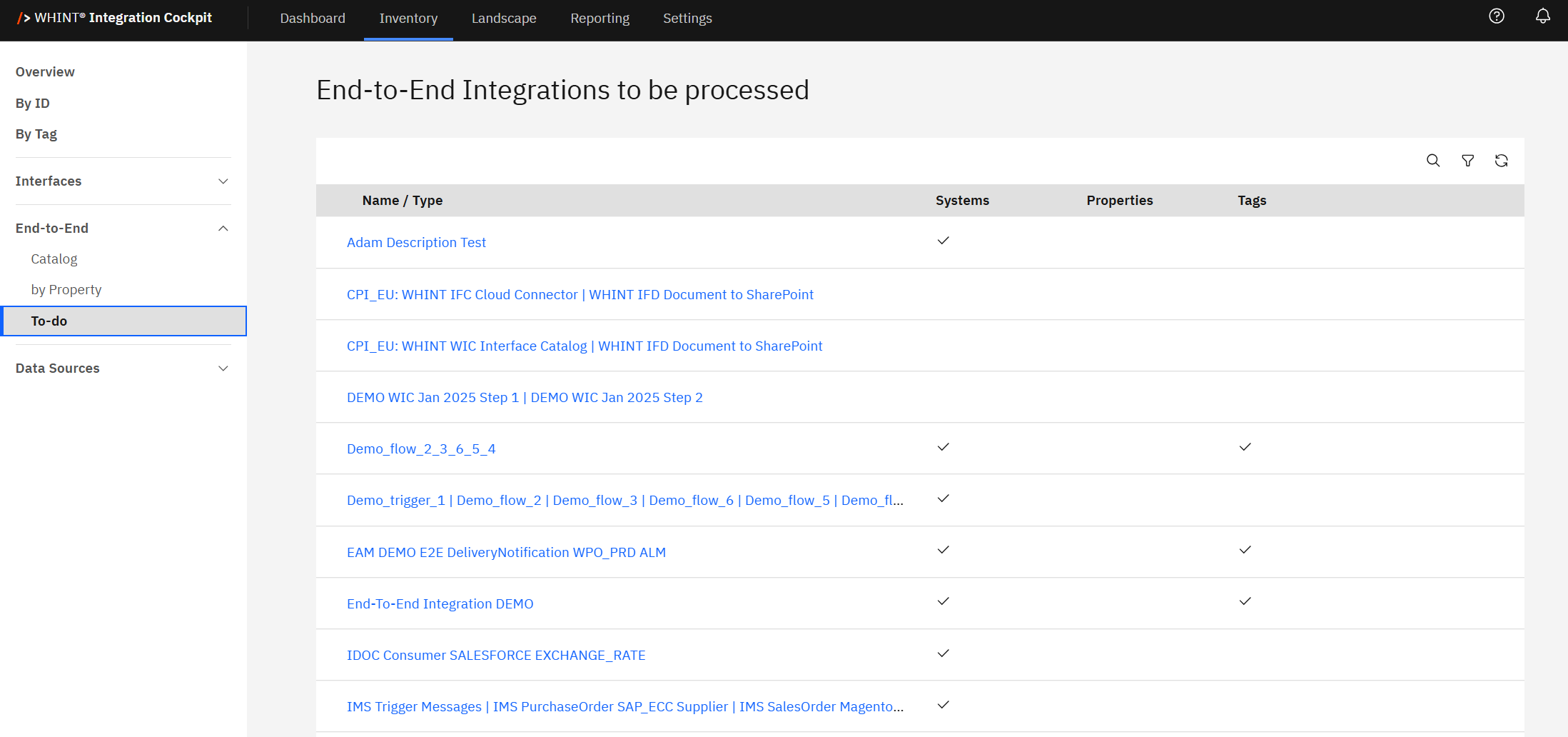
End-to-End Integrations to be processed
The To-do list displays all end-to-end integrations with completion tracking across three key metadata categories, enabling systematic integration enrichment and documentation management.
Completion Tracking Columns
-
Name / Type: Integration flow identifier and business description (clickable)
-
Systems: System mapping completion status (checkmark indicates sender/receiver systems are properly assigned)
-
Properties: Custom properties completion status (checkmark indicates organizational properties are assigned)
-
Tags: Categorization completion status (checkmark indicates integration tags are applied)
Visual Progress Indicators
-
Checkmarks (✓): Indicate completed metadata categories for each integration
-
Empty Cells: Show incomplete or missing metadata requiring attention
-
Complete Rows: Integrations with checkmarks across all columns are fully documented
-
Partial Completion: Integrations with mixed checkmarks and empty cells need additional work
Clicking an integration name (e.g. "EAM DEMO E2E DeliveryNotification WPO_PRD ALM") opens the detailed integration view where you can complete missing metadata assignments.
Integration Examples from To-do List
Fully Completed Integrations:
-
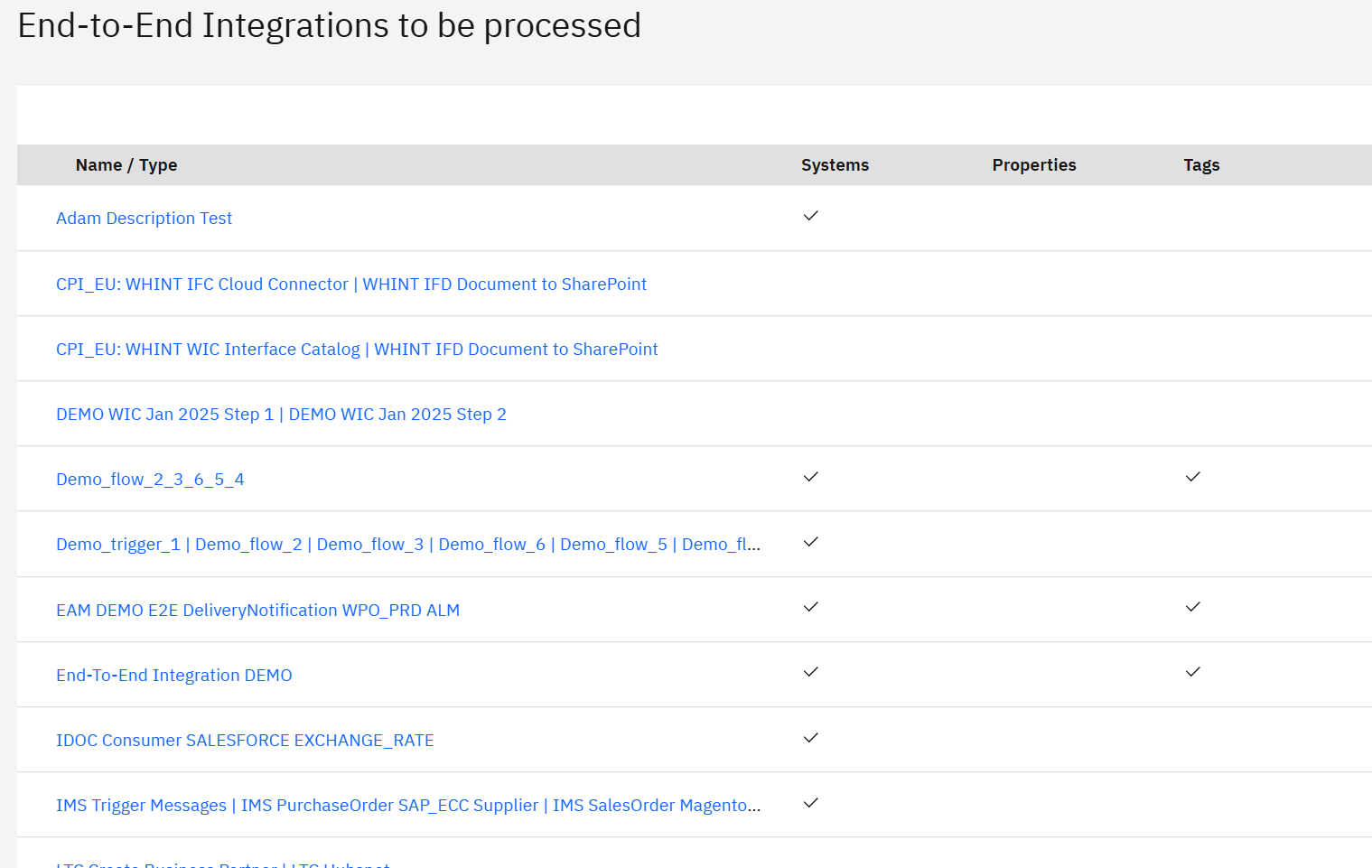
Demo_flow_2_3_6_5_4: Shows checkmarks across Systems, Properties, and Tags
-
EAM DEMO E2E DeliveryNotification WPO_PRD ALM: Complete metadata across all categories
-
End-To-End Integration DEMO: Fully documented with all completion indicators
Partially Completed Integrations:
-
Demo_trigger_1 | Demo_flow_2 | Demo_flow_3 | Demo_flow_6 | Demo_flow_5 | Demo_fl..: Systems complete, Properties and Tags pending
-
IMS Trigger Messages | IMS PurchaseOrder SAP_ECC Supplier | IMS SalesOrder Magento...: Systems complete, Properties and Tags need completion
Incomplete Integrations:
-
Adam Description Test: Only Systems completed, Properties and Tags missing
-
CPI_EU: WHINT IFC Cloud Connector | WHINT IFD Document to SharePoint: No completion indicators shown
Integration Completion Workflow
The To-do view supports systematic integration enhancement across multiple metadata categories:
-
Incomplete Systems: Click integration name to assign proper sender and receiver system mappings
-
Missing Properties: Access integration details to add organizational properties like team ownership, criticality or external references
-
Untagged Integrations: Apply appropriate categorization tags for filtering and analysis
For guidance on creating and configuring properties and tags, see Add Properties & Tags in the Onboarding Guide.
Filtering and Progress Management
Use the toolbar controls to manage completion workflows:
-
Search: Find specific integrations requiring metadata completion
-
Filter: Show only integrations missing specific metadata types
-
Refresh: Update the view to reflect recent completion progress
Completion Benefits: Fully documented integrations enable more effective filtering in by Property, Catalog, and other End-to-End views, improving integration landscape visibility and governance capabilities.
Common Use Cases
-
Architect: Complete integration documentation as part of enterprise architecture governance
-
Process Owner: Ensure consistent integration documentation standards across end-to-end flows
Systematic Approach: Use the To-do view to establish integration documentation standards and track completion progress, ensuring comprehensive metadata for effective end-to-end integration landscape management.
Last Updated: August 18, 2025